Finally, I bought myself an early Xmas gift: Dell Optiplex 990 SFF Desktop!
This is my one and only PC upgrade after almost 13 years. In fact, believe me or not, I am still using the old PIII system (Asus P2B-D, Dual PIII850Mhz, 1GB Ram, 120GB HD, Windows Server 2003 Ent) as I am typing this blog.
There have been probably over 10 PC generations before this upgrade (ie, P4, Core, Core2 now the Sandy Bridge).
The configuration is the latest Intel desktop CPU Core 2, 2nd generation Sandy Bridge i5-2400 with vPro, 3.1Ghz, 4GB (2GB x 2) Ram, 500GB 7200RPM HD, Extra Broadcom NetXtreme gigabit NIC, 8x DVD +/- RW, Windows 7 Professional 64 Bits, MS Office 2010 Home Edition, 5 Years NBD service.
There are several points that I would like to highlight during the selection of this PC: 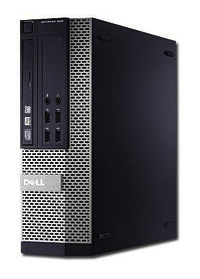
- Buy Dell, I’ve compared other vendors like IBM/HP/Acer/Asus, nothing even comes close to this 990SFF, similar configuration will cost 20-30% more. Of course, I knew Dell’s inside sales and they have been serving me well over the last 10 years, that’s why I’ve got a good deal.
- i5-2400 is more than enough, don’t spent money on upgrading to i5-2500 or i7-2600 (4 cores with HT).
- Sandy Bridge i5-2400 comes with build-in GPU now, it’s 850Mhz HD2000 graphic processor, enough for watching 1080p HD MKV or BD-RMVB. Of course i5-2405S (2.5Ghz) is better as it comes with HD 3000, but Dell does’t sell any 2xx5 or 2xxxS i5 processor, those are for overclock amatures.
- Ivy Bridge is around the corner, but still have to wait till Mar/Apr 2012 which is too far for me. Besides who knows if there will be any problems in the new chipset (H/P/Q/Z) like before. Remember Sandy Bridge had a serious SATA chipset problem when they first release in Feb 2011, that most vendors needed to recall defected MBs, so I really don’t want to be that guinea pig.
- vPro, yes, I definitely want to try this Desktop equivalent of DRAC, saw the demo on Youtube, seems interesting.
- I want the Energy Efficient Option (90%) version of 990 SSF, but it’s not available locally, neither does Dell offer 16x DVD, also no low-power version of i5. If you are in US, you can order i5-2400S which is only 65W comparing with 95W of i5-2400.
- Found out the only Intel desktop chipset supports VMware ESX5 VT-D is Q67 and Z68, and there are less than 3 SFF in the market offer Q67 chipset, Optiplex 990 is one of them.
- People said default installation of ESX5 won’t work due to the on-board Intel 82579LM NIC is too new, probably ESX5 Update 1 will add this driver and solve the problem. For now just use a Boradcom NIC instead, or even a cheap Realtek will do.
- I compared the cost of DIY PC with Dell Optiplex 990 SSF, almost same price but Dell has 5 years site visit full warranty, I really don’t want to carry each failure piece to it’s corresponding distributor for repair and wait for over 1 week, I really hated that, no more!
- Dell’s Harddisk and Ram is still way expensive (100% more) than others even after huge discount, so I am going to buy from local computer shops, a 4GB 1333Mhz Ram is only USD20 or less, too cheap to be true! Just be reminded, bring the actual ram over to the computer shop as I heard the Optiplex ram is low profile type.
- Optiplex 990 SSF includes with many great software such as PowerDVD, Roxio Creator, Dell Backup and Recovery Manger (I will use Acronis still) and best of all Microsoft Office Starter (with Word and Excel only and that’s all I need really). It also includes PowerPoint Viewer 2010, to view and print PowerPoint slides and shows. In case you don’t know, there is also also a version called Office Web Apps which include online versions of Word, Excel, PowerPoint and OneNote.
- Oh…I just read about the new coming desktop will have 8 ram slots (X79 MB with latest Sandy Bride E processor, supports Ivy Bridge and native USB 3.0 of course), so you can have 32GB ram for ESX for less than USD160, (still it’s only half price of a DDR3 1333MHz ECC Server Ram) which is DAMN cheap! With HA and DRS, who really care about the reliability? Well Google is a good example using cheap hardware for building their data center globally.
- The reason I choose Small Form Factor (SFF) is because it’s size of course and normally SSF has higher PSU 80 Plus efficiency and offers quieter experience.
- Remember I wrote about my USB 3.0 experience with Poweredge R610 previously? Now I can finally use all those “thought to be wasted “ goodies, such as HighPoint USB 3.0 HBA Dual Ports with 5Gb/s individual port, plus my Hitachi Touro 2.5” 7,200RPM 750GB USB 3.0 external harddisk (somehow it works really fast with USB 2.0 as well), also I will get one more Lacie 2TB Minimus 5,900RPM for backup purpose.
- I will also purchase a USB 3.0 IDE+SATA docking to transfer all my existing data over to the new PC.
- Finally I will install VMware workstation 8 and test all the great stuff on it, like nested ESX, MacOS, ESX 5.0 and more.
- For daily use, I only need Word and Excel, not even Access, so MS Office 2010 Home Edition is the perfect low cost solution for me. Even MS Office Starter should do most of the work, no worried about opening PowerPoint as Microsft has a free Powerpoint viewer.
- Same applies to selecting Win7Pro, I don’t need any of those additional features included with Ultimate, I could install Windows 2008 R2 Standard on this PC, but since the core is the same for Windows 7 and W2K8 now and Windows 7 supports more multimedia devices, so why bother.
Update Dec 13, 2011
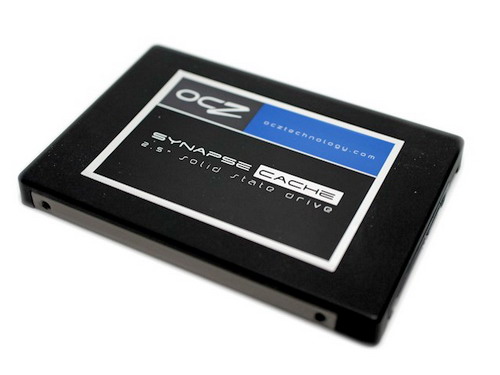
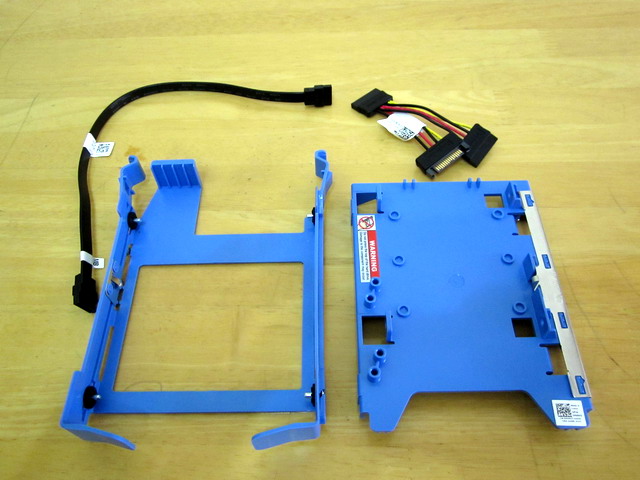
Btw, I’ve got my Optiplex 990 for almost a week now, I love the compactness and it’s really quiet even I placed it near my bed. Somehow, the internal 7200RPM 500GB boots up Windows 7 Pro in less than 15 seconds, this really makes me wonder if I still need to add the SSD caching (e.g., OCZ Synapse SSD). Anyway, I still ordered the special 2.5″ hard disk bracket for future upgrade which can fit 2 x 2.5″ SSD or HD+SSD.
The other things is the default 4GB is enough for now, may add more later when I run VMWare Workstation 8 on top. Don’t have time to play this especially Xmas coming. 
My 2.5″ USB 3.0 external 7200RPM Hitachi Touro is lightning fast around 116MB/s when testing with HDTune, even faster than the internal 3.5″ Western Digital Blue 500GB (about 105MB/s), comparing to my existing PIII 33MB/s ATA (actually 12MB/s tested), this is almost 10 times more). Again the nice thing is I choosed that cheap Syba USB 3.0 card instead of Highpoint again because it doesn’t require external power, and 990SSF only has two SATA power cables which I will use for the above two 2.5″ disks later. Of course there is SATA split cables, as I don’t want to complicate the cables and reliability is another reason.

Last but not least, the integrated Intel HD 2000 Display Port to DVI works perfectly with my old Dell Ultrasharp 2007FP (somehow Dell still sells it even now), it can output 1600×1200dpi sharper than ever, I can finally enjoy 1080p HD MKV movie and I noticed the CPU usage is only 2%, crazy low!
Update Dec 28, 2011
Finally received my 2.5″ HD Kit from Dell after the holiday. I have to say it’s a very hard to find item, took me a few days to google and talked to my sales in order to locate this Kit set. My advice is to order the complete Kit Set, not invididual parts, as it includes many extra items such as SATA split cable, SATA cable, 4 screws (why 4 instead of 8? well, Dell expects you to use the 4 screws from original HD, that’s why this kit is called Extra Parts not Replacement Parts) and one more blue plastic HD holder, so R494D alone is not enough.
Update Jan 19, 2012
There has been a very strange problem with my Optiplex 990 SSF recently, it will simply power on itself automatically. I’ve searched around and found nothing, not even local Dell support was able to solve this myth.
Finally, I was able to locate the root of the problem, it’s related to Intel vPro or AMT (Active Management Technology) and the auto power on problem has nothing to do with BIOS setting or particular the WOL setting.
By default Intel vPro has it’s own WOL and my PC is connected to an always-on fiber modem, so probably it received a WOL packet from the Internet. You can refer to AMT mannual for more information.
The solution is simply disable AMT for the time being (btw, the default password is “admin”) and I shall study more regarding vPro and how to use it and how to avoid such thing happen later.
Update Jan 30, 2012
The PC turns itself on problem continues and I tried one more thing to disable NIC with PXE and hope this will solve the problem completely.
Update Mar 14, 2012
The previous mysterious PC automatically turn on issue has been solved for sure, now it’s time to due with overall noise reduction.
After some research, I’ve figured out the most possible noise emission is from the main system fan (8cm fan), although the 1500RPM fan itself is already a better than normal quality, it still produces a noticeable amount of noise pollution.
So what you may have already guessed, yeah! Pull it OFF! Dangerous to do? Not really! It’s because the CPU has it’s own passive heat sink with fan, power supply never really pushing to 100% as my PC is mainly used for browsing the net, daily word processing as well as watching some HD movies. The part needs the most cooling is RAM, after running for 1 hour with all sorts of activities, HWiNFO shows RAM merely went over 30C and hard disk also stays below 35C, that’s why I conclude and convinced it’s safe to do so.
If I want to reduce the noise further, the default 3.5″ 7200RPM hard disk will be my next target, simply by replacing it with a 2.5″ 5400RPM or SSD will make my Optiplex 990 SSF almost completely silent, but since my Dell carries 5 years warranty, I will probably let go on that option.
Finally, another big advantage by disconnecting the main 8cm system fan is reduction in dust pollution, my 990 SSF was like a dust sucking machine before, and it’s no longer the case, um…I wonder how come main stream Optiplex 390/990 doesn’t come with a dust filter like Optiplex XE?
Update Mar 20, 2012
I’ve decided to put back the fan as it’s not a good idea after all, as the hard disk went over 40+ degrees after running for a few hours.
Update Jun 10, 2015
The biggest problem with Optiplex SFF is dust! Searching for that official dust filter for Optiplex for years in vain, ending up doing my own, simply cut a piece of water filter material for fish tank (9.5cm x 7.5cm) and put in front of SFF’s main fan. That’s it, it does the job beautifully as I’ve been running this configuration for the past 2 months, bulletproof, it works!

 Comments (3)