Chun-Li 春麗
 Comments (0)
 小時候特別沉迷打機。
那是一個期末考試前打機打到連書包被偷也懵然不知,響機鋪連贏40幾鋪 爭啲比圍觀嘅古惑仔群抽嘅瘋狂年代!
春麗當然也曾經是我最喜歡的街霸人物之一。
1/8 春麗 彫刻 by 林浩己 (日本)




Comments (0) 小時候特別沉迷打機。
那是一個期末考試前打機打到連書包被偷也懵然不知,響機鋪連贏40幾鋪 爭啲比圍觀嘅古惑仔群抽嘅瘋狂年代!
春麗當然也曾經是我最喜歡的街霸人物之一。
1/8 春麗 彫刻 by 林浩己 (日本)
終於搵到呢對復刻版! 青春嘅記憶返晒嚟!!!
Nike Air Zoom GP Turbo ‘30 Years of Challenge Court’ – WhiteHot LimeNeo TurquoiseSolar Red
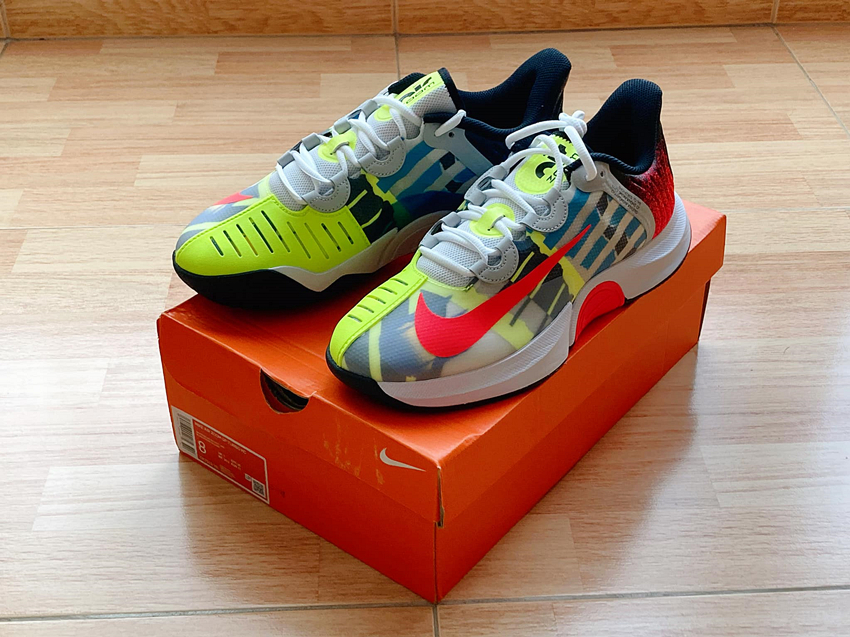
好鬼鍾意阿加斯90年代嘅形象!!!

AMD EPYC 7763 87,767
Intel Xeon Gold 6248R @ 3.00GHz 38,521
Intel Xeon E5-2690 v4 @ 2.60GHz 20,776
Intel Xeon X5650 @ 2.67GHz 5,779
Intel Xeon E5620 @ 2.40GHz 3,709
Intel Core i5-2400 @ 3.10GHz 3,821
AMD Opteron 285 956
Intel Pentium III 1.4Ghz 193
The quick fix is “Set-NetConnectionProfile –Name “Unidentified network” -NetworkCategory Private” but it won’t sustain as it will change back to Public profile after reboot.
So the easiest way to trick Windows is to assign Unidentified network property to Private!
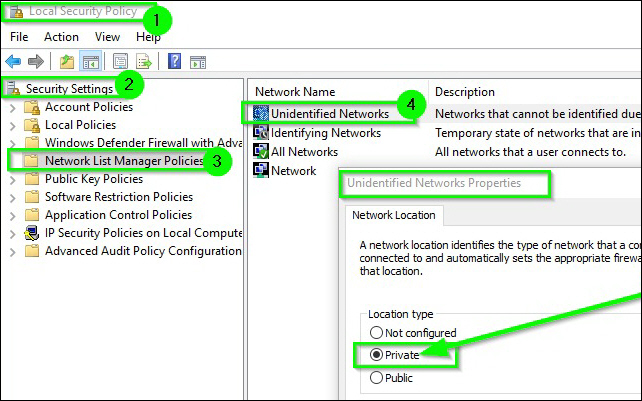
The solution is quite easy with PowerShell
New-SelfSignedCertificate -CertStoreLocation Cert:\LocalMachine\My -DnsName “stargate.domainname.com” -FriendlyName “Stargate” -NotAfter (Get-Date).AddYears(20)
Using certmgr, make sure copy it from Personal Certificates to the Trusted Root Certification Authorities, or it won’t appear in IIS Server Certification.
Simply add the following lines to VM options
tools.syncTime 0
time.synchronize.continue 0
time.synchronize.restore 0
time.synchronize.resume.disk 0
time.synchronize.shrink 0
time.synchronize.tools.startup 0
time.synchronize.tools.enable 0
time.synchronize.resume.host 0
Seems the old Windows Server 2003 is having trouble with recent SEP v12.1 virus definition updates.
Solution is simple by restarting the SEP service.
smc -stop
smc -start
Then manually update the definition will solve all the question marks.
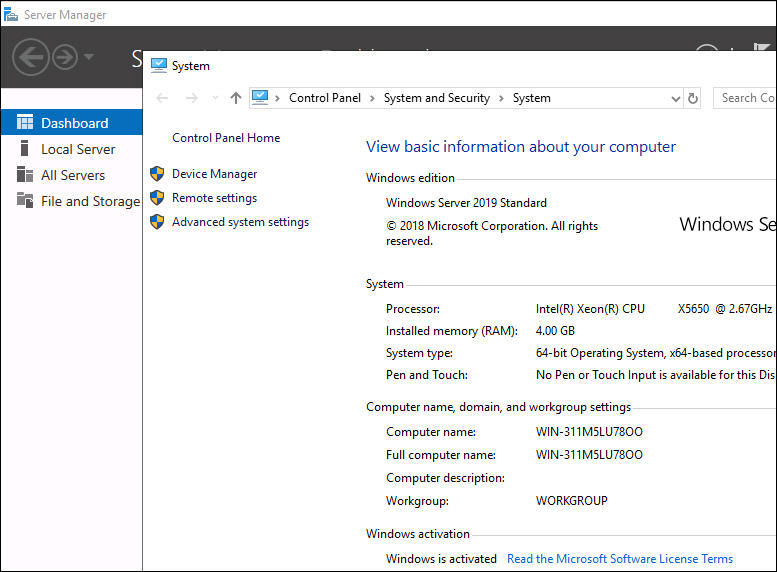
As expected, the installation process is almost identical to Windows Server 2012 and 2016. The key is to use BIOS version SLIC 2.5.
Except I’ve encountered a tricky problem that the valid license key won’t activate, it returns with “windows server 2019 error -xc004f069″.
It turns out the the source ISO is an evaluation copy, so all you have to do is to convert the Eval copy to Retail version by:
DISM /Online /Set-Edition:ServerStandard /ProductKey:xxxxx-xxxxx-xxxxx-xxxxx-xxxxx /AcceptEula
To determine upgrade path and other available edition:
DISM /online /Get-TargetEditions
For the evaluation/retail version of Windows Server 2016 Standard, you can also convert to the retail version of Windows Server 2016 Data Center using the same command and the appropriate product key.
DISM /Online /Set-Edition:ServerDatacenter /ProductKey:xxxxx-xxxxx-xxxxx-xxxxx-xxxxx /AcceptEula
Update: Apr 11, 2021
It turns out VM will lost its customized CPUID parameter after Veeam backup restoration, BIOS SLIC 2.5 parameter holds though.
So you have to add it back again, or the VM will keep crashing every now and then.
However, if the VM is deployed via template, then there is no problem at all.