
 Comments (0)
 ![aa77381-02f900art[1]](http://www.modelcar.hk/wp-content/uploads/2011/05/aa77381-02f900art1.jpg "aa77381-02f900art[1]")

Roberta Flack – What a Classic!
By admin, May 5, 2011 6:19 pm
It’s like a totally new re-discovery for me. I just came to know about Roberta Flack only yesterday after going through the list of Grammy’s Best Song of the Year, and surprisingly found she was the original singer of “The First Time Ever I Saw Your Face” (1973) and “Killing Me Softly” (1974)
The First Time Ever I Saw Your Face (1973), it’s such a Beautiful song!
Killing Me Softly (1974), definitely a classic! Roberta said she wrote this song after seeing Don McLean of American Pie fame in concert.
Enjoy!
The great hits from 60 and 70s, I just love them!
By admin, May 4, 2011 6:06 pm
I accidentally discovered the following on Wiki today, simply copy and paste the song into Youtube, then you had your magically Pandora Box.
Grammy Award for Song of the Year
Grammy Award for Record of the Year
I just can’t stop loving the great music from the 60 and 70s, and those are the real music for real people.
Btw, I came to know Roberta Flack only by today and found out she’s also the original writer and singer for Killing Me Softly (1973)
Enjoy!
Free Tools from VKernel
By admin, May 4, 2011 4:52 pm
It seemed the market for 3rd party virtualization tools is really heating up, this time it’s VKernel offers some free apps for those who love every bites of those nice looking GUI based tools.
- ApplicationVIEW
- CapacityVIEW
- StorageVIEW
- Capacity Modeler
I’ve tried them all, well, it does what it suppose to, which is just to give you a very preliminary of what your current virtual infrastructure is and also present you some problems it discovered, to get into more details, you have to pay as expected. Well, to some extend, I don’t like VKernel’s free tools, as they are really does nothing but to get you into buying their products, by contract, Veeam is doing much better for the free products that’s actually useful, so I’ve uninstalled all 4 after 30 mins of testing as I found they are really not useful at all.
A few years back, I was seriously consider buying VMkernel’s chargeback product as it’s more advanced than VMware’s chargeback product, but both contains flaw and drawbacks. After almost 3 years, I still don’t see anyone on the market offers a good cloud based chargeback/billing panel for easy to use and customize to individual company’s requirement, if you know any new comer, please drop me a line, thanks.
Delicious Mediterranean Salad for Lunch
By admin, May 4, 2011 3:37 pm
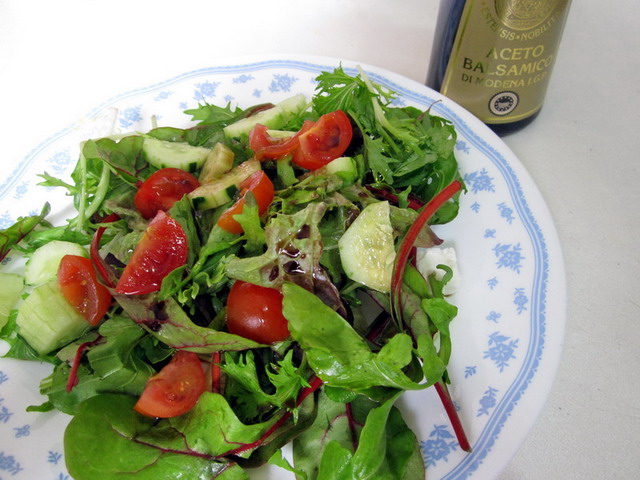
Mix Greens from Australia, Cherry Tomatoes from Israel, Organic Cucumber from Local, Feta Cheese from Greek, and a touch of Extra Virgin Olive Oil and Balsamic from Italy. Together with a slice of home baked bread and some left over Carbonara, this makes a perfect lunch!
The cost for the salad per serve is about HK$25, way cheaper and healthier than buying the ready-made ones from super market, this price of course not counting the labor that is. 
動力澎湃的911 (964) Turbo
By admin, May 1, 2011 7:31 pm
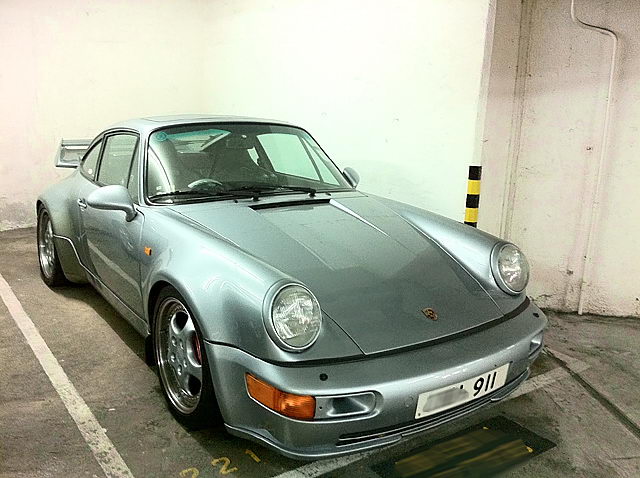
每個星期天早上9點正﹐正當很多鄰居還在睡夢中的時候﹐這輛450匹馬力天藍銀色的巨無霸總會很準時的低吼著﹐靜悄悄地從外面歸來﹐車主很明顯是個很懂得超級波子機械的發燒友﹐風雨無阻他和愛駒週日的晨操﹐從他的車牌都掛以911可見車主愛車的程度非一般人士可比﹗
這台罕見的90年代末期964 Turbo多年前就早已成為保時捷粉絲間必爭的囊中之物,十几年過去了,保養得還是那么美麗如初。仔細觀看之下,發現這台車和原厂的Turbo略有不同,尤其是裙角和車位定風翼的改裝更將其獨有的霸气表露無疑。
最近我發現自己越來越喜歡各類超跑的引擎聲音﹐樓下那1968年野馬GT390 V8的咆哮聲簡直就令人發狂﹐賓利的含蓄又是另一番的悅耳﹐F458的則是完全狂野的叫囂﹐各大超跑的聲音可以說完全不同﹐即使是同廠不同型號﹑不同年份的也可以分別很大。我開始可以憑聲音就說得出是什麼牌子的車了﹐相信不久的將來甚至更可以練成分辨出是那一款型號和年份的神功﹐哈哈。。。
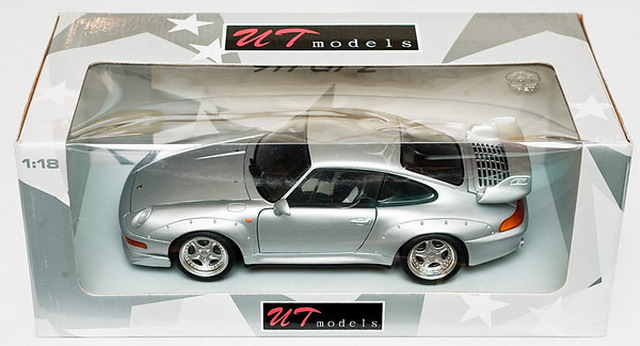
另附上UT的993銀色GT2
MC的wubo縱論基于CMC這個优秀車模品牌的收藏路線之种种 (轉文)
By admin, May 1, 2011 10:00 am
看到論壇里朋友們談到關于汽車模型收藏路線的話題,那我就就著這個話題,借題發揮的談一下基于CMC這個优秀車模品牌的收藏路線之种种吧。
在我眼中,CMC精品汽車模型收藏完全是可以有路線遵循的。尤其是在CMC新品与精品層出不窮,而錢袋中的銀子卻捉襟見肘的當下,有的放矢地把握住自己的收藏路線与方向是多么迫在眉睫的事情啊!
CMC汽車模型的收藏有路線可以遵循的關鍵,竊以為要看作為愛好者、收藏者的我們怎么去精心設計自己的收藏思路,以及自我了解或擁有哪方面相關的知識去配合、去支撐這种思路。因為世間沒有人能做到完全收藏天下所有的汽車模型,甚至可能全世界也沒有几人時至今日擁有CMC出版的全部汽車模型產品而無一漏网,當然更不用說今后數年或數十年CMC所出版的每一款帶有產品編號的CMC模型了。
請喜歡CMC的每一位模友記住我下面說的話,目前乃至今后的若干年內,可能只有CMC這個具有德國血統的优秀汽車模型品牌,會讓我們在探索18比例合金汽車模型的終極收藏与持久尋覓中得到:精致的做工、考究的材料、逼真的型准、合理的价格等多方面、全方位的滿足感。
經過不算縝密的思考,在我的腦海中大致浮現出如下几類具有鮮明CMC產品特質的收藏思路。
第一類收藏路線:
只服從汽車美學,為其完美的造型而陶醉,基本無視歷史、完全不考慮汽車品牌的收藏思路。
可能納入收藏范疇的車型:Ferrari 250GT SWB、Porsche 901、Ferrari Testa Rossa、Mercedes Benz SSK1930 、Audi 225 Front Roadster、Bugatti Typ 57 SC ……
第二類收藏路線:
只強調性能路線,十足的机械狂人,兼考歷史、忘掉外在美、完全不理會汽車品牌的收藏思路。
可能納入收藏范疇的車型:Mercedes-Benz W196R、Ferrari 250GT SWB、Mercedes-Benz 300 SL1952、Ferrari Testa Rossa、Mercedes-Benz SLR McLaren2003 、Maserati Tipo 61Birdcage ……
第三類收藏路線:
只追求歷史經典,沉醉于經典無法复制的感慨中,忽視其他方面的收藏思路。
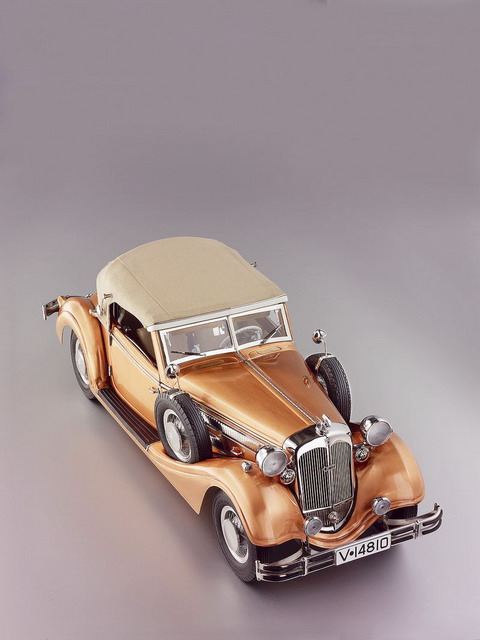
可能納入收藏范疇的車型:Horch 853、Mercedes-Benz 540K、Mercedes-Benz 300d、Ferrari Testa Rossa、Ferrari 250GT、Porsche 901、Maserati Tipo 61Birdcage ……
第四類收藏路線:
只鐘情成績的張力,將輝煌瞬間凝固于永恒,無視其他方面的收藏思路。
可能納入收藏范疇的車型:Mercedes-Benz的白象軍團与銀箭傳奇系列、Ferrari紅魔与Maserati賽車系列、(具體車型此處略掉15部以上)……
第五類收藏路線:
以上四類兼收的收藏思路,但确實還存在個人喜好的選擇,比如顏色的取舍,限量与普通版本的選擇。
納入收藏范疇的車型:完全收藏CMC所有24以及18比例每一款車型、但放棄收色,不重視限量版本(該种收藏路線已經讓我本人羡慕不已)……
第六類收藏路線:
基本是要把自己打造成CMC公司產品展示室或產品存檔處。
納入收藏范疇的車型:從自己收藏CMC的第一天起收藏了所有能買到的任何比例的CMC模型正品,無分顏色、無分款牌、無分价格,保有一网打盡之气概(我自己都說服不了自己,有這种朋友存在嗎?如果有別攔著我,值得驕傲的你一定要把他介紹給我!!!)……
如上觀點僅是我個人看法,如能給某些朋友以一絲啟發,我當高興不已。
最本文的最后,祝大家五一勞動節快樂!因為我們一定都是勞動者。
吳波 2011.4.30 于北京
P.S., 僅從目前看,CMC是唯一一個能滿足我個人全部要求的18比例合金車模的高端品牌。諸如:車型的選擇、歷史、做工、選材、价格等因素。CMC絕不是完美的,僅就現在看CMC是最适合我的。
BBR的做工和材料在我看來次于CMC,另外這個品牌只鐘情于法拉利,正像你所說的它完全拘泥于某個品牌之中,一個18比例合金的ENZO出了各色的几十款,這是一個出色的优秀車模品牌商的拿得出手的做法嗎?搖頭啊!
富蘭克林已經是昨日黃花不堪回首了,24比例也是無奈風中花落去,24比例的优點也是他的缺點,小巧比不了43,精致和細節遠遜于18比例。再加上富蘭克林只存活于上個世紀的車模工藝和選材,還是讓他慢慢走吧。
EXOTO是個不錯的品牌,但自從去了中東代工,价格飛漲,一款18比例的新品价格已經接近了3000元人民幣實在不敢再買了。更讓人生气的是完全美國作風的營銷方式,打折季低至4、5折的打折銷售,寒的是誰的心?另外EXOTO的漆水与型准也稍遜于CMC,發動机部分确實做得很好,与CMC可以一搏高低,也值得CMC學習。EXOTO每年的新品發布頻率似乎也低于CMC不少。
AA、KY、MC的產品是無法与CMC相比的,這我就不說了吧。但AA目前的价格也确實讓我瞠目了,但其模型產品的內涵怎么与CMC相提并論?我都慚愧的。
另外的18比例合金汽車模型品牌就不提也罷了。
因為現今CMC的出色以及基于我對CMC的了解,所以我更看好CMC也對CMC寄予厚望。
在此重复我曾經的三個觀點:
1、CMC近年緊緊圍繞著如下的主題來開發和制作自己的產品:以精細的制作工藝、出色的細節表現以及优秀的選材用料,通過自己開發的合金模型認真還原和紀錄世界極名車、歐洲著名賽車歷史的重要節點,注重揭示那些精典賽車的輝煌身世,使用惟妙惟肖的手段刻畫人類曾經對于速度不斷追求的過程。
2、也許多年之后,我們可能會面對著收藏了一大柜子的CMC模型突然感到些許茫然,但這些精品模型背后所負載的、更為重要的是對應這些模型歷史及相關的汽車文化將伴隨我們一生,會畢生收藏在每位CMC愛好者的記憶里;相比于物質的CMC精品模型,這些來自于精神層面的精彩記憶不占用絲毫空間不發生任何費用,它只專屬于我們自己;而這些CMC精品模型,僅僅是攪動我們對于賽車歷史的沉思以及回首往昔收藏歲月的助燃劑和催化劑而已。
3、目前乃至今后的若干年內,可能只有CMC這個具有德國血統的优秀汽車模型品牌,會讓我們在探索18比例合金汽車模型的終極收藏与持久尋覓中得到:歷史的探知、精致的做工、考究的材料、逼真的型准、合理的价格等多方面、全方位的滿足感。
皇家婚禮的禮賓車們
By admin, April 30, 2011 12:50 pm
昨天看完整個盛事﹐第二欣賞的就是這些氣派萬千的英倫豪華轎車﹗
想不到的是最後新郎把老爸的寶藍色Aston Martin DB6 Volante拿出來接新娘兜風﹐來個美式的JU5T WED巡迴﹐這的確有點意思﹐因為這輛漂亮經典的DB6跟那輛百年馬車一樣都是黛妃和查理斯曾經在30年前一齊乘坐過的﹐其中意義不言而喻﹐看著看著還真有點感慨了。
Queen’s 1977 Rolls-Royce Phantom VI
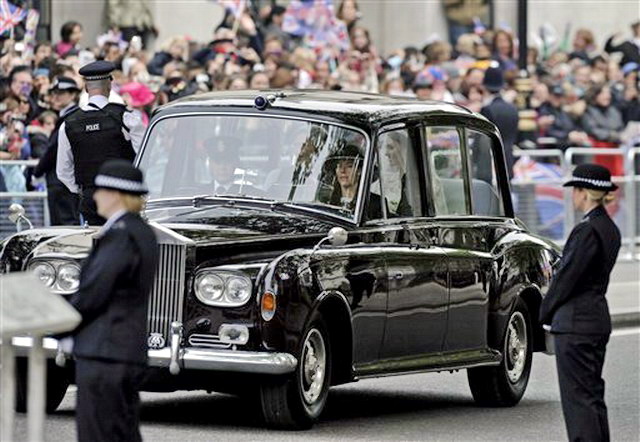
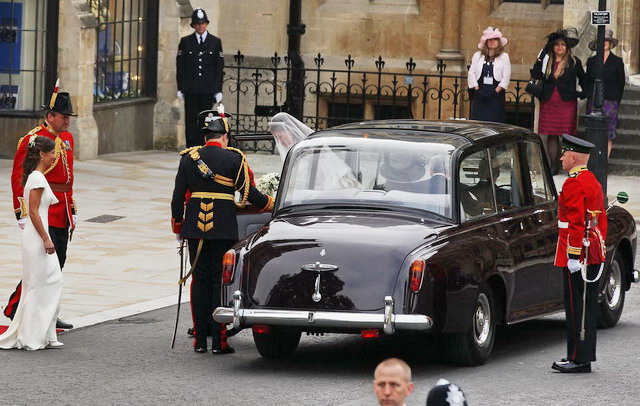
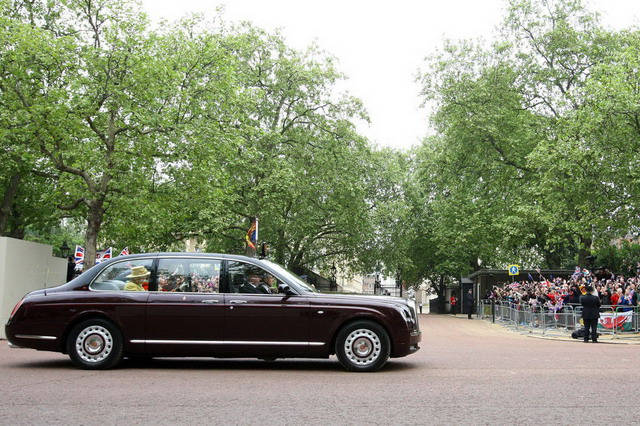
Queen’s 2002 Bentley Bentley Golden Jubilee
Prince Charles 1965 Aston Martin DB6 Volante
![carmain2_1301613a[1]](http://www.modelcar.hk/wp-content/uploads/2011/04/carmain2_1301613a1.jpg "carmain2_1301613a[1]")
![plate682_1301609a[1]](http://www.modelcar.hk/wp-content/uploads/2011/04/plate682_1301609a1.jpg "plate682_1301609a[1]")
![astondicharles_1301600a[1]](http://www.modelcar.hk/wp-content/uploads/2011/04/astondicharles_1301600a1.jpg "astondicharles_1301600a[1]")
The 1902 State Landau Wedding Carriage
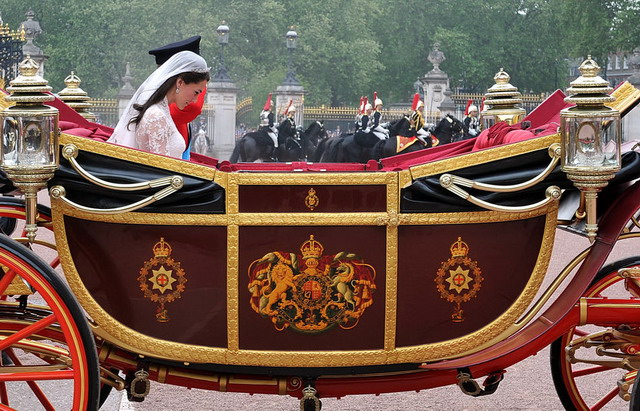
Problem: Untangle 8.1 OVF and ESX 4.1 in Transparent Mode
By admin, April 29, 2011 2:55 pm
I’ve read the Wiki page for installing OVF on ESX and failed once already because I bridged the vNICs on the same vSwitch without using VLAN, so eventually I crashed my network as looping started to occur.
So this is my second attemp, please refer to the picture I’ve attached, hope you can give me some advice and suggestions.
1. So basically, I have ONE vSwitch with TWO physical NICs binded together to have Load balancing and failover.
2. Within, I have THREE Port Groups:
- External (no VLAN) connects to Internet
- Untangle DMZ (VLAN 21) – Useless as I will use Transparent Mode
- Untangle Internal (VLAN 22) – where I put VMs that I want to protect behind the Untangle.
Is the following concept correct?
1. When I use Untangle in Bridge or Transparent Mode, I will ONLY utlilize two interfaces External (no VLAN) and Untangle Internal (VLAN 22), so these are the two vNICs Untangle VM will connect to. This leaves Untangle DMZ useless, so I can remove it from VMX or VM configuraiton GUI?
2. I Understand I need to enable Promiscuous Mode in order to have Untangle to scan the network in transparent mode (ie, a sniffer that is), (side topic: Do I need to have Promiscuous Mode if I am using Route Mode?)
I understand I need to enable Promiscuous Mode on Virtual Switch Level (ie, toppest level), which I DON’T WANT to due to security reasons (ie, VM behind Untangle can sniff the whole network right?), Can I enable Promiscuous Mode in individual Port Group Instead?
If Yes, the ONLY Port Group need to have Promiscuous Mode enabled is Untangle Internal (VLAN 22) right? Where it is the Port Group all the VMs are going to connect to. I do not need to enable Promiscuous Mode in External (No VLAN), is this correct?
Or I HAVE TO ENABLE IT on vSwitch level? but why? I thought individual Port Group will OVERWRITE the default setting, NO?
But wait, no matter where I enabled the Promiscuous Mode (ie, vSwitch level or Port Group level), the risk is still here, can I say I am allowing all the VM to have the capability to sniff traffic on the network? If yes, this is absolutely NO GOOD in using Untangle as enabling Promiscuous Mode will open a big security hole in L2 (ie, enabling Promiscuous Mode will render my switch to a hub)
3. FYI, the TWO PHYSICAL NICs (ie, vmnic8 and vmnic0) are connected to the same physcial L2 switch. VLAN 21 AND VLAN22 have been configured on this physical switch as well, also VMware VST VLAN tagging is used on the Port Group. I wonder if my current configuration will STILL create a loop that will crash my network again? (I don’t see how it can, but really want to double make sure and confirm with you guys)
4. Where is the management interface for Untangle going to be in this case? Do I need to create a new port group say Untangle – Management VLAN 23, and also add a new vNIC (probably just use the one for DMZ) and then connect to this Untangle – Management port group.
![untangle[1]](http://www.modelcar.hk/wp-content/uploads/2011/05/untangle1.jpg "untangle[1]")
Update May-1-2011
Now I understood Port Group with VLAN VST Mode won’t work with Untangle and confirmed again with what’s on the Wiki, the document said it clearly “Each vSwitch should be connected to it’s own Physical NIC, or at least be separated by VLAN tagging at the physical NIC level. ” (ie, on the Physical NIC level and the picture attached above also confirmed this).
So does this mean Promiscuous Mode for bridge mode can ONLY work on Virtual Switch Level, but not Port Group Level?
Um…it’s quite disapointed as I gradually found out Untangle on ESX has so many limitation (ie, no VLAN tagging, must enable Promiscuous Mode for vNic connecting VMs, must have Promiscuous Mode on vSwitch but not on Port Group).
So I have decided to use Route Mode now to aovid the above limitation now.
Since I don’t have any more physical NIC to spare, can I create an internal vSwitch (ie, WITHOUT NIC) for Untangle VM ?
ie, External > Untangle External > Untangle Internal (which is on the internal vSwitch without NIC) and all the VM will be on this same internal vSwitch, which will be all protected by Untangle that is.
This will work right? Anyone Please?
Update May-19-2011
Finally, I’ve got Untangle 8.1 OVF working under ESX 4.1 in route mode, the solution is very simple:
1. Simply remove the last NIC in VM configuration, this will get rid of the DMZ NIC, leaving only External and Internal NICs. These two NICs are exactly what Route Mode requires.
2. Assign External NIC to your external connectivity to the Internet, and Internal to a seperate Port Group (in my case it’s VLAN 20 – Untangle)
3. Reboot Untangle, now, you won’t be able to use the default admin/passwd to login, it’s ok, just reset it, after successfully login to the console, configure the statics IP for both External and Internal.
That’s all you need, simple and neat! and I am really starting to fall in love with Untangle’s GUI, they do look so much cooler than my dull Netscreen’s GUI.