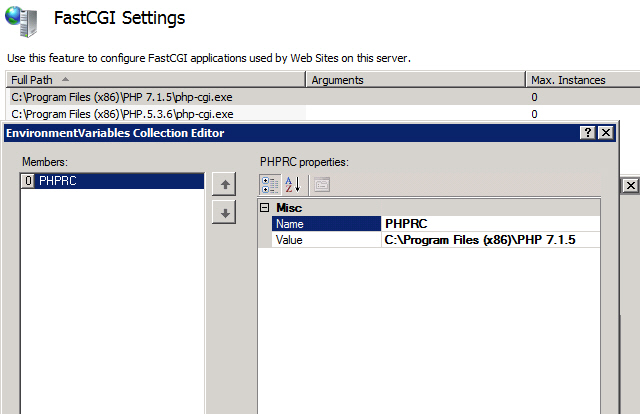
The trick is to create an extra environment variable PHPRC and point to the specific PHP version directory that contains php.ini.
* DO NOT put an extra \ at the end, ie, C:\Program Files (x86)\PHP 7.1.5 is the correct form without the ending \.
* Make sure you downloaded the Non-Thread Safe x86 version for PHP release
Extra Note:
For FastCGI on Windows Server 2003, the last supported binary Non-Thread Safe x86 version of PHP is 5.4.9. (ie, php-5.4.9-nts-Win32-VC9-x86.zip)
Enable the User-Defined INI files
If you want to allow Web application owners to control PHP settings themselves, you can enable a user-defined PHP configuration.
Add the following setting, which specifies the name to be used for user-specific INI files, to the main php.ini file. Setting this to an empty value disables the user-defined PHP configuration.
console
user_ini.filename = .user.ini
Create a file called .user.ini in C:\inetpub\website1.com\ folder, and add the following:
console
max_execution_time = 300
Add the following to the file .user.ini in C:\inetpub\website2.com\ folder:
console
upload_max_filesize = 12M
Note that if your main php.ini file has [PATH] sections that point to the root folders of these sites, then you need to remove those sections; if you do not remove those sections, the user-defined settings will not take effect.
Use phpinfo() or ini_get(”max_execution_time”) to check that the new settings have overwritten the default settings. Create a PHP file with the following text and save it in the Web root folder:
Note also that when you enable the user-defined INI files, the settings in those files are cached by the PHP engine to avoid re-reading those files for every request. This means that if the user makes a change to .user.ini file, then that change may not take effect right away. Instead it may take effect after the cache time to live (TTL) has expired. The cache TTL value is controlled by the php.ini setting user_ini.cache_ttl, which is set to 300 seconds (5 minutes) by default.
The following settings can be used to tighten the security of a PHP installation. To make the recommended changes, locate and open the php.ini file and edit the configuration settings as described below:
Setting
Description
allow_url_fopen=Off allow_url_include=Off
Disable remote URLs for file handling functions, which may cause code injection vulnerabilities.
register_globals=Off
Disable register_globals.
open_basedir=”c:\inetpub\”
Restrict where PHP processes can read and write on a file system.
The IIS FastCGI module will fail the request when PHP sends any data on stderr by using the FastCGI protocol. Disable FastCGI logging to prevent PHP from sending error information over stderr and generating 500 response codes for the client.

 Comments (0)