永恆的美麗﹕Ferrari Dino 246 GT

By admin, July 29, 2011 10:33 pm

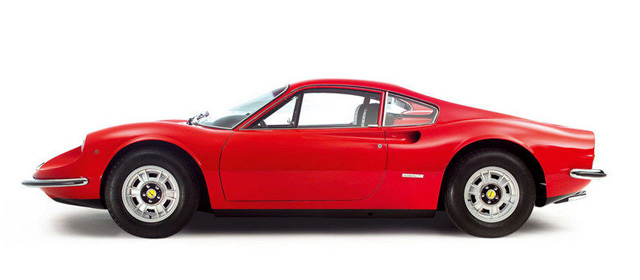
小時候曾經有段時間不停地搜索所有關於法拉利跑車的型號﹐記得那時好像還沒有Internet﹐唯一的途徑就是跑到書店看那些免費的外國汽車書籍和雜誌。我清楚記得當時看到了那個難以令人忘懷的流線型身影﹕Ferrari Dino 246 GT﹐那一刻我真的震撼了﹐那誘人的側面設計實在美的不可言喻﹐震撼度僅次于經典的Testarossa﹗

ferrari-dino-246-gt[1]

就是這個Pininfarina的偉大設計迷倒了一代又一代的法拉利車迷。

Dino 246 GT是法拉利的第一款中置引擎﹐又是法拉利系列裡唯一採用V6引擎的跑車。而Dino這個名字則是Enzo Ferrari老先生為了紀念其24歲英年早逝愛子而採用的。246

246的後繼車款也就是那大名鼎鼎的308﹐作為標準法拉利迷的你如果有細心觀察的話﹐其實不難發現後繼者如308﹑348﹑ 355﹑ 288 GTO﹑ F40甚至ENZO等線條其實都是由此基礎變化出來的﹐正所謂天下武功出少林也就是這個道理了。另外246的命名其實就是2.4升V6汽缸﹐288則是是2.8升V8汽缸﹑而328則是是3.2升V8汽缸﹐如此類推。

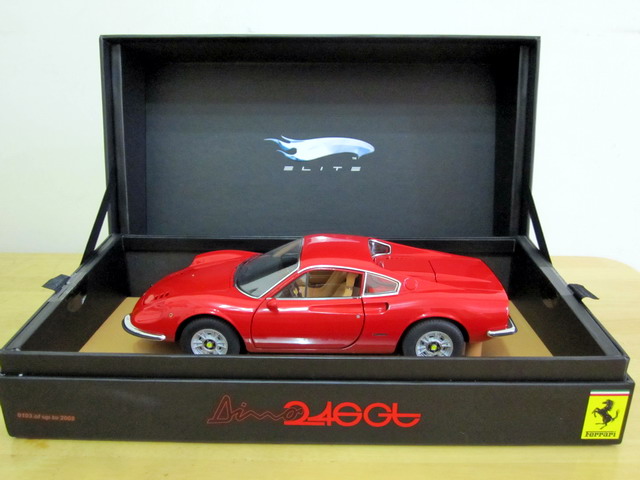
Ferrari Dino 246 GT可以說是我最喜愛的70年代法拉利﹐在收藏初期﹐ Dino 246只有Anson生產過﹐但無奈質量實在太差沒收。到後來才輾轉收入了紅黃兩色的Hotwheels Elite Dino 246 GT街車版本﹐沒過多久後Super Elite就推出了﹐但那高昂的價格完全令人卻步。

最近幸運之神又再次降臨了﹐上一手車主原來也是在去年12月中的那次本地車模店聖誕節大特價時買的﹐那次我買了台半價的410 Superamerica﹐但對于這台半價的Super Elite Dino 246 GT還是忍住了瘋狂的購買慾。這次能夠以上一手半價再1/3的“奇跡經歷”搜得﹐簡直自己都不太相信。回來後用了1個小時幫車清潔和打蠟後﹐Dino 246 GT紅得就跟新的一樣﹐實在是漂亮﹐全車用了極多的蝕刻片﹐而且價錢竟然比我之前收的普通Elite版還要便宜得許多﹐這次可真樂死我了﹗


1/18 Hotwheels Super Elite Ferrari Dino 246 GT

IMG_4758

Dell’s Customized ESXi ISO

By admin, July 28, 2011 5:38 pm

Recently, I involved in a project to deploy latest ESXi 4.1 at client site and all of their ESX hosts are Dell Poweredge based.

We know there are two variation of ESXi images, one is the VMware version you normally download from VMware’s web site, the other is the one customized by server vendor such as IBM, HP and Dell. The main difference is those customized ones are modified with vendor specific IPMI/Hardware monitoring stuff, for Dell, they have added some drivers in order for OpenManage SNMP agent to recognize and use. So it’s common sense to use vendor specific ISO if you happen to use their servers.

However, I looked into Dell’s FTP, there are two Completely Different versions founds:

VMware-RecoveryCD-4.1.0.update1-348481.x86_64-Dell_Customized.iso
VMware-RecoveryCD-4.1.0.update1-348481.x86_64-Dell_Customized_A01.iso
VMware-RecoveryCD-4.1.0.update1-348481.x86_64-Dell_Customized_A02.iso
VMware-RecoveryCD-4.1.0.update1-348481.x86_64-Dell_Customized_A03.iso
VMware-RecoveryCD-4.1.0.update1-348481.x86_64-Dell_Customized_A04.iso

VMware-VMvisor-Installer-4.1.0.update1-348481.x86_64-Dell_Customized.iso
VMware-VMvisor-Installer-4.1.0.update1-348481.x86_64-Dell_Customized_A01.iso
VMware-VMvisor-Installer-4.1.0.update1-348481.x86_64-Dell_Customized_A02.iso
VMware-VMvisor-Installer-4.1.0.update1-348481.x86_64-Dell_Customized_A03.iso
VMware-VMvisor-Installer-4.1.0.update1-348481.x86_64-Dell_Customized_A04.iso

And the answer is VMware-VMvisor-Installer is to be installed on local storage (like harddisk or SAN) and VMware-RecoveryCD is for internal embedded devices like SD Card of USB.

In additional, Dell has created more confusion as there are even different versions within each distribute, like for VMware-VMvisor-Installer-4.1.0.update1-348481.x86_64-Dell_Customized, there is A01, A02, A03 and A04 version.

Lucikly, by carefully reviewing the content of each download, you will soon discover the short cut that is always use the latest number, like A04 in this case because it contains all the previous fixes in A03, A02 and A01.

Hope this helps those who had scratched their hair recently.

人的出生不是平等的,人的死亡是平等的 (轉文)

By admin, July 26, 2011 2:20 pm

突發奇想﹐大家都說的“上帝面前﹐人人平等”﹐想深一層﹐那不還是說人死後。這跟李怡所講的“人的出生不是平等的,人的死亡是平等的”有著同曲異工之妙。

因為出版了兩本人生話題書,有人問我對人生能不能提出最基本的概括觀念。

人生的課題,不外是生與死,以及從生到死這中間的過程。人的出生不是平等的,有人含着金鑰匙出生,有人出生在窮困或破碎家庭,有人生而健康,有人生來有殘障。但在上帝面前是人人平等的。生而幸運的,要知道感恩。股神巴菲特說,他的富有,是因為他中了「卵巢獎券」,這獎券就是他出生在美國,又是男性和白人,這使他有較好的發展機會。他知道感恩。生而不幸的,不要抱怨。台灣一位生來患有嚴重腦麻痺症的女士黃美廉,她不能講話,做一些簡單動作都很困難,但她說父母愛她,上帝愛她,她會畫畫,寫文章,她只看自己所有的,不看自己所沒有的。她沒有抱怨。知道感恩和沒有抱怨的人,就有充實人生。

人的死亡是平等的。最有錢和最窮困的人,都要面對死亡。生前所有的一切,財富,權勢,爭鬥,愛恨情仇,當死亡到來都會成為過去。清楚認識人人會死,就不會把人生的成敗得失看得那麼重;看重的應是忠於自己,不要扭曲自己,是首要執着於是非對錯,而不是成敗得失。人生是一個過程,讓這過程有意義,享受這過程,比達到什麼目的和結果更重要。因為所有的目的和結果都會在人死時成為過去。故懂得提起,更要懂得放下。

即使了解以上的基本概念,也絕不能回應我們幾乎每天遇到的人生困惑。人生是一本一輩子讀不完的大書,有時一下就翻過了一頁,錯過一些重要細節,而往往魔鬼在細節中,天使在細節中,智慧也在細節中,儘管是小小的人生智慧。

(李怡)

Ancient Aliens & Life Did Not Evolve First on Earth

By admin, July 24, 2011 10:55 am

I watached an interesting series of Ancient Aliens by Discovery Channel.

One of the episode I watched (forgot the link) is about Nazi and its advanced weapon, most of those top German scientist were captured after WWII and sent to America, the German guy who invented V-Rocket/Missile said their technology was actually from them (them being refer to aliens).

The more I knew, the more I tend to believe many religion gods or upper rulers in the past may be aliens. 

The universe is is TOOO huge, combines billions of stars in our Galaxy and there are billions of Galaxies out there!

So it would be crazy to say there is no other life being in the universe besides us.

“I’ll tell you one thing about the universe, though. The universe is a pretty big place. It’s bigger than anything anyone has ever dreamed of before. So if it’s just us… seems like an awful waste of space. Right?” from the Movie Contact.

One particular thing is Sir Frances Crick discovered the DNA in the 1960s and won the Nobel Prize.

http://exopermaculture.com/2011/04/14/francis-crick-on-dna-intelligent-design/

Sir Francis Crick has the following theory:

“Life did not evolve first on Earth; a highly advanced civilization became threatened so they devised a way to pass on their existence. They genetically-modified their DNA and sent it out from their planet on bacteria or meteorites with the hope that it would collide with another planet. It did, and that’s why we’re here. The DNA molecule is the most efficient information storage system in the entire universe. The immensity of complex, coded and precisely sequenced information is absolutely staggering. The DNA evidence speaks of intelligent, information-bearing design.

Complex DNA coding would have been necessary for even the hypothetical first so-called’ simple cell(s). Our DNA was encoded with messages from that other civilization. They programmed the molecules so that when we reached a certain level of intelligence, we would be able to access their information, and they could therefore ­ teach” us about ourselves, and how to progress. For life to form by chance is mathematically virtually impossible.”

Tiered Enterprise Storage with SSD

By admin, July 20, 2011 4:26 pm

I found an excellent article on ITHome (Taiwan) regarding the latest trend in Tiered Enterprise Storage with SSD, but it’s in Chinese, you may need Google Translate to read it.

68700_4_3_l[1]

Update:

Aug-17-2011

There is new topic about Distributed SSD Cache in Enterprise SAN and Server, new SSD caching products are coming from EMC, NetApps, but where is Equallogic in this area?

Also Dell just released its SSD solution (CacheCade) for H700 H800 raid card with 1GB NVRam, but the cost is quite expensive, not worth the money really. (as one 149GB Solid State Drive SAS 3Gbps 2.5in HotPlug Hard Drive,3.5in HYB CARR [US$4,599.00])

CacheCade is used to improve random read performance of the Hard Disk Drive (HDD) based Virtual Disks. A solid-state drive (SSD) is a data storage device that uses solid-state memory to store persistent data. SSDs significantly increase the I/O performance (IOPS) and/or write speed in Mbps from a storage device. With Dell Storage Controllers, you can create a CacheCade using SSDs. The CacheCade is then used for better performance of the storage I/O operations. Use either Serial Attached SCSI (SAS) or Serial Advanced Technology Attachment (SATA) SSDs to create a CacheCade.

Create a CacheCade with SSDs in the following scenarios:

Maximum application performance—Create a CacheCade using SSDs to achieve higher performance without wasted capacity.

Maximum application performance and higher capacity—Create a CacheCade using SSDs to balance the capacity of the CacheCade with high performance SSDs.

Higher capacity—If you do not have empty slots for additional HDDs, use SSDs and create a CacheCade. This reduces the number of HDDs required and increases application performance.

The CacheCade feature has the following restrictions:

Only SSDs with the proper Dell identifiers can be used to create a CacheCade.

If you create a CacheCade using SSDs, the SSD properties are still retained. At a later point of time, you can use the SSD to create virtual disks.

A CacheCade can contain either SAS drives or SATA drives but not both.

Each SSD in the CacheCade does not have to be of the same size. The CacheCade size is automatically calculated as follows:
CacheCade size =capacity of the smallest SSD * the number of SSDs

The unused portion of SSD is wasted and can not be used as an additional CacheCade or an SSD-based virtual disk.

The total amount of cache pool with a CacheCade is 512 GB. If you create a CacheCade which is larger than 512 GB, the storage controller still uses only 512 GB.

The CacheCade is supported only on Dell PERC H700 and H800 controllers with 1 GB NVRAM and firmware version 7.2 or later.

In a storage enclosure, the total number of logical devices including virtual disks and CacheCade(s) cannot exceed 64.

NOTE: The CacheCade feature is available from first half of calendar year 2011.
NOTE: In order to use CacheCade for the virtual disk, the Write and Read policy of the HDD based virtual disk must be set to Write Back or Force Write Back and read policy must be set to Read Ahead or Adaptive Read Ahead.


Aug-24-2011

I’ve found out only H700 H800 raid card with 1GB NVRam supports FastPath and CacheCade, unlike the LSI product which requires a hardware or software key, Dell’s LSI OEM H700/H800 provides those free of charge!!!
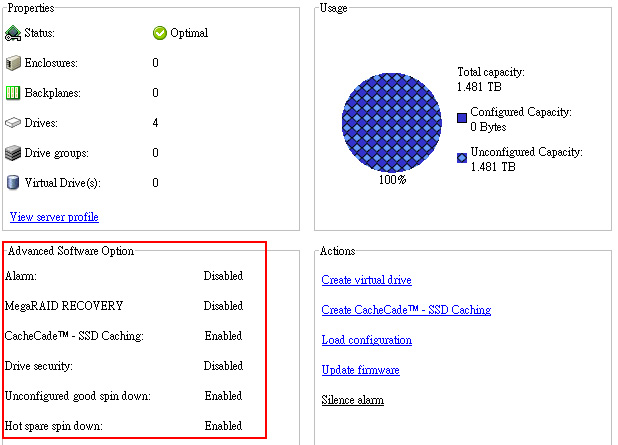
msm

In additional, if you tired of using OpenManage to manage your storage, you can try LSI’s Magaraid Storage Manager (aka MSM) which is a client based GUI tool like the previous Array Manager.

However, this still leave with one big questions even you have a H800 w. 1GB NVCache as it only supports SAS interface on Powervault MD1200/MD1220. Where can we find a cheap compatible  SAS SSD for alternative? (OCZ still costs a lot), if you know, please let me know.

For those of you who are interested in enabling H700 with cheap SATA SSD for CacheCade and FastPath, here is the How To Link, but it’s in Chinese.


Aug-27-2011

CacheCade software enables SSDs to be configured as a secondary tier of cache to maximize transactional I/O performance. Adding one SSD to substantially improve IOPs performance as opposed to adding more hard drives to an array.

By utilizing SSDs in front of hard disk drives (HDDs) to create a high-performance controller cache of up to 512GB, CacheCade allows for very large data sets to be present in cache and deliver up to a 50X performance improvement in read-intensive applications, such as file, Web, OLTP and database server.

The solution is designed to accelerate the I/O performance of HDD-based arrays while minimizing investments in SSD technology.


CacheCade Characteristics
The following list contains various characteristics of CacheCade technology:


- A CacheCade virtual disk cannot be created on a controller where the CacheCade feature is disabled. Only controllers with a 1GB NVDIMM will have the CacheCade feature enabled.

- Only SSDs that are non-foreign and in Unconfigured Good state can be used to create a CacheCade virtual disk.

- Rotational drives cannot be used to create a CacheCade virtual disk.

- Multiple CacheCade virtual disks can be created on a controller. Although there is no benefit in creating multiple CacheCade virtual disks.

- The total size of all the CacheCade virtual disks will be combined to form a single secondary cache pool. However the maximum size of the pool will be limited to 512GB.

- Virtual disks containing secured Self-Encrypting Disks (SEDs) or SSDs will not be cached by CacheCade virtual disks.

- CacheCade is a read cache only. Write operations will not be cached by CacheCade.

- IOs equal to or larger than 64KB are not cached by CacheCade virtual disks.

- A foreign import of a CacheCade virtual disk on a controller with the CacheCade feature disabled will fail.

- A successfully imported CacheCade VD will immediately start caching.

- CacheCade VDs are based on R0. As such the size of the VD will be the number of contributing drives x the size of the smallest contributing drive.

- In order to use CacheCade for the virtual disk, the Write and Read policy of the HDD based virtual disk must be set to Write Back or Force Write Back and read policy must be set to Read Ahead orAdaptive Read Ahead.

- CacheCade has NO interaction with the battery learn cycle or any battery processes. The battery learn behavior operates completely independent of CacheCade. However, during the battery learn cycle, when the controller switches to Write-Through mode due to low battery power, CacheCade will be disable.
NOTE:

Any processes that may force the controller into Write-Through mode (such as RAID Level Migration and Online Capacity Expansion) will disable CacheCade
 

Reconfiguration of CacheCade Virtual Disks

A CacheCade virtual disk that is made up of more than one SSD will automatically be reconfigured upon a removal or failure of a member SSD.

The virtual disk will retain an Optimal state and will adjust its size to reflect the remaining number of member disks.

If auto-rebuild is enabled on the controller, when a previously removed SSD is inserted back into the system or replaced with a new compatible SSD, the CacheCade will once again be automatically reconfigured and will adjust its size to reflect the addition of the member SSD.


Sep-4-2011

LSI Corp. today updated its MegaRAID CacheCade software to support write and read solid state drive (SSD) caching via a controller, providing faster access to more frequently used data. 

LSI MegaRAID CacheCade Pro 2.0 speeds application I/O performance on hard drives by using SSDs to cache frequently accessed data. The software is designed for high-I/O, transaction-based applications such as Web 2.0, email messaging, high-performance computing and financials. The caching software works on LSI MegaRAID 9260, 9261 and 9280 series of 6 GB SATA and SAS controller cards.

LSI delivered the first version of CacheCade software about a year ago with read-only SSD caching. MegaRAID CacheCade Pro 2.0 is priced at $270 and is available to distributors, system integrators and value added resellers. LSI’s CacheCade partners include Dell, which in May began selling the software with Dell PowerEdge RAID Controller (PERC) H700 and H800 cards.

“What we want to do is close the gap between powerful host processors and relatively slow hard disk drives,” said Scott Cleland, LSI’s product marketing manager for the channel. “Hosts can take I/O really fast, but the problem is traditional hard disk drives can’t keep up.”

LSI claims the software is the industry’s first SSD technology to offer both read and write caching on SSDs via a controller.

LSI lets users upgrade a server or array by plugging in a controller card with CacheCade. Cleland said users can place hot-swappable SSDs into server drive slots and use LSI’s MegaRAID Storage Manager to create CacheCade pools. The software will automatically place more frequently accessed data to cache pools.

“In traditional SSD cache and HDD [hard disk drive] configurations, the HDDs and SSDs are exposed to the host,” Cleland said. “You have to have knowledge of the operating system, file system and application. With CacheCade, the SSDs are not exposed to the host. The controller is doing the caching on the SSDs. All the I/O traffic is going to the controller.”

SSD analyst Jim Handy of Objective Analysis said it took time for LSI to build in the write caching capability because “write cache is phenomenally complicated.”

With read-only cache, data changes are copied in the cache and updated on the hard drive at the same time. “If the processor wants to update the copy, then the copy in cache is invalid. It needs to get the updated version from the hard disk drive,” Handy said of read-only cache.

For write cache, the data is updated later on the hard drive to make sure the original is still updated when the copy is deleted from cache.

LSI also has a MirrorCache feature, which prevents the loss of data if it is copied in cache and not yet updated on the hard drive.

Handy said read and write caching is faster than read-only caching.

“Some applications won’t benefit from [read and write caching],” Handy said. “They won’t notice it so much because they do way more reads than writes. For instance, software downloads are exclusively reads. Other applications, like OLTP [online transition processing], use a 50-50 balance of read-writes. In these applications, read-write is really important. ”


Sep-5-2011

The SSD Review did an excellent research in their latest release “LSI MegaRAID CacheCade Pro 2.0 Review – Total Storage Acceleration Realized

vSphere Storage Appliance 1.0, Is It Really Necessary After All?

By admin, July 19, 2011 2:08 pm

A week ago, one of the latest derived products from vSphere 5 catches my attention, the vSphere Storage Appliance v1.0. Basically, it’s a software SAN solution for ESX Shared Storage requirement. VMware vSphere Storage Appliance provides virtual shared storage volumes without the hardware.

VSA enables Different Key Features according to different vSphere Editions:

Essentials Plus, Standard
•High Availability
•vMotion

Enterprise
•Fault Tolerance
•Distributed Resource Scheduler

Enterprise Plus
•Storage vMotion

And it offers Storage Protection
RAID 1 (mirroring) protection across nodes
RAID 10 protection within each node

Licensing
vSphere Storage Appliance is licensed on a per-instance basis (like vCenter Server)

Each VSA instance supports up to 3 nodes. (ie, maximum expandability is 3 ESX Hosts)
At least two nodes needs to be part of a VSA deployment

Pros: There is only ONE, it doesn’t require you to purchase an expensive SAN in order to use vMotion/DRS.

Cons: Too Many!!! Read on…

1. The license fee is USD5,995 per-instance but 40% off if with vSphere Essentials Plus, again VMware wants all of you to purchase E+, a $$$ driven price structure thing created by its fleet of “genius” MBAs. If your company have the money to purchase VSA, then I am pretty sure a proper SAN won’t cost you an arm.

2. “Run vCenter Separate from VSA Cluster for best protection” Why’s that?  These days the ultimate goal is to virtualized everything even for vCenter, it’s against the most fundamental rule of virtualization just like vRam asking you to purchase more servers with less ram installed on each host!

3. Have additional disk-space to enable RAID protection: VSA protects your data by mirroring data in multiple locations – this means your business data will require additional raw disk capacity. Good rule of thumb is to get 4x the server internal disk space you expect to use (You kidding me! RAID10, then split the rest for other node’s mirror, left you ONLY 1/4 of the original storage, this is again not enviornmental friendly); in VSA 1.0, disk capacity and nodes cannot be changed setup – feature is planned for future release.

3. Two VSA Hosts can support up to 25 VMs, Three VSA Hosts can support up to 35 VMs: This particularly renders VSA to Not Worth Spending the $$$, 3 nodes can only support 35 VMs max sounds unjustified for ROI.

4. Since it’s NFS based, you can’t use RDM or VAAI, this is bad news for those who run Exchange/SQL and looking for performance, but again, if you are after IOPS, then you got the $$$. Not to mention NFS is well known for its low performance over IP network comparing to block based such as FC or iSCSI and placing the same shared storage or SAN on ESX host will inevitably reduce the overall performance.

It seemed to me an immature rush to release product, use 400% more space is not a solution for Enterprise, it’s a big waste and a 2nd point against virtualization. It reminds me the software feature from NetApp’s Network Raid, it will use 2/3 of your storage for N+1 raid feature, well it worked, but it just doesn’t justify the cost after all.

Virtualization should save cost by fully utilizing Cpu/Ram/Space, but with the release of vSphere 5, it seemed to me the VMware is trying its best to discourage everyone by using vRam model as well as this VSA product. There is a hot debate on this topic on VMTN, 99.9% is against this “vmw screwed us“ new license change, and vmw’s official is hiding in the dark and afraid to response with a valid point.

No body want to purchase more servers with less ram on each host these days, these will use more power and absolutely non environmental friendly, now, we see VMware is becoming an anti-environmental friendly corporation.

Finally, VSA will use host CPU and local storage IOPS, and it’s not a model for future aggregate IOPS growth comparing to a real SAN, but after all, it’s just a temporary product for SMB, but why does VMware charge so much for it? In my own opinion, vSphere Storage Appliance 1.0 can be made obsolete and it’s uncessary as there are already Free Products from Microsoft iSCSI Target, Starwind and many similar products from Linux world for the purpose of Shared Storage for ESX.

PS. Just found out the free vSphere 5.0 ESXi version has the pathetic 8GB limit, now I finally understand why Monopoly is a bad thing, I shall start to look into Xen and Hyper-V seriously for my clients.

Concept from Movie Inception became true with ESX, How Many More Layers Can You Create?

By admin, July 19, 2011 1:50 pm

Last time I tried a Nested iSCSI VM thing, EQL>MS iSCSI Target>Starwind but today I found something even more crazy!

This is probably one of the best and most people responded blog page regarding Nested ESX and it’s unlimited possibilities.

The author even went so far by migrate a running VM with VMotion from the physical ESX host to the virtual ESX host, as well as running Hyper-V within ESX.

Wow, why don’t you install an additional ESX within that Hyper-V again to see what will happen when migrate a running VM back to the original mother ESX, that’s 2 layer’s back.  :)

從一場精彩的乒乓球女子雙打比賽得到的啟發

By admin, July 17, 2011 6:05 pm

南韓選手打的是削球,球拍向乒乓球的中下部削推,過來的球下旋,對手回球一定要根據下旋的程度來上提或平推,提得不夠球會下網,提得太多球會出台。下旋球的轉軸可以是平的,也可以是斜的, 給對手造成很大的困難。中國選手打的是上旋進攻球,擊球中上部,產生上旋球,除了來球快,球到對方台面會急遽前衝,對手要有快速反應的能力才行。

我做這解說,希望大家了解雙方攻防的難處,從而欣賞這場球賽。

希望大家已經領悟到了如何應付善于用下旋和側旋打法的球員。

Equallogic PS Series Firmware Version V5.1 Released

By admin, July 17, 2011 4:54 pm

It’s a Early Production Access. Originally, I thought we need VMware vSphere 5.0 in order to use these great features, but apparently, it also works for vSphere 4.1 (Wrong, see update below). In additional, Dell is finally moving into Fluid Data Solution with Equallogic and Compellent products. (ie, moving hot-data to SSD/15K SAS tiers automatically)

Two of the major improvements are:

Support for VMware Thin Provision Stunning

Version 5.1 of the PS Series Firmware supports VMware’s Thin Provision Stunning feature. When thinly-provisioned volumes containing VMware virtual machines approach their in-use warning threshold, the PS Series Group alerts vCenter that the volume is low on space. When the volume reaches the maximum in-use threshold, the PS Series Group does not take the volume offline, which would cause the virtual machines to crash. Instead, vCenter stuns (ie, suspend) the virtual machines on the volume to prevent them from crashing. When additional volume space is created, either by growing the volume or moving virtual machines to other volumes, the administrator can resume the virtual machines.

Performance Load BalancingIn Version 5.1

Improvements have been made to the load balancing capabilities in PS Series groups. This enhancement is designed to provide sub-volume performance load balancing and tiering in both heterogeneous and homogeneous storage pool configurations. The load balancer detects pool member arrays that are at, or near, overload, and shifts some of the workload to less-loaded arrays. To ensure that the load balancing responses to long-term trends rather than brief increases in activity, the operation takes place gradually, over a period of hours. The result is improved performance balancing in pools, especially in pools containing mixed drive or RAID configurations. Mixed pools experience the greatest benefit with workloads that show tiering and are regular in their operating behavior.


Fix List v5.1:

- A problem with an internal management process may disrupt in-progress management commands. This issue affects arrays running version 5.0.4 or 5.0.5 of the PS Series Firmware. In rare circumstances, on arrays running version 5.0.5 Firmware, this may also result in a control module becoming temporarily unresponsive.

- Unplanned control module failovers may occur in multi-member groups running in environments in which VMware ESX version 4.1 with VAAI, the Host Integration Tools for Microsoft v3.5, or Host Integration Tools for VMware 3.0 are used. (This is serious!)

- In some cases, a controller failover occurred because of a drive error during a RAID rebuild.

- In some cases, the background drive scanning process encountered an error during drive testing, and the drive was reported as “faulted” and left online when it should have been marked failed” and removed from use. AND In rare cases, a failing drive in an array could not be correctly marked as failed. When this occurred, the system was unable to complete other I/O operations on group volumes until the drive was removed. This error affected PS3000, PS4000, PS5000X, PS5000XV, PS5500, PS6000, PS6010, PS6500, and PS6510 arrays running Version 5.0 of the PS Series Firmware. (Still haven’t fixed this since v5.04! So the Predicative Feature doesn’t work in reality.)

- A failure in a hot spare drive being used as the target in a drive mirroring operation could have resulted in the group member becoming unresponsive to user I/O.

- Connection load balancing could result in volume disconnects in VMware environments using the EqualLogic Multipath Extension Module. (You KIDDING ME right?)


Update Oct 26, 2011

I got the wrong impression VMware Thin Provision Stun Option will also work with the existing ESX 4.1 version before, so this means vSphere version need to be version 5.

vSphere Storage APIs – Array Integration (VAAI) were first introduced with vSphere 4.1, enabling offload capabilities support for three primitives:

1. Full copy, enabling the storage array to make full copies of data within the array
2. Block zeroing, enabling the array to zero out large numbers of blocks
3. Hardware-assisted locking, providing an alternative mechanism to protect VMFS metadata

With vSphere 5.0, support for the VAAI primitives has been enhanced and additional primitives have been introduced:

• vSphere® Thin Provisioning (Thin Provisioning), enabling the reclamation of unused space and monitoring of space usage for thin-provisioned LUNs
• Hardware acceleration for NAS
• SCSI standardization by T10 compliancy for full copy, block zeroing and hardware-assisted locking

終于得到了大個頭的Alfa Romeo 8C Competizione

By admin, July 16, 2011 11:03 pm

作為意大利龍頭大阿哥的Alfa Romeo過去曾經出過不少漂亮而又聞名于世的超級跑車﹐比較出名的有8C﹑TZ及T33系列。其中自己不太喜歡TZ﹐總覺得它比較沒有性格﹐當然這是相對于60年代同期的法拉利250GTO而言﹐聽聞AA今年底即將推出那設計幾乎完美的T33﹐我絕對是萬分期待的﹗

曾經見過西班牙的車模攝影高手Impression把此車拍得無比的漂亮之後就著了魔﹐直至去年才有幸收藏到了Spark製作精美1/43的Alfa Romeo 8C Competizione﹐心裡其實還是很掛念大個子的它。但我對一眾MR的1/18“龜殼”8C手版並不感興趣﹐主要考慮因素是MR的性價比跟我收藏的預算距離實在太大。

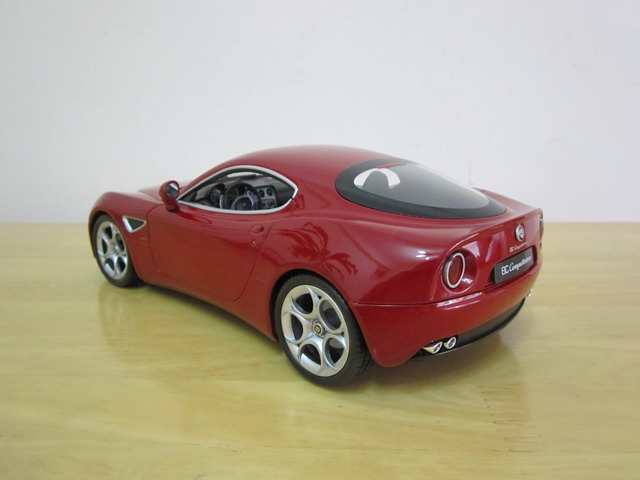
好了﹐之前見過Burago的1/18版本﹐但總覺得不大對勁兒﹐後來才知道原來Burago的比例根本就不對﹐Welly的才是皇道﹗但本地車模店很少見過有Welly版的8C Competizione﹐有也是曇花一現﹐機會瞬間流失。上一次出現在拍賣場已經是去年底﹐但也是緣份擦身而過。這星期我終于從上次那個贏得此車的買家手中獲得了這個“第三手”的散包8C﹐而且比他那時購買的價格還要便宜了許多﹐才港幣75元正﹐沒錯﹐真是便宜的令人難以置信﹐哈哈。

經過近1個小時的清潔﹑修補和打蠟﹐Welly的Alfa Romeo 8C Competizione終于回復了原來漂亮的外貌。說真的﹐Welly的這款8C就跟網友們的評論一樣﹐性價比來的實在太高了﹐造型好看之餘﹐細節也很充分﹐而且四個輪子都有彈簧﹐玩味十足。最主要是Welly的油漆質量上乘﹐在維修過程中用田宮打磨膏去掉了好些表面的油漆﹐車身依然是光潔發亮。

總結這台車可能是我近年收藏裡性價比其中最高的一款﹐如果你們有機會遇見﹐此車一定不能錯過。


1/18 Welly Alfa Romeo 8C Competizione – Red

IMG_4757

Pages: Prev 1 2 3 4 5 6 7 ...276 277 278 ...332 333 334 Next