
涼瓜炒牛肉
 Comments (1)
 今天晚上打算煮道豉椒炒牛肉配上這對來自泰國的特大涼瓜,長度幾乎有15CM,媽媽教路,只有圓的才不苦,長型的肯定苦到出汁。

Comments (1) 今天晚上打算煮道豉椒炒牛肉配上這對來自泰國的特大涼瓜,長度幾乎有15CM,媽媽教路,只有圓的才不苦,長型的肯定苦到出汁。
最近在Tom Cruise主演的科幻片Oblivion裡聽到了一首熟悉的旋律,查詢之下發現了原來是英國樂隊Proco Harum 1967年的A Whiter Shade Of Pale。自己其實覺得開頭的旋律跟20年後Berlin的Take My Breath Away有著異曲同工之妙,短短的十幾妙旋律往往能令人繞樑三日。
這是1967年的原版
但我更喜歡2006年這個管絃樂伴奏的版本,滿頭銀髮的主音Gary Brooker再唱此曲充滿了不同的滄桑感,很有Feel!
If you like British sitcom and enjoy the special sense of humor, then this is definitely for you.
Vicious 極品基老伴
Ian McKellen’s performance is so outstanding even than his role in the Lord of the Rings. It really brings back the good old feelings as I used to watch tons of those with my landlady back in UK. It’s just so British, terribly mean 尖酸刻薄的薄黑色幽默 and really fun to watch.
每年夏季Uniqlo大減價都會買一兩件短袖運動T-Shirt當網球衫穿,因為發現除了價錢吸引外,質地也很不錯,透氣的來又夠輕盈,所以開始放棄A和N的兩大品牌了。

Well, it’s about time, battery normally last for 3 years, this is the first time I encountered such error and the 2nd time EQL went wrong, the first time was due to a failed disk.
event: 28.4.31
time: Sun Jul 14 21:43:29 2013
NVRAM battery failed. Power failure could result in loss of data.
Critical health conditions exist.
Correct immediately before they affect array operation.
NVRAM battery failed and must be replaced.
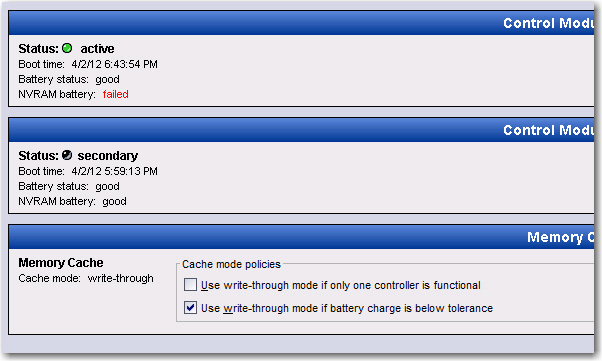
There are 1 outstanding health conditions. Correct these conditions before they affect array operation.
Active control module cache is now in write-through mode. Array performance is degraded.
Note the Write Latency shoots up right away because Write Back Mode is disabled although you can force to use Write Back mode.
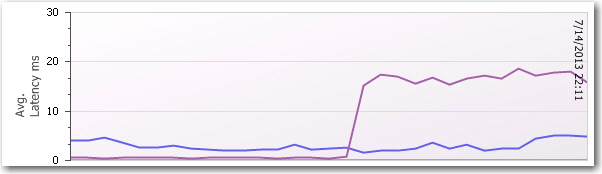
Update: 7/15/2013
I can’t think of any reason anyone don’t like this kind of high redundancy with easy maintenance built in mind! Bravo! Equallogic!

終於等到了第八代Adidas Barricade的到來,結果還是期待越大、失望越大。除了價錢倍升外,就連以前吸引的外型也逐漸變得保守了,整體感覺更像一雙跑鞋。
去年11月中轉換陣營投奔Nike ,買了人生第一對Courtballistec 4.3,經過了近8個月的訓練,右腳鞋底前端已經開始出現嚴重磨損,看樣子再多兩個月就可以報廢了。
今天偶然遇見了運動店大減價,而且這個醒目的橙+白色更是心頭所好,所以就不加思索,立刻買了下來。
Nike Air Courtballistec 4.3 orange/White

今年的All-England Club溫布頓可謂爆冷連連,伴隨著排名頭幾位種子選手在前段時間的相繼出局,原以為精彩會由此止步。但是昨天的半決賽Djokovic對Del Potro的那場證明我又看錯了,這場對壘很可能是開賽以來最緊張刺激的一回。
作為頭號種子選手的Djokovic整場比賽面對Del Potro不停的猛烈抽擊幾乎招架不住,但在關鍵時刻他往往卻能打出超乎意料的致勝回球,再次證明了他的世界第一絕對是真材實料的。
倒是星期天的男單決賽,我希望贏得比賽的反而是那個脫胎換骨的英國人,因為Murray正是英國人自Fred Perry 1936年奪冠後77年來最大的希望和榮譽。 (Update: Congratulations Andy Murray!!! Finally!!!)
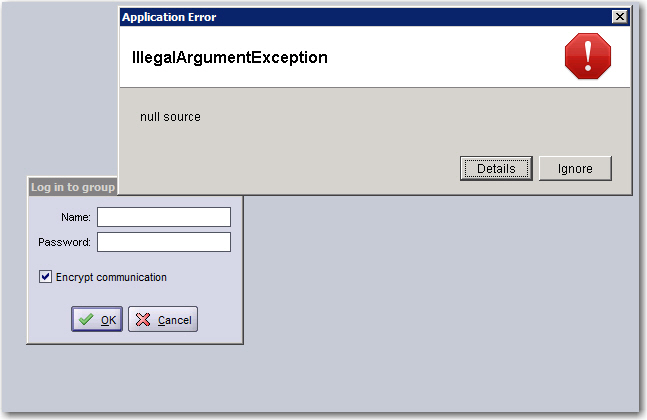
The EQL GM Java Applet stays as blank screen for about 2 minutes and then throws an exception as shown in the picture below, simply ignore the error then group manager login screen will appear agin. This problem doesn’t occur if I launch the EQL GM in web browser, strange!
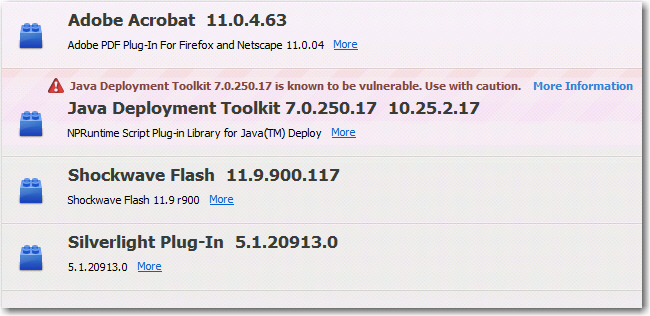
Seemed quite a few having the same problem on Dell’s EQL forum after upgrading to Java 7 Update 25, Yes, we selected to upgrade because there is a serious security hole in Java 6.
This is the warning showing in Firefox Add-On Page.
The other problem is after I clean the Java Cache, my EQL Group Manager icon on desktop has also gone, does anyone know how to recreate such icon? I don’t want to re-install HIT for Windows again just for getting the icon back for sure. 
Just received an alert from Equallogic this morning regarding hard disk firmware update.
Dell has made improvements in the drive error handling routines of EqualLogic array firmware over the course of the last few years and has worked closely with its drive manufacturers to improve the error handling routines of the hard drives.
We have released the newest version of hard disk drive firmware, EC04, for the below listed 7200RPM based 1TB, and 2TB drives shipped on the PS4100E, PS6100E, PS6110E, and the PS6110E arrays
- Toshiba 7200 RPM NL-SAS MK1001TRKB (1 TB)
- Toshiba 7200 RPM NL-SAS MK2001TRKB (2 TB)
If you are using arrays with these drives, Dell strongly recommends that you update the hard disk drive firmware.
I recall I’ve received the same kind of alert at least 3-4 times regarding 7,200 RPM SATA/NL-SAS firmware update in the past 3 years and none for SAS. Worst many users reported frequent 7,200 RPM disks failure or false positive. In additional, past EQL’s firmware updates constantly indicate there were problems with error detection or false positive of the 7,200 RPM disks. So I think this does provide you a clear picture how reliable those slower disks can be. Now with disks moving into 4TB each, I don’t think it’s pleasant scenario to see one of these failed.
The good thing is Equallogic is always working closely with the disk vendor to improve its reliability over the years. That’s why we see Improved “hard drive monitoring intelligence with an advanced predictive reliability algorithm” has been built into it’s latest firmware again.
We have released recommended software updates for EqualLogic PS Series Arrays: Firmware versions 6.0.5 and 5.2.9, which include key maintenance fixes.
Notably, the v6.0.5 release includes recent improvements to hard drive monitoring intelligence with an advanced predictive reliability algorithm. This algorithm is designed to help preserve overall system reliability and long-term performance by proactively identifying drives which are at risk for failure, copying their data, and allowing you to safely replace them. In a small percentage of storage arrays, this process will occur shortly after the array firmware is updated. More details are included in the release notes. Version 6.0.5 also removes a false error warning that appeared on some arrays following drive replacement, and includes other fixes.We recommend that you move to the v6 firmware stream and adopt v6.0.5. However, for customers staying on the 5.x code stream, we have released v5.2.9 which includes the drive reliability algorithm mentioned above and additional fixes.
Recently, I encountered some trojan asp scripts that cannot be removed, finally found it’s related to Windows folder name restriction, clever! but how did the hacker able to create those in the first place?
The other thing is I sensed more and more DDOS and Antispam mail is sending from the hidden PHP scripts these days, it’s becoming harder to catch them.
网站被放置了许多木马文件 nul.asp ,怎么也删除不了,提示 无法删除 nul; 参数不正确 ,正郁闷的时候找到了原因以及删除方法。
我的网站就是FCK文件夹下被放了两个nul.asp,于是在cmd dos下删除了它。
Microsoft Windows [版本 5.2.3790]
(C) 版权所有 1985-2003 Microsoft Corp.C:\Documents and Settings\BEN>del \\.\D:\wwwroot\FCKeditor\editor\filemanager
\browser\default\images\icons\32\nul.aspC:\Documents and Settings\BEN>del \\.\D:\wwwroot\FCKeditor\editor\css\images\
\nul.aspC:\Documents and Settings\BEN>
网上查找的相关资料如下:
Windows 下不能够以下面这些字样来命名文件/文件夹,包括:“aux”“com1”“com2”“prn”“con”和“nul”等,因为这些名字都属于设备名称,等价于一个 DOS 设备,如果我们把文件命名为这些名字,Windows 就会误以为发生重名,所以会提示“不能创建同名的文件”等等。
当然,有一些特殊的方法可以偷机取巧,建立以这些设备名为名的文件夹,比如我们在命令提示符下执行“md C:\aux\\”,就在 C 盘建了一个名叫aux 的文件夹。此文件夹虽然可以访问,也可以建立子文件夹,但却无法删除,因为 Windows 不允许以这种方式删除设备。在系统看来,这个 aux
文件夹就是设备。
那么,如何删除这样的文件/文件夹呢?我们只要按照完整的 UNC 路径格式,就是网上邻居的路径格式,正确输入文件路径及文件名即可。比如要删除 C 盘下的 aux 文件夹,可在命令提示符下执行:rd /s \\.\C:\aux,rd 是命令提示符删除文件夹的命令,/s 参数表示从所有子目录删除指定文
件。
再比如要删除 C 盘 temp 文件夹下的 nul.exe 文件,在命令提示符下执行:del \\.\C:\temp\nul.exe 即可。
还要找服务器上找黑客上传的途径才行,危险呃。。
