Category: Others (其它)

Interesting Discovery when Customize a VM

By admin, November 2, 2011 3:28 pm

One of my clients requires W2K3 with MSSQL 2005 and .NET 4 as well as Silverlight4, so I started to deploy the VM from Windows Server 2003 Standard SP2 template, the template itself is configured with the most basic features, there is no IIS or .NET components.

I’ve encountered a few problems that really surprised me:

When I installed IIS, it asked me for both the Windows Server 2003 and SP2 CD-ROM (it never did if I use a W2K3 without SP2), where do I get that SP2 CD huh?  After a while, I figured out the solution is simply to extract the files from the SP2 zip then it completes the whole IIS installation.

Then I encounter another problem when installing SQL Server 2005, the installation failed with error code 1063, Google helped me again, the solution is to install .NET 2.0 first as SQL Server installation files depends on this foundation.

Finally, the client requires .NET 4.0 and Silverlight 4. Luckily, I came across this blog page “Configuring Windows Server 2003 with ASP.NET 4.0 while supporting ASP.NET 2.0“.

債的詛咒:歐債的前生今世 (轉文)

By admin, October 30, 2011 5:39 pm

英國開動印鈔機,美國再度「量化寬鬆」,歐元瀕臨崩潰。中國雖然在賬面上是最大的「債主」,但在一個連美金也日漸泡沫化的時候,美元儲備有多少、持有幾多國債券,當一個國家經濟前景的雞蛋已經通通砸進了歐洲和美國這個籃子裡的時候,又有多大意義?

第二次世界大戰之後,有足足四分一世紀,亞非小國獨立,歷史給了足夠的時間讓人類痛定思痛,走上大國之路。但納粹滅絕、蘇俄發動的冷戰方酣,人類浪費了大好時機,搞到今日田地,要從頭收拾這個廢墟,為時已晚。中國開放市場,西方生產線爭相搬入中國,導致西方銀行金融信貸過剩,連英國的機械工業也已經空洞化之際,一個「債」字,把歐美拖垮。今日的孽債,早埋在什麼時候?比中國開放市場的一九七九年更早。「債」的詛咒不是今天才開始的。在金融海嘯之前,非洲許多窮國每天要償還一億美元給世上最富裕的國家,譬如西非的利比里亞,外債高達三十七億美元,但每年ZF的總支出只是一億二千萬美元,即是香港地產富豪,足可以「殺起」像利比里亞這種國家一百五十年的總支出:醫療、教育、軍隊和警察的薪酬。

債的詛咒,始自第三世界向歐美借貸,正式形成噩夢,在七十年代的石油危機。罪魁禍首是以沙地為首的石油輸出國組織,大舉提升油價。阿拉伯的油王酋長,以這種方式,形同任意為自己印鈔票——幕後有美國的支持,因為美國要用金錢誘使沙地阿拉伯、巴林、科威特等石油國,使之不倒向蘇聯,收買其成為忠實的聯盟。油價一升,沙地阿拉伯的美金收入暴漲,錢多了,存進歐美銀行。西方的銀行一度「水浸」,要急謀借貸出路,第三世界國家便成為最理想的對外借貸對象。因為別的「債仔」,可以「走路」,但第三世界如菲律賓、剛果,有土地資源,是跑不掉的。石油輸出國組織的現金收入,轉了一圈,落到第三世界貧窮國家貪污腐敗的元首的口袋——這些獨裁國家,子承父位,兄終弟及,早年反英抗法的所謂「民族英雄」,一旦「當家作主」,即刻腐化,喊假大空的口號,建水壩、修皇宮般的ZF大樓、起高速公路和大體育館,用民族主義的口號麻醉本國的賤民,歐美銀行的熱錢通通貪進了私人口袋又轉一個圈,化為瑞士銀行的戶口和英美的房地產。

英美領袖略施小計,就變了一場人類有史以來最偉大的五鬼運財戲法。第三世界的部落基因同時發酵,如果他們只熱衷假大空倒還好,壞在他們自相殘殺,貪污的獨裁家族政權,為了鞏固權力,用借來的錢買武器。二十一世紀,第三世界欠下的債務,其中有兩成是用來買軍火的;美國、俄國、中國是三大主顧,他們也樂得眉開眼笑。八十年代扎伊爾總統賽哥,其擺脫殖民地獨立後「吐氣揚眉」的成就,是為他那個黑人國家借下五十億美元,他本人中飽私囊,層層搜刮,名下在比利時擁有十一座古堡,巴黎、突尼斯、瑞士的豪宅無數,尚有幾架私人飛機。這些黑人酋長「先富起來」之後,歐美銀行的貸款以「國債」的名義結具成全國的負擔。但現金買了飛機、遊艇、豪華房車,這一切,卻都又是歐美白人國家的優等物質名牌,繞一個圈,又回到了西方的銀行,不過戶口已經是各大名牌的企業老闆。

歐美國家的政治領袖比起非洲土著,智商很高。還記不記得七十年代末、八十年代初銀行利息高達十五釐的日子?因為列根和戴卓爾治下的財政部長和銀行家,在聯手愚弄他們鄙視的第三世界獨裁者:從此窮國即墮下債務的深淵,其蟻民也墜入十八層地獄。在那幾年,油價還是上升,但原材料價格下降,南美洲要賣幾多噸香蕉給美國才抵得上利息?道理就像今日的中國,賣幾多件血汗T恤,才換回一百億美元外匯,然後又用同一筆外匯買LV、紅酒、波音新客機?「橋唔怕舊」,騙局的理論一樣,惟中國與南美洲的扎伊爾之流的第三世界不同之處,是中國擁有十四億人口,是一個大國。這樣一來,七十年代歐美對第三世界,通過中東油價和未開化的非洲獨裁者為槓桿的吸星大法,雖可同樣施於中國,但中國的廉價勞工市場,卻反過來也把歐美的實業生產力吸走。換言之,七十年代歐美對亞非第三世界的吸搾,如果是強姦,則中國加入了這場淫亂派對。二十年來,與歐美合夥變成了一尊精髓互吸的歡喜佛。

《金瓶梅》在四百多年前,好似早有預見,一個西門慶,一個潘金蓮,講的不就是今日歐美與中國?好笑的是,春梅和李瓶兒,如印度、越南等,還要爭着上西門慶的床呢。國際貨幣基金會必要時就「干預」了,要第三世界重整債務,迫令其「經濟改革」,譬如,多賣點農產品,少些「公共開支」。但第三世界既然獨裁,黑鬼總統夫人又怎捨得少上巴黎少掃幾隻鑽戒呢?貪污如故,造成的只會是削減可憐的賤民的教育和醫療。世界經濟困局,陷入了泥潭,原因就是如此,一點也不複雜。明眼人一看,就知道貧富懸殊,只會加劇,絕對沒得救。世界即將在人性和政治的醜戾自私中覆滅,出生早一點的,如英國殖民地時代的香港人,英國人給了你時間、機會,你可以造好自己的救生艇。晚出生的一代,像什麼九十後,如同今日的蘇丹和埃塞俄比亞同齡的人,就沒有什麼機會了——不錯,香港的九十後,再「赤貧」也有褲子穿,不必皮包骨。但絕望的本質是一樣的。

- 陶傑

Song from The 80s: Richard Sanderson – Reality

By admin, October 28, 2011 1:19 pm

I just found out “Reality” (by Richard Sanderson), one of my favorite songs of the 80s is actually from a 1980’s French movie “La Boum”, and Guess What? That little girl (14 years old) in the movie is Sophie Marceau later we all know who she is.

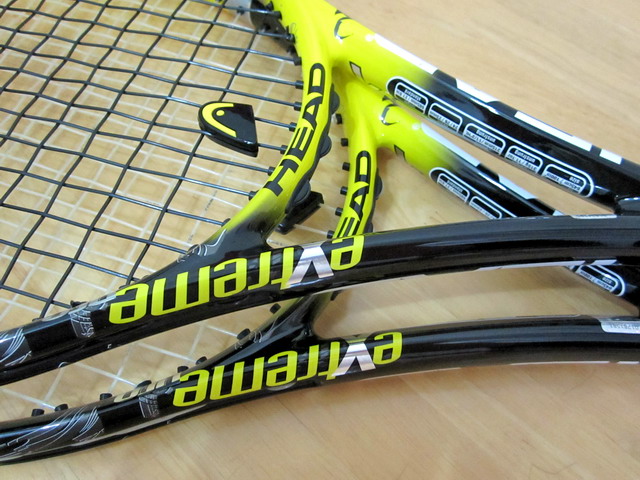
My 2nd Head YOUTEK IG Extreme Pro

By admin, October 26, 2011 10:35 pm

After playing with Head YOUTEK IG Extreme Pro almost 3 weeks, I’ve decided it’s time for me to get an extra stick for spare in case my 1st one broke as Head YOUTEK IG Extreme Pro is famous for eating strings.

It came to my attention someone has posted a 99.9% new IG Extreme Pro in a local tennis forum, so I contacted the seller directly and bought it without hesitation at almost 30% off the original price.

One of the most important reasons is because I do need an original Grip 3 IG Extreme Pro.

Originally I was thinking selling the original Grip 2 at the same tennis forum, and there was actually a NO Brain approached me asking for 50% off, then I found out it’s very easy to change the grip to a Grip 3 at a pro-shop, even better, I simply put an over grip on the of the Grip 2 solved the problem with $40.

After receiving the racket, I couldn’t be happier, as I found out it’s almost new, even newer than my 1st one, absolutely no scratch on the bumper that makes me wonder if the previous owner actually went to court and hit the balls.

Then it’s the perfect Grip 3, I can feel it’s even a bit smaller than my DIY Grip 3.

Anyway, I do hope the pair will last for a long long time, probably another 20 years just like my beloved POG. Well, it may not be a good news for local pro-shop though.

IMG_5117

More Spindles Means More IOPS? RAID10 vs RAID50

By admin, October 26, 2011 10:21 pm

I’ve asked Equallogic Support the following question today, it turns out I had wrong understanding about RAID10 before.

Client enviornment is running VMWare using EQL PS6000XV, 16 15K RPM disks (ie, 14 disks + 2 hot-spares)

In RAID10, there are 7 spindles as RAID10 only ultilizes half the disks, so there are only 7 spindles producing the atual IOPS.

In RAID50, all 14 spindles are used.

I/O pattern is mostly random (30% Read, 70% Write)

Does this mean in this case RAID50 is faster than RAID10 in terms of IOPS as there are 14 spindles in RAID50 compares to 7 spindles RAID10?


Reply from Equallogic’s US Support

The thing to remember here is that with RAID10 it will make two writes, one to each disk.
With RAID50, it will need to make the read/write/parity to all of the member disks in the raidset.

With Read/Write sequential IO, the difference would be minimal. With an environment as you described (virtual environment) where there are many small random I/Os, RAID10 will be quicker.

RAID10 will also be quicker if a drive fails whereas the performance with RAID5/50 is poor when the raidset is degraded and a rebuild is going on.

And of course, the space issue when considering RAID10 or RAID50 is a huge consideration
 

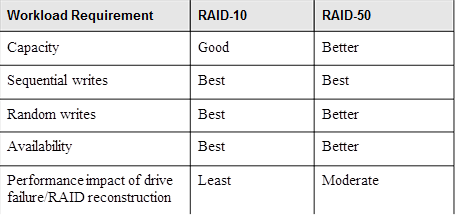
Then, I got an even better answer from a Dell storage expert in Hong Kong

image00194

Actually spindle in RAID10 is still 14, not 7; 7 is the capacity oriented view. We still consider using all disks during I/O.

But you may notice that above chart didn’t mention for Read performance? And yes, read performance for RAID 10 and RAID 50 or even RAID-5 will almost the same!  The different will mainly focus on write.

RAID 50 is two RAID-5 and stripe, the RAID parity overhead will still exist across the disks; the more disks you have in the RAID group, the more overhead and performance penalty you have!

In RAID 10, every RAID group consists with two disks only, so overhead and performance penalty is minimum.


Equallogic Latest Release: Firmware V5.1.2, SANHQ 2.2, HIT/VMware 3.1.1

By admin, October 25, 2011 1:28 pm

No more worries using the pre-released or pre-production versions. As usual, it’s recommended to wait for at least another month before upgrade to the latest firmware.

I am going to try the latest SANHQ and HIT/VMware this week for sure.

Equallogic PS Series Firmware, version V5.1.2
Enhanced Load Balancing, VSSA and Thin Provision Stun

SANHQ 2.2
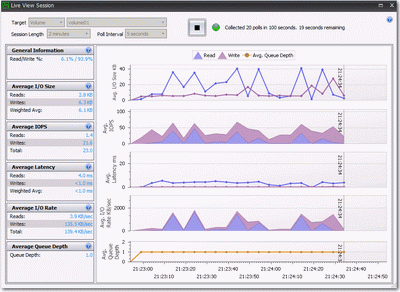
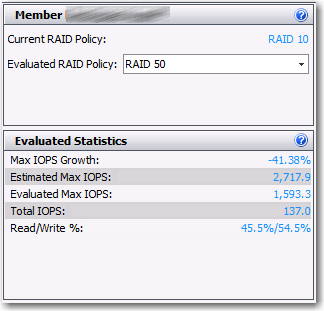
Live View and 95th Percentile Reporting, as well as RAID Evaluator (ie, R10 > R50 performance prediction)

HIT/VMware 3.1.1
Support for VMware Version 5, VMFS 5, Thin Provision Stun, VASA, Datastore Clusters and Storage DRS

Finally, I also noticed the release of a newer version of EqualLogic Multipathing Extension Module (MEM) V1.0.1


Update: Oct 27, 2011

I’ve upgraded the SANHQ to version 2.2 and immediately tried two of the most interesting features,

1. Live View

live_view

It does provide very useful detail ONLY when you need it, such as when you suddently found IOPS is abnormal and wanted to find out which volume is causing the problem. However to be honest, I would rather use VMTurbo’s Usage for VM table, it’s much easier and easy to find the bad VMs.

2. RAID Evaluator

raid_eval

I found this is the most useful one in my own environment as I may expand my Equallogic SAN capacity by changing from RAID10 to RAID50, so I definitely need to know the estimated  performance decrease if I do so, it shows me 41%, wow, that’s huge!


I recevied a false alarm email with subject “SAN HQ Notification Alert” immediately after the SANHQ upgrade completed

Caution conditions:

10/27/2011 9:02:44 PM to 10/27/2011 9:08:08 PM

Caution: Controller failed over in member eql (IT DID SCARE THE HELL OUT OF ME)

Caution: Firmware upgrade on member eql Secondary controller.
 - Controller Secondary in member eql was upgraded from firmware version to version V5.0.2 (R138185)
 - Condition already generated an e-mail message. If the condition persists, additional messages will be sent approximately every 6 hours.

Caution: Firmware upgrade on member eql Primary controller.
- Controller Primary in member eql was upgraded from firmware version to version V5.0.2 (R138185)

Deploying Windows 2008 R2 and Windows 7 templates with vmxnet3 renames the NIC as #2

By admin, October 21, 2011 10:09 am

This is interesting as I have just found the solution, the hotfix is not available for download, you will need to contact Microsoft or your server OEM to get the hotfix, note there are two different hotfix versions besides the 32/64bits, one is for Win7/Win2k8R2 with SP1, one is without.

Symptoms

When deploying or cloning virtual machines from a Windows 2008 R2 or Windows 7 template configured with the VMXNET3 virtual network device:

•The resulting virtual machine’s guest operating system shows the Ethernet network interface as:

- VMXNET Device #2 in Device Manager
- Local Area connection #2 in Network Properties

•The old Ethernet network interface remains present in Device Manager when Show Hidden Devices is enabled.

•The old Ethernet network interface retains its network configuration, preventing the new interfaces from reusing the previous static IP addresses. For more information see Networking Error: IP address already assigned to another adapter (1179).

Note: Upgrading the virtual hardware from version 4 to 7, or upgrading the VMware Tools, may automatically convert Flexible or VMXNET2 virtual network interfaces to VMXNET3. This issue may be observed after such an upgrade.

Also I encountered the following error when trying to open “Edit Settings” after converted the Template to VM.

Call “PropertyCollector.RetrieveContents” for object “propertyCollector” on vCenter Server “VC” failed.

The solution is simple, remove the VM from inventory and add it back again will solve the problem.

Of course, you also need to add back the extra VMX parameters if you are using OEM Windows and make sure devices.hotplug = false is added which prevents hot plug warning in OS.

* Just found out you don’t need to do this if you added the VM to Inventory from Datastore directly as the original VMX contains such information already.

明天會更好

By admin, October 17, 2011 8:01 am

昨天還跟身邊發生的問題糾纏不清﹐今天一早起床發現問題迎刃而解了﹐高興得直呼“明天會更好原來是真的﹗”。

鑽牛角尖很多時候是解決不了問題的﹐還是早點睡覺為好。

What Will Happen After Veeam Maintenance is Over?

By admin, October 13, 2011 1:12 pm

Interesting there is a 10 years glass ceiling, it was never mentioned in their web site I guess.

If you open a license file with notepad, you will see that there are two expiration dates: one for support and one for the product. Each license is issued for 10 years, so if your support expires, you can use an existing installation until the product expiration date is reached. You will not, however, be eligible for support and product upgrades.

Thanks,
Andrey Beck
Veeam Software Support

Equallogic MEM and Number of iSCSI Connections in the Pool

By admin, October 12, 2011 11:13 pm

The following is from the latest October Equallogic newsletter:

How will installing Dell EqualLogic Multipathing Extension Module (MEM) for MPIO on my ESXi hosts affect the number of iSCSI connections in an EqualLogic pool?

The interesting answer to this question is for most the number of connections will increase but for a few it will go down.  The key to understanding the number of iSCSI connections created by MEM are the following variables:

  • The number of ESX hosts you have
  • The number of vmkernel ports assigned for iSCSI on each ESX server
  • The number of EqualLogic members in the pool
  • The number of volumes in the EqualLogic pool being accessed from the ESXi hosts
  • The MEM parameter settings

The MEM is designed to provide many enhancements over the VMware vSphere Round Robin multipathing and standard fixed path functionality including – automatic connection management, automatic load balancing across multiple active paths, increased bandwidth, and reduced network latency.  However, before installing the MEM you should evaluate and understand how the number of iSCSI connections will change in your environment and plan accordingly. In some cases it may be necessary to adjust the MEM parameter settings from the defaults to avoid exceeding the array firmware limits.

The MEM parameters are listed below.  You’ll notice each parameter has a default, minimum and maximum value.  What we’ll go over in this note is how to determine if the default values are suitable values for your environment and if not, what values are suitable for your environment to ensure that the total iSCSI connections to the EqualLogic pool remains below the EqualLogic pool iSCSI connection limit.

Value Default Maximum Minimum Description
totalsessions 512 1024 64 Maximum total sessions created to all EqualLogic volumes by each ESXi host.
volumesessions 6 12 3 Maximum number of sessions created to each EqualLogic volume by each ESXi host.
membersessions 2 4 1 Maximum number of sessions created to each volume slice (portion of a volume on a single member) by each ESXi host.

Single EqualLogic Array in Pool

Let’s start with a simple example – a four node ESXi cluster with 4 vmkernel ports on each host.  Those hosts all connect to 30 volumes on an EQL pool and that pool has a single EQL array. For each individual ESXi host the following variables effect how many connections MEM creates: 

Input Value
membersessions MEM parameter value 2
volumesessions MEM parameter value 6
totalsessions MEM parameter value 512
# of vmkernel ports 4
# of volumes 30
# of arrays in pool 1

So the first step in our ESXi host connection math is to get some subvalues from these parameters we’ll call X, Y and Z.

X = [Lesser of (# of vmkernel ports) or (membersessions parameter value)]

Y = [# of volumes connected to by this ESXi host]

Z = [Lesser of ((# of arrays in pool) or (volumesessions/membersessions)]

We then use X, Y and Z to calculate the total MEM sessions for one ESXi host using the formula below.

Total iSCSI Sessions from ESXi host = [Lesser of (X * Y  *  Z)  or (totalsessions MEM parameter value)]

So in this particular scenario X = 2 (the membersessions MEM parameter value),   Y = 30 (# of volumes connected to by this ESXi host) and Z = 1 (the # of arrays in the pool).  So for one ESXi host in this scenario we have a total of 60 iSCSI connections.  Since 60 is less than the totalsessions MEM parameter limit of 512 the MEM will create all 60 connections on this ESXi host.

We have 4 ESXi hosts in our environment this EQL array will have a total of 240 (4 x 60) connections from those ESXi hosts.   


Why would I get less iSCSI connections with MEM?

Let’s go back to our statement that some environments you may have less connections with MEM than with VMware vSphere Round Robin multipathing.  Typically this will only happen if you have a single member group and when the number of vmkernel ports is more than the membersessions MEM parameter.  In our original example we had four vmkernel ports so with VMWare fixed VMware vSphere Round Robin multipathing you would have four connections to each volume.  When you install MEM it will look at the membersessions MEM parameter and change the number of connections to the default of 2 connections per volume.

You may be concerned that changing from four connections per volume to two connections per volume might have a performance impact but this is usually not true. MEM will use all four VMkernel ports for the various volumes but just not use all vmkernel ports for all volumes. In addition, the EqualLogic array connection load balancing will keep the network load on each individual array port balanced out as evenly as possible.


Add Additional
EqualLogic Arrays in Pool

Let’s say your environment grows and you need more storage capacity.  Let’s add another two EqualLogic arrays to that single member pool in our original example.   The volumes in the pool will now spread out over all three arrays. That is, there is a “slice” of the volume on each of the three arrays.  Now the 3rd MEM parameter – volumesessions – comes into play.  MEM will create 2 connections (membersessions default) to each of the three arrays that have a slice of the volume. MEM is aware of what portion of each volume is on each array so these connections allow it to more efficiently pull volume data down to the ESX server. Standard ESX MPIO doesn’t know about the EqualLogic volume structure so it can’t be as efficient as MEM.

The only parameter that changes in the table from the first example is the number of arrays which increases from 1 to 3.

So let’s get our subvalues X, Y and Z for the situation where there are 3 arrays rather than just one:

X = [Lesser of (# of vmkernel ports) or (membersessions parameter value)]  = 2

Y = [# of volumes connected to by this ESXi host] = 30

Z = [Lesser of ((# of arrays in pool) or (volumesessions/membersessions)] 

= (3) or (6/2)

 = 3

So   X * Y * Z = 180 connections per ESXi host in this example.  180 is less than the totalsessions limit of 512 so MEM will create a total of 180 connections from each ESXi host. 

We have 4 ESXi hosts in our environment this EQL array will have a total of 720 (4 x 180) connections from those ESXi hosts.   720 total connections is within the limits for a PS6xxx series array but is well over the connection limit for a PS4xxx series pool.  However, if any additional expansion of the environment occurs – such as adding two additional ESXi hosts – the session count will now be 1080. So in some circumstances we may need to make some adjustments in the MEM parameters or array group configuration to optimize our configuration.   We’ll talk about that in the next section.
Planning the Number of iSCSI Connections

So if you have done your math and see that you’re getting near the array firmware limits for connections how do can you alter the number of connections?  There are several choices for this including:

  • reduce the number of volumes per pool
  • reduce the number of ESX servers that connect to each volume
  • move some of the EQL arrays/volumes to another pool
  • reduce the membersessions MEM parameter limit on each ESX server
  • reduce the volumesessions MEM parameter limit on each ESX serer
  • reduce the totalsessions MEM parameters limit on each ESX server.

Remember when you’re doing your math that you also need to include any connections from non-ESXi hosts when deciding if you’re going to exceed the array iSCSI connection limit.

As we’ve seen a little bit of planning will help you keep the iSCSI connections to your EqualLogic pool at an optimal level.

Pages: Prev 1 2 3 4 5 6 7 ...72 73 74 ...103 104 105 Next