Sorry, it’s really long, but I do think many will find it very interesting as it involved many things (USB 3.0 HBA, 2.5” 7200RPM external disk, Poweredge R610 PCI-e x8 slot and of course low cost Veeam Backup Solution)
I found myself running out of Veeam backup space recently. Instead of ordering an expensive DAS, I started to explore other alternative solutions that focus on low cost storage.
My Veeam Backup server is a 1U Poweredge R610 server which has 900MB internal storage (10K RPM SAS 300GB x 4 in Raid5) and it has only one PCI-e slot (Gen 2 x8) left.
The original option is to purchase a Powervault MD1200 with 12 2TB 7200RPM near-line SAS disks in Raid50 + 2 hot-spare configurations. PERC H800 raid card (with multi-path load balancing SAS Cables) is going to be used in that extra PCI-e slot. The expected performance should be around 500-600MB/s. One thing keeps delaying the client’s purchase is the cost as it is quite expensive considering there are only 16TB left (Raid50 with 10 2TB disks).
USB 3.0 really comes into play this year, giving its 10x improvement in transfer speed comparing to the old USB 2.0, it quickly captured main stream desktop and laptop market, but not in server at all.
So all I need is to find a USB 3.0 HBA with 2 or more ports, but the problem is which one?
After studied for a few days, I found out I need a latest USB 3.0 PCI-e HBA (ie, add-on card) with PCI-e GEN2 standard and each USB port has individual 5Gb/s bandwidth, so I can copy data must faster between the two USB 3.0 disks without saturating the internal bandwidth.
* Note: Bandwidth for PCI-e Gen1 is 2.5Gb/s or 250MB/s and PCI-e Gen2 is 5Gb/s or 500MB/s.
The other thing is selection of USB 3.0 disks, there are two choices: 1st one is the latest 2.5” external USB 3.0 disk that doesn’t require external power and produce very little heat. 2nd choice is to use the traditional 3.5” disk with external power supply.
In additional, you also have the choice of building your own (using USB 3.0 disk docking) or buy an existing external hard disk box either in 3.5” or 2.5”, and my preference is to go for a 7200RPM 2.5” external hard disk box that is solely powered up using standard USB 3.0 cable.
Obviously, the advantage of DIY is that you can have a higher rotation disk like 7200RPM to be placed in the disk docking because most of the pre-build external disk box are 5900RPM for 3.5” and 5400RPM for 2.5”. Of course the BIG Disadvantage is you may encounter unlimited possibilities that the disk may not work with your DIY docking or USB 3.0 box.
So I selected to play safe and I bought two disks, one is the 2.5” 7200RPM Hitachi TOURO, I wished there is a 1TB or higher 7200RPM 2.5” version, but only 750GB are available in the market currently and 1.5TB is the maximum size for normal 5400RPM 2.5” disks.
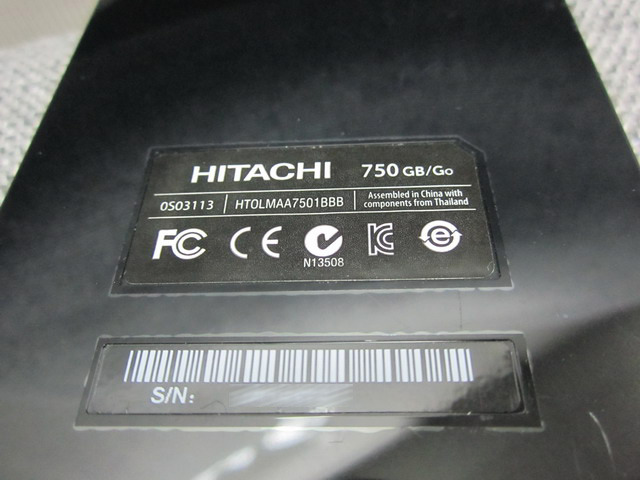
Comparing to 3.5”, disk is much bigger in size, there is even a 4TB from Seagate.
However hard disk price is really becoming more and more expensive than 2 months ago (1.5x higher in Hong Kong now than before the flooding in Thailand), so I decided to buy Lacie Minimus 2TB USB 3.0 mainly due to its price per GB and the nice looking aluminum case, actually this is important as it’s better for heat dissipation in a 24×7 data center environment.
Later I found out it’s actually a Seagate Barracuda Green Disk, Seagate ST2000DL001 (9VT156) 2TB 5900 RPM 32MB Cache SATA 3.0Gb/ s 3.5″, it’s only slightly expensive than other 2TB external disks and has 2 years warranty, but who cares.
Besides Lacie Mimimus 2TB is still the smallest in size among all external USB 3.0 disks even after 1 year of its launch back in Nov. 2010.
Oh one more thing I noticed that after the flooding in Thailand, internal 2TB harddisk is even more expensive than those external ones with box and USB2/3, e-SATA connector, Ridiculous Really! Lucily I also ready enterprise hard disks were not affected as most of those FC/SAS/SSD were made in China or Philippines.

Side topic: I didn’t know until yesterday a 3.5” SATA 2TB 7200RPM is actually faster than a 3.5” SAS 73GB 15K RPM. Mainly due to the hard disk mechanical head only requires shifting a tiny bit to read a total 73GB data comparing to a 73GB 15K RPM disk. The same theory applies to a 2.5” 5900RPM may be equivalent to a 3.5” 7200RPM disk due to the physical size and hard disk mechanical head doesn’t need to move that much in a 2.5” disk.
Back to the topic, after searching for many USB 3.0 PCI-e add-on cards, I was only able to locate one that fits all my requirements (ie, PCI-e GEN2, USB port with individual 5Gb/s bandwidth per port).
It is the latest release of RocketU series (September 2011) from HighPoint Tech (a Taiwanese storage company). Because I only need 2 USB 3.0 ports to start with, so I selected RocketU 1022A: Low-Cost 5Gb/s Dual-Port USB 3.0 HBA with PCI-e GEN 2 x1. Later I found out it uses ASMedia as the chipset which was reported better than the original NEC chipset in performance.
Highpoint claimed its RocketU product lines is the first and only one (so far) that has Dedicated 5Gb/s PER PORT performance, so I can easily get 10Gb/s with just two ports. (Only SSD may be able to saturate such high bandwidth)
I also noticed there is a white power supply connector (Molex) on top right corner which later proved I got the wrong USB 3.0 card. In additional, I have to order it on-line from Taiwan directly because none of the shops locally carry such product.
The fun part begun, I plugged in the Highpoint RocketU USB 3.0 HBA into Poweredge R610 x8 PCI-e GEN2 slot, installed the W2K8 R2 driver, OS recognized it without any problem, then connected the 2.5” 7200RPM Hitachi TOURO, there was no blue light at all, actually nothing at all. (ie, compare to USB 2.0 port, blue light will come up if I plug it into a USB 2.0 port), probably the HBA doesn’t have enough power if I did not connect the HBA to the external power, Damn!

No problem I told myself as I still got that 3.5” Lacie 2TB with external power (ha…glad I prepared ahead and had plan B), connected Lacie to USB 3.0 port, turn on the power, and guess what? Nothing happened!
Then I email Highpoint support that night and it turned out RocketU 1022A does require the external power to operate normally, OH NO!!!
So my next search is to find a way to split the power from within R610 chassis, bad luck again, there is no way at all!
I did a deep search in this area and found others actually faced the same/similar issue with no extra power connector (Molex connector) in R610/R710 for their FusionIO SSD PCI-e card which is sold by Dell as well.
For those who has R710, they are lucky and a workable solution is available for them to use this Dell Part (GP700 ASSY,CBL,PWR,BKPLN-CD-TB,R710), the split power connector, but for R610 owners, it’s just the end of the world, PERIOD!
I’ve called Dell Pro-Support several times and confirmed the above, they suggested not worth DIY myself the power splitter as it will definitely jeopardize the stability of the server and stick to USB 2.0 instead, then I gave up and used USB 2.0 for two days, but the sustained 29.8MB/s really pissed me off!
I won’t give up, ah…there is another way, there must be a USB 3.0 HBA doesn’t need any external power supply in this world, so I Googled again and located Asus U3S6 (it’s a PCI-e GEN2 x4 product as well, but no individual port with 5Gb/s) and Western Digital (it’s a PCI-e GEN1 x1 product) has such thing, bad thing is neither can be found in Hong Kong any more as they are out of stock as the products are more than 2 years old.
I visited almost all major computer malls in Hong Kong (probably more than 200 shops), 99.9% told me all USB 3.0 HBA requires an external power connector and even I found one that without, it must be a bad design that won’t work.
I almost gave up but I still have the last drop of hope that I will find one in-time!
and I DID! I found one shop finally carries one of these rare than gold card.
It’s a re-branded Syba OEM USB 3.0 HBA (SY-PEX20081, EtronTech is the chipset, proved faster than the original old NEC one as well) without the requirement of external power supply, the most amazing part is the cost, it’s only USD12.8!!!
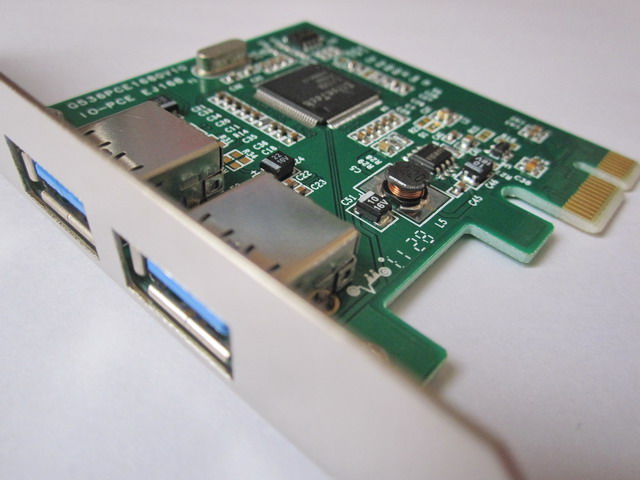
Inside it also indicate it does support Windows Server 2008, many other USB 3.0 HBA driver only supports Windows 7, I understand they are very similar, but I dare to take the risk.
Traveling between computer malls, so many shops, data center and finding the correct one is really tiring even Hong Kong is a tiny place. If I remember correctly, I spent at least 20 hours in searching for the right products (HBAs and external disks) and testing them.
Finally, I plug it into R610 slot, reboot, installed the driver, everything went well.
Then I cross my figures and plug in that 2.5” Hitachi TOURO 750GB 7200RPM, the blue light turned on, then dimmed again and then turned off! OH NO, this means the USB 3.0 port doesn’t have enough power to support USB 3.0 2.5” disks.
Now I only have one last chance which is to test the 3.5” Lacie 2TB with external power supply.
I plug the Lacie, turn the power on, nothing coming up as USB device!!!
Does this mean GAME OVER? OF COURSE NO, I remember Veeam 5 automatically turns off disk automount to prevent accidentally erase the SAN disk when using Direct SAN backup. All I need to do is to go to Disk Management and manually give the attached USB 3.0 disk a drive name.
BINGO, 1.87TB was right there and right in front of my eyes! YEAH! I couldn’t be happier for the rest of the day!
Then I started the fun part, testing the USB 3.0 performance using IOmeter, HDTune and ATTO Express and hoping I would get the same magically 130-140MB/s like many others did.
Disappointing is the only word when I see 35MB/s in sequential read, unplug the card, re-plug again, still the same result. I suspected it’s the driver version (Jan 2011) being too old, but I couldn’t find any newer ones on Syba product page, so I googled again (Just love google more each day), found the latest one from Gigabyte web site. Search for Etron chipset USB 3.0, found it, now the latest installed driver version is Aug 2011.
After reboot, it’s still 35MB/s, only 17% faster than USB 2.0, definitely not worth upgrading and all the trouble I went through.
So I started to email Syba support, the guy suggest it may be a defective card, so I went out to the same shop again and bought a new one the next day, tested it, amazingly, this time it shots to 138MB/s from 35MB/s, almost 4 times gain in performance, I am a happy man finally!
OK, I admit this Syba HBA is a PCI-e GEN1 x1 product and my Lacie is a 5900RPM SATA 3.0Gb, not even a 6G/b product, probably the HBA is one of the lowest bandwidth one, but still it can provide maximum 250MB/s, so it will take at least two USB 3.0 ports with two USB 3.0 disks to saturate the total bandwidth. Most important it’s more than enough for Veeam backup now.
Finally, I went back to the original shop and explained the whole story AND exchanged the defect one, I kept the swapped part as a spare just in case.
So who needs a Powervault 1200 with 2TB/2TB x 12 disks now? Probably nobody will from now on, ops sorry Dell.
If I need more bandwidth or storage in the future, I will only order a HighPoint RocketU 1144A which comes with 4 ports also doesn’t require external power supply!
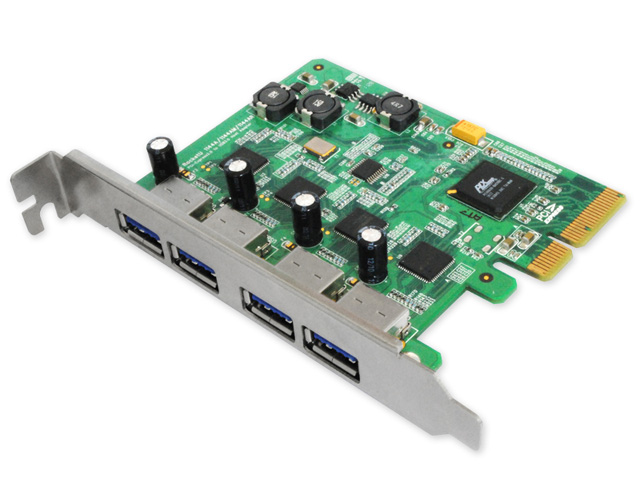
The most finding of the whole adventure is HOW could I miss this perfect product in the first place! It’s a PCI-e GEN2 and 4 ports with individual bandwidth of 5Gb/s and most importantly no need for external power.
With HighPoint RocketU 1144A, I will have 4 Ports x 4 TB disks= 16TB usable, comparing to Powervault MD1200 with 12 2TB disks in Raid50 + 2 hot-spare, same 16TB usable storage, but only 1/5 the cost with 13xMB/s in read and write, well, it really doesn’t take a genius to figure out the ultimate solution.
Finally, I also came across some USB 3.0 drive bays up to 8 disks in the same case with build-in Raid5/6, and guess that will complete the low cost backup target solution.

 Comments (0)