Category: Others (其它)

從一場精彩的乒乓球女子雙打比賽得到的啟發

By admin, July 17, 2011 6:05 pm

南韓選手打的是削球,球拍向乒乓球的中下部削推,過來的球下旋,對手回球一定要根據下旋的程度來上提或平推,提得不夠球會下網,提得太多球會出台。下旋球的轉軸可以是平的,也可以是斜的, 給對手造成很大的困難。中國選手打的是上旋進攻球,擊球中上部,產生上旋球,除了來球快,球到對方台面會急遽前衝,對手要有快速反應的能力才行。

我做這解說,希望大家了解雙方攻防的難處,從而欣賞這場球賽。

希望大家已經領悟到了如何應付善于用下旋和側旋打法的球員。

Equallogic PS Series Firmware Version V5.1 Released

By admin, July 17, 2011 4:54 pm

It’s a Early Production Access. Originally, I thought we need VMware vSphere 5.0 in order to use these great features, but apparently, it also works for vSphere 4.1 (Wrong, see update below). In additional, Dell is finally moving into Fluid Data Solution with Equallogic and Compellent products. (ie, moving hot-data to SSD/15K SAS tiers automatically)

Two of the major improvements are:

Support for VMware Thin Provision Stunning

Version 5.1 of the PS Series Firmware supports VMware’s Thin Provision Stunning feature. When thinly-provisioned volumes containing VMware virtual machines approach their in-use warning threshold, the PS Series Group alerts vCenter that the volume is low on space. When the volume reaches the maximum in-use threshold, the PS Series Group does not take the volume offline, which would cause the virtual machines to crash. Instead, vCenter stuns (ie, suspend) the virtual machines on the volume to prevent them from crashing. When additional volume space is created, either by growing the volume or moving virtual machines to other volumes, the administrator can resume the virtual machines.

Performance Load BalancingIn Version 5.1

Improvements have been made to the load balancing capabilities in PS Series groups. This enhancement is designed to provide sub-volume performance load balancing and tiering in both heterogeneous and homogeneous storage pool configurations. The load balancer detects pool member arrays that are at, or near, overload, and shifts some of the workload to less-loaded arrays. To ensure that the load balancing responses to long-term trends rather than brief increases in activity, the operation takes place gradually, over a period of hours. The result is improved performance balancing in pools, especially in pools containing mixed drive or RAID configurations. Mixed pools experience the greatest benefit with workloads that show tiering and are regular in their operating behavior.


Fix List v5.1:

- A problem with an internal management process may disrupt in-progress management commands. This issue affects arrays running version 5.0.4 or 5.0.5 of the PS Series Firmware. In rare circumstances, on arrays running version 5.0.5 Firmware, this may also result in a control module becoming temporarily unresponsive.

- Unplanned control module failovers may occur in multi-member groups running in environments in which VMware ESX version 4.1 with VAAI, the Host Integration Tools for Microsoft v3.5, or Host Integration Tools for VMware 3.0 are used. (This is serious!)

- In some cases, a controller failover occurred because of a drive error during a RAID rebuild.

- In some cases, the background drive scanning process encountered an error during drive testing, and the drive was reported as “faulted” and left online when it should have been marked failed” and removed from use. AND In rare cases, a failing drive in an array could not be correctly marked as failed. When this occurred, the system was unable to complete other I/O operations on group volumes until the drive was removed. This error affected PS3000, PS4000, PS5000X, PS5000XV, PS5500, PS6000, PS6010, PS6500, and PS6510 arrays running Version 5.0 of the PS Series Firmware. (Still haven’t fixed this since v5.04! So the Predicative Feature doesn’t work in reality.)

- A failure in a hot spare drive being used as the target in a drive mirroring operation could have resulted in the group member becoming unresponsive to user I/O.

- Connection load balancing could result in volume disconnects in VMware environments using the EqualLogic Multipath Extension Module. (You KIDDING ME right?)


Update Oct 26, 2011

I got the wrong impression VMware Thin Provision Stun Option will also work with the existing ESX 4.1 version before, so this means vSphere version need to be version 5.

vSphere Storage APIs – Array Integration (VAAI) were first introduced with vSphere 4.1, enabling offload capabilities support for three primitives:

1. Full copy, enabling the storage array to make full copies of data within the array
2. Block zeroing, enabling the array to zero out large numbers of blocks
3. Hardware-assisted locking, providing an alternative mechanism to protect VMFS metadata

With vSphere 5.0, support for the VAAI primitives has been enhanced and additional primitives have been introduced:

• vSphere® Thin Provisioning (Thin Provisioning), enabling the reclamation of unused space and monitoring of space usage for thin-provisioned LUNs
• Hardware acceleration for NAS
• SCSI standardization by T10 compliancy for full copy, block zeroing and hardware-assisted locking

簡單的浪漫

By admin, July 14, 2011 3:49 pm

一直都以為韓國人很大男人﹐但這個韓國傻小子確是個例外﹐他的真摯和簡單讓所有現場的人都感受到了那份震撼的浪漫。

My Own Interpretation of the Sudden Release of vSphere 5.0, What’s WRONG ?!!!

By admin, July 13, 2011 1:17 pm

After reviewing all the latest features, I would say it should be called vSphere 4.5 instead of vSphere 5.0 as there isn’t much improvements feature wise over the previous 4.1 version.

To my great surprise, VMware launched it’s latest flagship product vSphere in such a hurry, it was originally planed to be released in Q3, 2011 or later. Why is this?

As people say “the devil always lies in the details”, after half reading the latest pricing guide, I quickly figured out the answer to the above question.

It’s all about $$$, VMware tells you the latest vSphere 5.0 doesn’t have any more restriction in CPU/RAM on an ESX host, that sounds so fabulous isn’t it? Or IS IT?

Let’s make a simple example:

Say you have the simplest cluster with two ESX hosts with 2 CPU and 128GB RAM each, you Enterprise Plus edition for these two is USD13,980.

With the previous vSphere 4.1, you have UNLMITED vRAM entitlement and up to 48 cores.

With the brand new vSphere 5.0 pricing model, for the same amount of license (ie, USD13,980), you can only have 192GB entitled vRAM, so in order to have the original 256GB vRAM entitlement, you need to pay extra 2 more Enterprise Plus license, which is USD6,990.

The more RAM your server has, the more you are going to pay with the new licensing model.

So my conclusion is VMware is discouraging people going into cloud in reality. Think about this, why would you buy a Dell Poweredge R710 (2 sockets) with only 96GB RAM installed? The maximum RAM Powerdge R710 is capable of 288GB RAM but you need to pay EXTRA (288GB-96GB) / 48GB = 4 more Enterprise Plus license.

In reality, CPU is always the last resource to run out, but RAM IS! Future server will have much more powerful CPU for sure, but RAM is still the number 1 factor deciding your cloud capacity, IOPS is the 2nd, Network is the 3rd and just to remind you once more, CPU is the last!

Very clever VMware, but will potential customer buy this concept is another story.

Hum…may be it’s a strong sign that I can finally sell my VMW after all these years.

Finally, interesting enough, Microsoft also responsed to this interesting topic.  “Microsoft: New VMware Pricing Makes VMware Cloud Costs 4x Microsoft’s

* Please note the above is my own personal interpretation as a user, it doesn’t represent my current employer or related affiliates.

vSphere 5.0 is Released today by Surprise!

By admin, July 13, 2011 10:34 am

Today VMware announced the release of VMware vSphere 5.0 by surprise! The following is  some of the key features of this release: 

  • Convergence. vSphere 5.0 is the first vSphere release built exclusively on the vSphere ESXi 5.0 hypervisor architecture as the host platform.
  • VMware vSphere Auto Deploy. VMware vSphere Auto Deploy simplifies the task of managing ESXi installation and upgrade for hundreds of machines.
  • New Virtual machine capabilities. 32-way virtual SMP, 1TB virtual machine RAM, Software support for 3D graphics, and more.
  • Expanded support for VMware Tools versions. VMware Tools from vSphere 4.x is supported in virtual machines running on vSphere 5.0 hosts.
  • Storage DRS. This feature delivers the DRS benefits of resource aggregation, automated initial placement, and bottleneck avoidance to storage.
  • Profile-driven storage. This solution allows you to have greater control and insight into characteristics of your storage resources.
  • VMFS5. VMFS5 is a new version of vSphere Virtual Machine File System that offers improved scalability and performance, and provides Internationalization support.
  • Storage vMotion snapshot support. Allows Storage vMotion of a virtual machine in snapshot mode with associated snapshots.
  • vSphere Web Client. A new browser-based user interface that works across Linux and Windows platforms.
  • vCenter Server Appliance. A vCenter Server implementation running on a pre-configured Linux-based virtual appliance.
  • vSphere High Availability. VMware High Availability has been transformed into a cloud-optimized availability platform.

Here are some of the reasons why I’m excited about this: 

  • App Aware API.  This is the same API that has been used by Neverfail’s vAppHA and Symantec’s ApplicationHA products.  Now with 5.0, this API is publicly available.  This means anyone can craft a solution that allows for the monitoring of a application and interfacing with vSphere HA to restart the VM.  Couple this with the new vSphere Web Client’s ease of extensibility and you have the potential to do some great things.
  • Ever had DNS resolution cause you issues when using vSphere HA?  With 5.0, all dependency on DNS for vSphere HA has been removed!
  • IPv6 is now supported.
  • Logging.  There have been a lot of improvements to the log messages with vSphere HA.  This was done to make the log messages more descriptive than ‘unknown HA error’ and should help with identifying configuration issues.
  • Several user interface enhancements.  Now you can see more detailed state information about the hosts in your cluster and what role they play with vSphere HA.

The changes to the vSphere HA infrastructure now eliminates the primary/secondary constructs that existed in previous versions of vSphere.  Replacing that is a master/slave model.  In this model, one of the hosts is designated as a master, while the other hosts are designated as slaves.  The master coordinates most of the activities within the cluster and relays information to and from vCenter.

For now though, the reason why this is so great is that you no longer have to worry about details such as what hosts act as your primary nodes and which ones act as secondary nodes.  If you are installing vSphere HA in a blade chassis or making a stretched cluster, this is excellent news for you!

Heartbeat datastores is a feature that allows vSphere HA to utilize the storage subsystem as an alternate communication path.  Using heartbeat datastores allows vSphere HA to do things like determine the state of the hosts in the event of a network failure of the management network. Which brings up another enhancement to be excited about:  management network partitions are now supported in 5.0!

Finally, vSphere 5 has changed entitlements around CPU cores and memory use. The company has lifted licensing restrictions for cores per processor and RAM per host. It’s also eliminated the “advanced” version of vSphere plus, leaving just Essentials, Essentials Plus, Standard, Enterprise, and Enterprise Plus. vSphere 5 has also introduced a small change to the entitlement process around what is known as virtual memory or vRAM.

You must obtain new licenses to deploy VMware vSphere 5. Your existing VMware vSphere 4 licenses will not work on vSphere 5.

For more, please refer to What’s New in vSphere 5.0 and vSphere 5.0 Licensing, Pricing and Packaging Whitepaper as well as Compare VMware vSphere Editions.

Alizee – J’en Ai Marre

By admin, July 12, 2011 12:57 pm

Wow! This French girl does know how to twist her body!

A Huge Complex Upgrade Task Became A Piece of Cake with Virtualization and Equallogic!

By admin, July 11, 2011 10:31 pm

Today, I found Symmantec Antivirus has stopped updating its definition again due to space shortage, and I’ve tried everything to squeeze the last drop of space from my w2k3 without success, the original installation was back to mid-2004, at that time, 5GB is more than enough for the root C: dirve.

However after almost 7 years with all the patches and installed programs, it gradually filled up the C: drive to about 500MB left, so this leaves me no choice but to take the risk by using Acronis Disk Director to expand the partition.

First, I took a snapshot of the powered down VM, and then Edit the VM property and found the disk size has been gray out! Why? I don’t know, but after deleting the snapshot, I was able to expand the disk again, then took a snapshot again just to make sure.

Boot into Acronis Disk Director and I found there was no disk found due to SCSI controller was Paravirtual, changed to LSI Logic Parallel (LSI Logic SAS didn’t work) solved the problem, and the rest expanding the partition was just a piece of cake! I later found out there is no need to use Dell’s ExtPart utility as Acronis Disk Director did it all for me.

The interesting part was when Acronis Disk Director moving the blocks, it estimated 30 mins to re-arrange a 50GB partition, but at the end it only took less than 8 mins to complete the whole job, thanks to Equallogic’s fantastic 15K RPM Raid 10 IOPS capability! (Average Read/Write is about 2,000 IOPS, it’s quite high for two on-going parallel jobs)

Just to be cautions, if there is anything goes wrong, I still have the snapshot, the backup from Acronis True Image Server as well as my last resource Veeam backup, so it’s pretty safe to do the above with 3 different kind of backup on hand. Of course, I always forgot to mention there is the 4th hidden backup, it’s the Equallogic snapshot, but it’s the very last resource if all 3 backup methods failed to restore.

One more thing to take care of is the left over snapshot as I found the VM disk type automatically became Thick from Thin, this is due to the snapshot in the previous step, simply remove it will revert the disk to Thin again, nothing to worry about, but the removal process surprised me as it did took quite a long time to complete, if you know why, please let me know.

Boot up the VM and everything is back to order again. Back in the old days, when we perform a disk space upgrade, we often need to use Acronis True Image to clone all the partitions, then take out the old disks, normally raid 5 with 3 disks, and then insert 3 bigger size disks again and create a new raid 5 volume, finally restore it using CD-ROM, the whole process can take up to 4-5 hours to complete if you are lucky and need to cross your finger to pray no bad things happened!

Wow! I must admit that I love the benefits of virtualization and the magic of Equallogic more and more everyday!

Oh..Yeah…Alicia Keys is so Cool!

By admin, July 5, 2011 12:15 pm

I don’t like most of the modern ones, but this one is an exception! This song is also used in the movie “Sex and The City 2″ trailer.

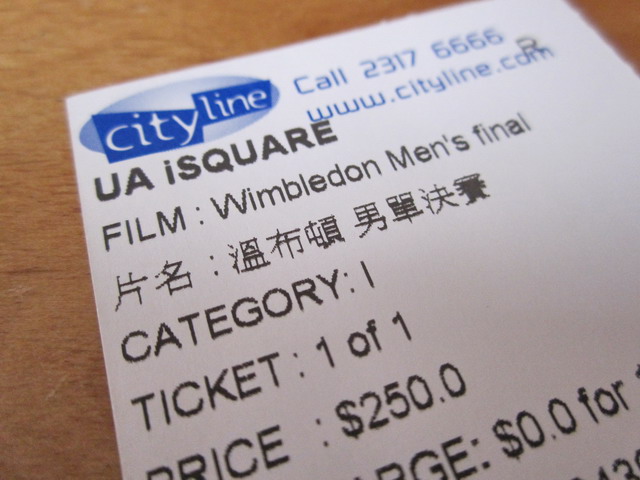
王者的誕生﹗

By admin, July 4, 2011 2:23 pm

IMG_4753

十分的昂貴價錢 !
八分的觀眾氣氛 !
五分的3D效果 !

總結﹕不值﹗

yyy-wimbledon1-articleLarge[1]

但這場賽事絕對是萬分的精彩﹗Djokovic今年氣勢如虹﹐之前連贏40幾場賽事﹐只輸了一場(法網半決賽給Federer)﹐今天王者得愿以嘗﹐新一代的球王就此產生了﹗恭喜﹗恭喜﹗

‎5D MARK 2影7D, 誰勝誰負, 立分高下﹗:)

By admin, July 2, 2011 11:51 pm

canon_5dm2

Pages: Prev 1 2 3 4 5 6 7 ...77 78 79 ...103 104 105 Next