Category: Others (其它)
 Comments (0)


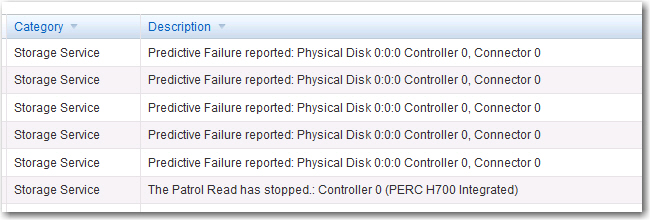
Predictive Failure is Working
By admin, August 12, 2014 12:15 pm
Finger crossed as sometimes the raid rebuilt won’t happen automatically, mind you it’s 11th generation of PERC, can’t believe it’s still having such stupid behavior.
How to fix SQL Server Orphaned User after Database Restore
By admin, July 30, 2014 10:05 pm
A simply way to link back the original user and fix all the permission problem after restoring MSSQL database to a different server using the .bak file.
Step 1:
exec sp_change_users_login ‘Report’
Orphaned users listed in the current database
Step 2:
exec sp_change_users_login ‘AUTO_FIX’, ‘username’
Can automatically log in to add a user name corresponding to the same name in syslogins
二八定律(巴萊多定律)
By admin, July 18, 2014 5:28 pm
19世紀末20世紀初意大利的經濟學家巴萊多認為,在任何一組東西中,最重要的只占其中一小部分,約20%,其余80%盡管是多數,卻是次要的。社會約80%的財富集中在20%的人手里,而80%的人只擁有20%的社會財富。這种統計的不平衡性在社會、經濟及生活中無處不在,這就是二八法則。
二八法則告訴我們,不要平均地分析、處理和看待問題,企業經營和管理中要抓住關鍵的少數;要找出那些能給企業帶來80%利潤、總量卻僅占20%的關鍵客戶,加強服務,達到事半功倍的效果;企業領導人要對工作認真分類分析,要把主要精力花在解決主要問題、抓主要項目上。
臥虎藏龍
By admin, July 8, 2014 3:56 pm
今天在FB看到一個驚為天人的視頻,一個骨瘦如柴的殘疾人在廣州街頭賣藝,唱的是陳百強的首本名曲”偏偏喜歡你”。說實在的,當時真的有些震撼,因為此君的嗓音仿彿Danny仔再世。

其後細聽之下發現”咪嘴”情況嚴重,深入調查才發現原來背後的原唱者是一個籍籍無名叫鐘明秋的廣東年輕人。
姑且不談”咪嘴”,此君的表演的確能煥發圍觀途人的同情心,哎。。。不過事實也說明了現在很多歌星根本就是表演家,只不過外表比此君出眾得多而已,錄音時每個音都已經用電腦矯正過,現場不一樣也是”咪嘴”。
這種通過形象包裝、大製作堆砌和買通傳媒瘋狂洗腦式的宣傳現象正因為得到了現今普羅大眾的接受而變得更加變本加厲,所以真正的唱家班反而沒人懂得欣賞,也就是說內涵這種東西已經變得過時了,又是一個劣幣驅逐良幣的好例子。
滄海遺珠
By admin, July 8, 2014 1:52 pm
這兩天聽畢Rolling Stone Magazine 500 Greatest Songs of All Time,發現了以下4首從未聽過的金曲,奇怪的是歌手竟然全部都是黑人,難道我真的喜歡上了Soul和R&B?
Fats Domino – Blueberry Hill
The Impressions – People Get Ready
Bob Marley And The Wailers-No Woman, No Cry (Live Version)
Ray Charles – I Can’t Stop Loving You
Equallogic Firmware Upgrade Checkup List
By admin, July 5, 2014 4:53 pm
I’ve received an alert this morning saying “Time-of-day clock battery charge is low” from my Equallogic array.
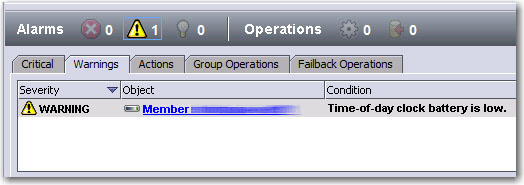
Googled a bit and turned out to be a false alarm (this was also double verified with Dell Pro-Support with EQL Diag log), it only happens with older firmware prior to v5.2.10 (and currently I’m still using v5.2.2). The only way to dis-alarm such warning is to upgrade to the latest firmware release (ie, >v5.2.10).
However I do remember there are certain EQL components depend on specific firmware version. Luckily, I’ve found out this chart, it’s really a time-saver and it’s advised to check out this list every time you plan to do a major firmware upgrade.
For me, my MEM is v1.1.0, SANHQ is 2.2.0, EQL Virtual Storage Manager for VMware is v3.1.1, so my best and most safe play is upgrade to EQL firmware v5.2.11 which is the latest. If I upgrade to v6 or v7, then many related components may not work.
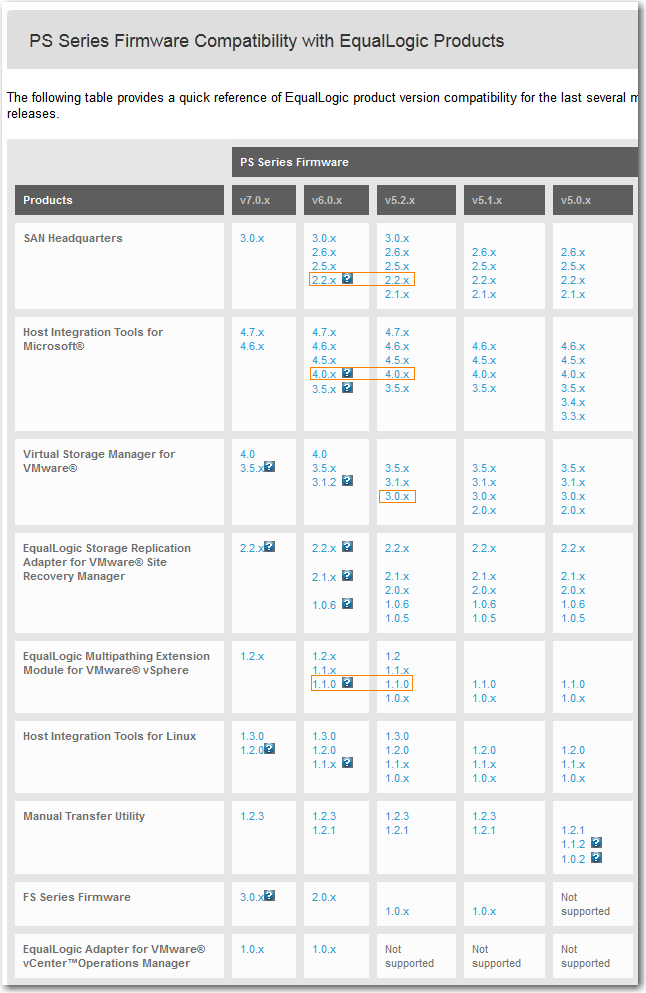
Of course this chart also shows the possible upgrade path:
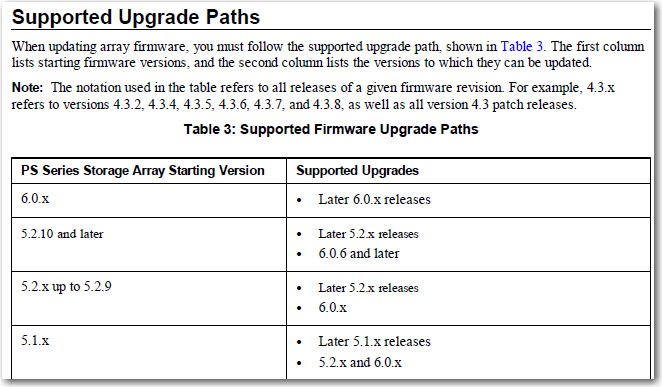
Extra Notes:
* Something special for latest MEM v1.2 only supports ESXi v5.0 or above, so for those of you still running ESX/ESXi 4.x, please stay with v.1.1.2.
* Also found out all Release Notes contains tips regarding upgrade path or different versions compatibilities, so better check out this document first.
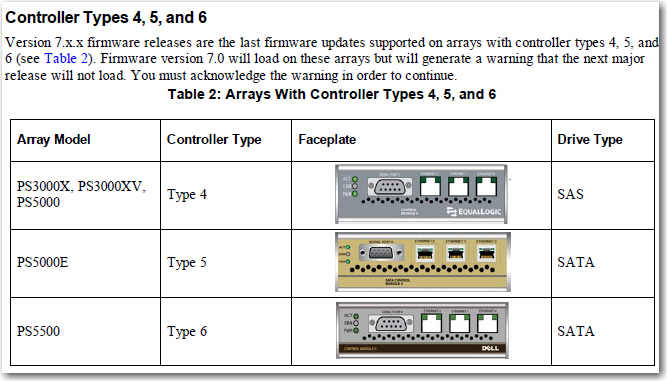
Finally, saw this Unfortunate Reminder from the latest EQL v7.x firmware Release Notes…so older Equallogic arrays can loaded with the latest firmware IS NO LONGER TRUE, sigh…
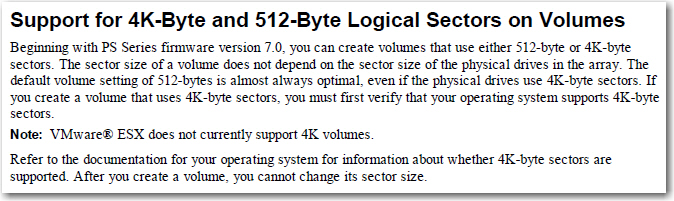
In additional, there is a good stuff that finally we can use 4k or 512-byte sectors, so this should save a lot of wasted space in Snapshots.
Update: July 6, 2014
Problem still exists after upgrading to v5.2.11, what the hell? Local Pro-Support at XiaMen remains unprofessional probably even worst than 4 years ago as he asked me “Can you accept Downtime” when restarting the controller? $#%R$#@!@!!!!!
The other thing I found out is the Restart Button in EQL Group Manager GUI is actually a way for active controller to failover, so your volume will still remain on-line just like firmware upgrade controller restarting process.
Update: July 7, 2014
Dell L2 support team head called me this morning, he mentioned US EQL support also noticed this specific error remains even with latest firmware v6.x applied, and it will be fixed in a later firmware hopefully.
Update: Apr 29, 2026
“Time-of-day clock battery charge is low” is finally solved after almost 12 years by replacing the coin battery (ie, CR2032) on the controller.

古董老爺相機
By admin, June 18, 2014 12:52 pm
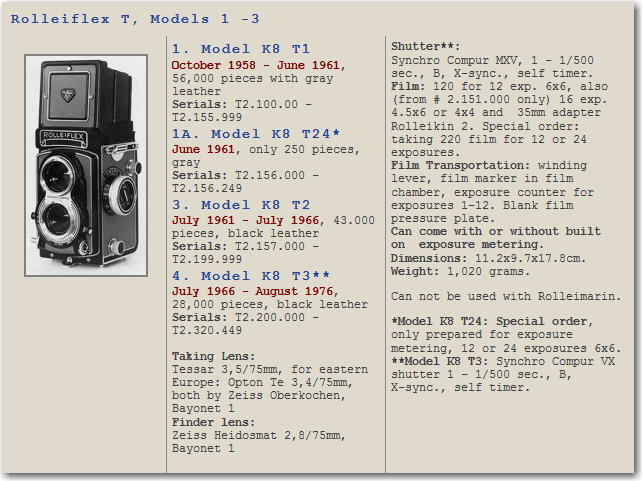
這次在溫哥華帶回來了老爸將近60年前的老爺雙鏡RolleiFlex相機,有機會可以拿來拍彩色照片。

Rolleiflex T (1958-1966)
Taking lens: Carl Zeiss Tessar 75mm F3.5
Viewing lens: Heidosmat 75mm F2.8
Shutter: Synchro Compur 1/500-1s/B MX
Special Features:
-Introduced as intermediate model between the Rolleiflex 3.5F and the Rolleicord
-Aperture and shutter are controlled by a single lever
-No automatic film feeler
-6×4.5 format with optional mask
-Removable hood with direct vision finder without focus mirror
-Optional uncoupled meter
-First model was gray, later models black