下一個網壇超級巨星: Milos Raonic
這個年輕的加拿大球手Really Rocks!

Update Feb-20
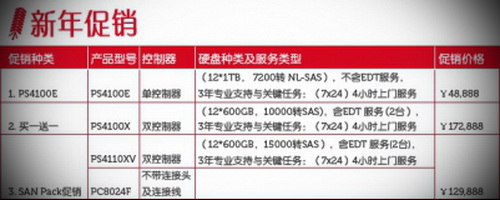
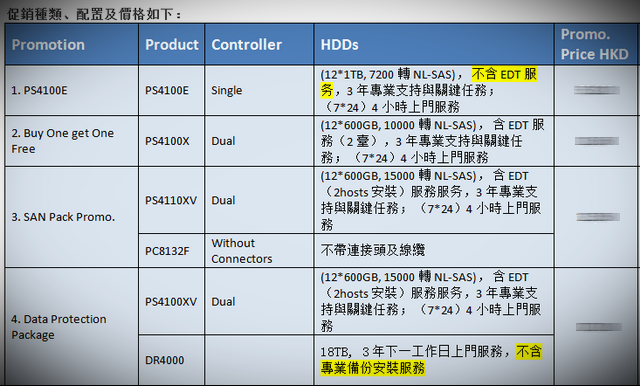
Just received the latest promotion for Hong Kong customers, well, not exactly attractive as I don’t want any series E, option 3 & 4 has to buy something I don’t need.
This only leaves with option 2, but it’s Near-Line SAS, which is different from SAS (as NL-SAS is basically a merging of a SATA disk with a SAS connector), so Nope I don’t want any SATA, same reason as for series E.
Hey, somehow I think Option 2 is a cheat!

How SAS, Near Line (NL) SAS, and SATA disks compare
By Scott Lowe
February 7, 2012, 10:20 AM PSTTakeaway: Scott Lowe breaks down the differences in reliability and performance between SAS, Near-Line SAS, and SATA drives.
When you buy a server or storage array these days, you often have the choice between three different kinds of hard drives: Serial Attached SCSI (SAS), Near Line SAS (NL-SAS) and Serial ATA (SATA). Yes, there are other kinds of drives, such as Fibre Channel, but I’m focusing this article on the SAS/SATA question. Further, even though solid-state disks (SSD) can have a SAS or SATA interface, I’m not focused here on SSDs. I’m focusing solely on the devices that spin really, really fast and on which most of the world’s data resides.So, what is the real difference between SAS, NL-SAS and SATA disks? Well, to be cryptic, there are a lot of differences, but I think you’ll find some surprising similarities, too. With that, let’s dig in!
SAS
SAS disks have replaced older SCSI disks to become the standard in enterprise-grade storage. Of the three kinds of disks, they are the most reliable, maintain their performance under more difficult conditions, and perform much better than either NL-SAS or SATA disks.
In reliability, SAS disks are an order of magnitude safer than either NL-SAS or SATA disks. This metric is measured in bit error rate (BER), or how often bit errors may occur on the media. With SAS disks, the BER is generally 1 in 10^16 bits. Read differently, that means you may see one bit error out of every 10,000,000,000,000,000 (10 quadrillion) bits. By comparison, SATA disks have a BER of 1 in 10^15 (1,000,000,000,000,000 or 1 quadrillion). Although this does make it seem that SATA disks are pretty reliable, when it comes to absolute data protection, that factor of 10 can be a big deal.
SAS disks are also built to more exacting standards than other types of disks. SAS disks have a mean time between failure of 1.6 million hours compared to 1.2 million hours for SATA. Now, these are also big numbers – 1.2 million hours is about 136 years and 1.6 million hours is about 182 years. However, bear in mind that this is a mean. There will be outliers and that’s where SAS’s increased reliability makes it much more palatable.
SAS disks/controller pairs also have a multitude of additional commands that control the disks and that make SAS a more efficient choice than SATA. I’m not going to go into great detail about these commands, but will do so in a future article.
NL-SAS
NL-SAS is a relative newcomer to the storage game, but if you understand SATA and SAS, you already know everything you need to know about NL-SAS. You see, NL-SAS is basically a merging of a SATA disk with a SAS connector. From Wikipedia: “NL-SAS drives are enterprise SATA drives with a SAS interface, head, media, and rotational speed of traditional enterprise-class SATA drives with the fully capable SAS interface typical for classic SAS drives.”
There are two items of import in that sentence: “enterprise SATA drives” and “fully capable SAS interface”. In short, an NL-SAS disk is a bunch of spinning SATA platters with the native command set of SAS. While these disks will never perform as well as SAS thanks to their lower rotational rate, they do provide all of the enterprise features that come with SAS, including enterprise command queuing, concurrent data channels, and multiple host support.
Enterprise/tagged command queuing. Simultaneously coordinates multiple sets of storage instructions by reordering them at the storage controller level so that they’re delivered to the disk in an efficient way.
Concurrent data channels. SAS includes multiple full-duplex data channels, which provides for faster throughout of data.
Multiple host support. A single SAS disk can be controlled by multiple hosts without need of an expander.However, on the reliability spectrum, don’t be fooled by the acronym “SAS” appearing in the product name. NL-SAS disks have the same reliability metrics as SATA disks – BER of 1 in 10^15 and MTBF of 1.2 million hours. So, if you’re thinking of buying NL-SAS disks because SAS disks have better reliability than SATA disks, rethink. If reliability is job #1, then NL-SAS is not your answer.
On the performance scale, NL-SAS won’t be much better than SATA, either. Given their SATA underpinning, NL-SAS disks rotate at speeds of 7200 RPM… the same as most SATA disks, although there are some SATA drives that operate at 10K RPM.
It seems like there’s not much benefit to the NL-SAS story. However, bear in mind that this is a SATA disk with a SAS interface and, with that interface comes a number of benefits, some of which I briefly mentioned earlier. These features allow manufacturers to significantly simplify their products.
SATA
Lowest on the spectrum is the SATA disk. Although it doesn’t perform as well as SAS and doesn’t have some of the enterprise benefits of NL-SAS, SATA disks remain a vital component in any organization’s storage system, particularly for common low-tier, mass storage needs.
When you’re buying SATA storage, your primary metric is more than likely to be cost per TB and that’s as it should be. SAS disks are designed for performance, which is why they’re available in 10K and 15K RPM speeds and provide significant IOPS per physical disk. With SAS, although space is important, the cost per IOPS is generally just as, if not more, important. This is why many organizations are willing to buy speedier SAS disks even though it means buying many more disks (than SATA or NL-SAS) to hit capacity needs.
Summary
At a high level, SAS and SATA are two sides of the storage coin and serve different needs — SAS for performance and SATA for capacity. Straddling the two is NL-SAS, which brings some SAS capability to SATA disks, but doesn’t bring the additional reliability found with SAS. NL-SAS helps manufacturers streamline production, and can help end users from a controller perspective, but they are not a replacement for SAS.
In an upcoming post, I’ll talk about SAS commands and why they help cement SAS’s enterprise credibility.

我之前一直都很喜歡Tecnifibre的NRG2 Multi,唯一的缺點就是不耐用,每個月就要再穿一次,不到20個鐘頭就斷線了,小數怕長計,一年下來算起來幾乎都可以買一只全新的球拍了。後來聽不同師兄的介紹,得知原來Gut線的Hybrid一來手感更好,二來壽命比較耐用,而且透過師兄更加有較大的穿線折扣,長遠來算比NRG2更加經濟實惠。
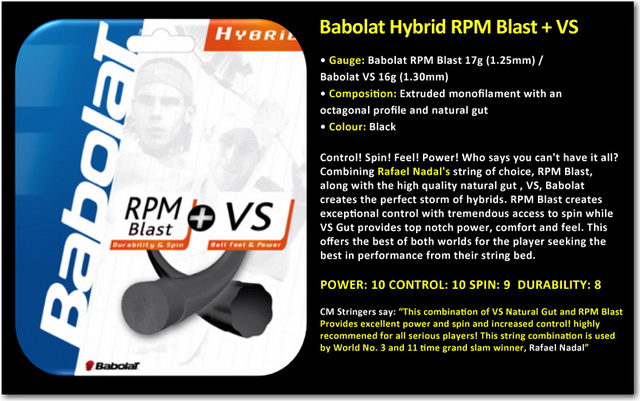
這次Hybrid的新體驗,感覺Babolat Hybrid RPM Blast 17g + VS Gut 16g的確比NRG2硬,開始很不習慣,經過了一個多鐘頭兩種不同的線不停地摩擦結合後才漸入佳境,慢慢感覺到了VS Gut的手感和RPM Blast的Spin。
Babolat VS Gut不用多說,手感控制當然一流,其實看見不少朋友們都會用塑料袋裝起腸線球拍,目的是防潮。但是現今VS Gut的最新Thermogut科技已經做到防熱和防潮,我認為放在塑料袋反而會困住了濕氣,對Gut造成負面影響。
雖然大家都是Poly,但因為Babolat RPM Blast擁有獨特的八角形相比起Tecnifibre Black Code的五邊形更加咬球,從而大大增加球停留在線床的時間,所以打起Top Spin來更加得心應手。
Poly線出名硬,有不少師兄都曾經深受其害(網球肘),尤其是Luxilon Big Banger,所以很多都不約而同地推薦較為軟身的Poly: Black Code就是這個原因,有說跌磅的Poly也是造成網球肘的元凶之一。另外聽說這次的RPM是”Team”版本,也就是Babolat所有”Team”版本都比較軟身和令到擊球更加舒服,也就是Arm Friendly。
另外就是兩副線都是黑色,連VS Gut (Babolat VS Natural ThermoGut 16 Touch String Black) 也用了罕有的黑色Coating,配上我那只Head YOUTEK IG Extreme Pro黃黑的Paint Job,的確好鬼型,哈哈。
我這次的選擇是Main用VS Gut、Cross用RPM Blast, 同是55磅,目的當然是想比較耐用。相反的話(Main用RPM Blast、Cross用VS Gut)手感肯定會較好,但是球線的壽命也會大大縮短。
根據觀察朋友使用的經驗來推測,這樣的組合應該可以維持至少2-3個月,當然Poly的RPM Blast的磅數應該已經全掉光了,其實這是所有Poly的死穴,就是從穿完線那刻就開始跌磅,聽師兄說最近出了一隻金色跌磅比較慢的Poly,這是一個好的開始,當然也有人中途再穿過一條新的RPM Blast(Cross)來維持整體磅數,但我認為這是多此一舉。
另外這次的體驗Hybrid開始不再用Damper,完全感覺到了純淨的感覺,很喜歡,現在覺得加了Damper後擊球的時候好像總是隔了層什東西的感覺,不知道你們有沒有同感﹖
其實兩年前我就曾經自行Mix過類似Hybrid,當時的選擇是Babolat Natural Gut (Main)加上Gamma TNT2(Cross)穿在Price Original Graphite Oversize上(一只超Classic和Flex的板)。手感好是好,但是就是代價不菲,因為不到一個月就斷線了,心疼死了,那次經驗實在太奢侈了,所以之後都沒有再穿過腸線。
最後在網上查此線資料的時候才發現原來Babolat Hybrid RPM Blast 17g + VS Gut 16g正是Nadal的選擇!
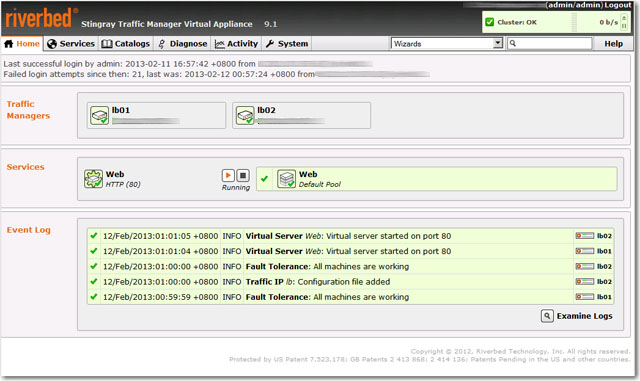
What can I say? Riverbed Stingray Traffic Manager (previously know as Zeus Traffic Manager) is probably one of the best Load Balancers I’ve tested on the market, now it’s also available as VMware OVF format.
From initial VM OVF deployment to the actual implementation of the first load balanced web sites was less than 30 minutes. Simple concept and solid performance during stress tested (concurrent over 10,000 users per seconds).
I particularly like the admin GUI, simple and intuitive, everything is self explanatory and no non-sense.
What’s best, it also comes with an integrated Application Firewall as well as Traffic Manager Cluster Mode which you can add one or more Traffic Managers to the cluster to make it HA, wow, this idea is brilliant!
I’ve even gone as far as adding the 3rd TM (on a different subnets) into the cluster, it worked somehow, but failed when creating a Traffic IP as the Traffic IP must be seen on all subnet, I think this can be easily solved using a router between the two different subnets thought. Alternatively, I think GSLB is my next option on the list, but don’t have time now, will try later.
The most magical feature is Aptimizer which transparently optimize your web page (ie, compressed, hence reduced the time for loading) without you rewrite any of the coding.
Stingray Aptimizer is what was formerly known as Website Accelerator, or WAX. It was created by New Zealand software developer Aptimize to rejigger and accelerate web pages running on IIS or Apache web servers as well as pages stored on content delivery networks from Akamai Technologies.
Aptimizer analyzes how web pages load and reorganizes the content so a web browser doesn’t have to make so many roundtrips back to the web server to load a page. Because there are dozens of elements on a typical page, reconfiguring the web pages on the fly and storing the more efficient web page in cache on the web server can reduce page load times by a factor of four. The beauty is that this optimization does not change the web applications one bit, so you don’t have to modify your code.
The only complain is probably the cost, which is prohibitive to implement for the average SMBs, but since Riverbed is really targeting enterprise market, so I guess they don’t really care about the little ones after all.
Oh…there is a free and fully functional with limited features (10 request per second) Developer edition, don’t forget to try it out.

今天有幸品嘗到了超嫩的紐西蘭小羊架,製作方法非常簡單,用Olive Oil和香草腌大概5分鐘,然後焗15分鐘就大功告成,味道超級的好! 覺得比城中名店Sabatini的羊架還要好吃得多! 而且全部成本才$150,太合算了,這個當然要多謝從事食品進出口生意朋友的優惠。
其實烹飪西餐的竅門大部份還得依賴食物的質量,相比起中菜擁有化腐杇為神奇的效果和其博大精深的文化,簡直就是小巫見大巫。
Onion Soup with Parmesan Cheese
New Zealand Baby Lamb Rack
Brussel Sprout from US
Red Wine from Bordeaux
French Lemon Tart

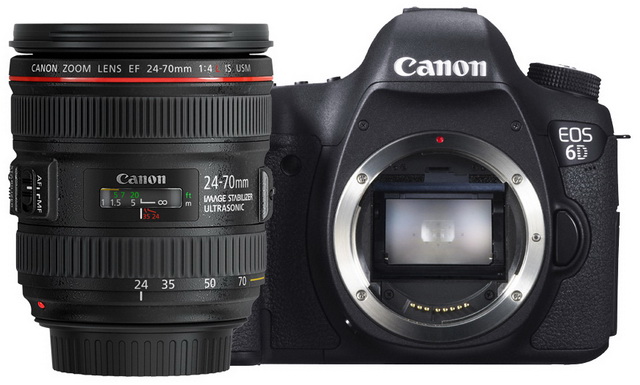
比較了一下功能,重量以及售價,號稱全副FF的入門版6D明顯是雞肋,比上不足(5D2、5D3),比下有餘否 (貴過60D很多)。
最重要是十字對焦只有一點,所以對焦太慢,影BB、運動等完全跟不上,還不如EOS 7D。
另外發現兩年前買的那隻APS-C鏡王EF-S 17-55mm f2.8 IS USM售價竟然要9千多,比當初的7千頭還要貴上1/3,看來全拜日圓升值所賜,所以之前有攝影前輩提醒購買高級相機鏡頭是一種保值的投資的確有其道理。
This is the latest recommendation from Dell Equallogic, found in Firmware 6.0 Release Note:
Beginning with this release, the Group Manager GUI no longer includes the option for configuring a group member to use RAID 5 for its RAID policy. RAID 5 carries higher risks of encountering an uncorrectable drive error during a rebuild, and therefore does not offer optimal data protection. Consequently, Dell recommends against using RAID 5 for any business-critical data.
RAID 5 may still be required for certain applications, depending on performance and data availability require-ments. To allow for these scenarios, you may still use the CLI to configure a group member to use RAID 5.
For a complete discussion of RAID policies on PS Series systems, review the Dell Technical Report titled PS Series Storage Arrays: Choosing a Member RAID Policy, which can be downloaded from either of the following locations:
• www.equallogic.com/resourcecenter/documentcenter.aspx
• en.community.dell.com/techcenter/storage/w/wiki/equallogic-tech-reports.aspx
In addition, Dell recommends against using RAID configurations that do not use spare drives. You should convert all group member that are using a no-spares RAID policy to a policy that uses spare drives.
Known Issues and Limitations
The following restrictions and known issues apply to this version of the PS Series Firmware. For information about known issues and restrictions from other releases, see the Release Notes for those versions. For issues about Dell EqualLogic FS Series Appliances, refer to the Dell EqualLogic FS Series Appliances Release Notes. For issues and limitations pertaining to host operating systems and iSCSI initiators, refer to the iSCSI Initiator and Operating System Considerations document.
RAID Conversion From No-Spares To Spares Does Not Work
RAID conversion from a no-spares policy to a spares policy appears to work, but it actually converts to no-spares, resulting in no change. (Funny)
I am pretty happy with SANHQ 2.2, HIT MS 4 and HIT VMware 3.1, and there aren’t much new features I need, so I choose to delay the upgrade for the time being.
Furthermore, there are two interesting videos presented by Dell EQL User Group in Taiwan (in Chinese), the following new features were intensively mentioned as well. (Part 1 and Part 2)
SAN HQ 2.5 Announcement
Dell announces Host Integration Tools for Microsoft 4.5
Dell Announces Host Integration Tools for VMware 3.5
Note: HIT for VMware v3.1.1, and earlier, is not compatible with Equallogic Firmware Version, 6.0, of the PS Series Firmware. A later version must be installed prior to upgrading to Version 6.0, for compatibility.
This huge PDF poster shows some of the advanced features that VMware doesn’t have, even I am not a Microsoft visualization guy, but it’s good to know what competitor is up to.

“Keep It SIMPLE!”
I was once told by a data center veteran about 10 years ago.
This has been deeply embedded in my network/storage/security design methodology ever since and it is still holding the truth even today. It saved me from many pitfalls and allowed me to quickly track down where exactly the problems were.
It is especially true when your equipments (server/switch/storage) are growing at a fast pace and “Keep It SIMPLE!” is the only tool to save your life after all.