Category: Others (其它)

Question about Latest Equallogic Firmware 5.1 Feature: Auto Load Balancing

By admin, December 8, 2011 9:36 am

I’ve opened a case with Equallogic, but so far getting no reply yet.

As I understand Equallogic Firmware 5.1 supports Auto Load Balancing which the firmware (or software) automatically reallocate hot data to appropriate group members.

In fact, there were two great videos (Part I and Part II) about this new feature on Youtube.

As we knew the best practice before FW 5.1 is to group similar generation and spindles in the same storage pool. For example, place PS6000XV with PS6000XV, PS6000E with PS6000E, etc.

Now with FW 5.1, it is indeed possible to place whatever you want in the same pool  (ie, different generation and spindles in the same pool) as Auto Load Balancing will take care the rest.

Dell called this Fluid Data Technology, actually a term borrowed from its recently acquired storage vendor Compellent.

My question is in terms of performance and updated best design practice, is it still recommended by Dell Equallogic to go with the old way? (ie, Separate storage tier with similar generation and spindle speed)


Update: Dec 12, 2011

Finally got the reply from Dell, seemed the old rule still applies.

The recommendation from Dell to use drives with the same drive speed is still the same within a pool. When you mix drives of different speeds, you slow the speed of the faster drives to the speed of the slower drives. The configuration should WORK but is not optimal and not recommended by Dell.

Then my next question is what’s the use  of the new feature “Fluid Data Technology” if the old rule still applies? huh?


Update: Dec 21, 2011

Received another follow up from EQL support, this really solved my confusion now.

Load balancing is across disks, controllers, cache, and network ports.  That means the storage, processing, and network ports access are balanced.  Not ONLY disk speed. 

Dell Equallogic customers create their own configuration.  It is an option for you to add disks of different speeds to the group/pool; however, the disk spin speed will change to be the speed of the slowest drive.  Most customers do not have a disk spin speed bottleneck; however, most customers are also aware of the rule-of-thumb in which they keep disks of like speeds together.

http://www.cns-service.com/equallogic/pdfs/CB121_Load-balancing.pdf


Update: Jan 18, 2011

After spending a few hours at Dell Storage Community, I found the following useful information from different person, the answer is still the same.

DO NOT MIX different RPM disks in the same pool even with the latest EQL FW v5.1 APLB feature!

Yes, the new improvements to the Performance Load Balancing in v5.1.x and the sub-volume tiering performance balancing capabilities now allow for mixed drive technologies and mixed RAID policies coexisting in the same storage pool.

In your case, you would have mixed drive technologies (the PS400E, SATA 5k and the PS4100X, SAS 10k) with each member running the same RAID policies.

When the PS4100X is added to the pool, normal volume load balancing will take the existing volumes on the two PS400E’s and balance them onto the PS4100X. Once the balancing is complete and you then remove the PS400E from the group (which is the requirement to remove 1 PS400E), the volumes slices contained on this member will be moved to the remaining two members and be balanced across both members (the PS400E SATA and PS4100X SAS) at that point.

Note, however, that Sub-volume performance load balancing may not be so noticeable until the mixed pools experience workloads that show tiering and are regular in their operating behavior. Because the operation takes place gradually, this could take weeks or EVEN MONTHS depending on your specific data usage.


Arisadmin,

Hi, I’m Joe with Dell EqualLogic. Although we support having members with mixed RAID policies in the same pool, in your case this is not advisable due to the two different drive types on your two members, i.e., your PS6000E is a SATA and your PS6000XV is a SAS. Mixing different drive types in the same pool, will most likely degrade performance in the group.

If the arrays were of the same drive type, i.e., both SATA (or both SAS), then combining the two (RAID 10 and RAID 6), would not be a problem, however the actual benefits, in your case, may not be as great as expected.

In order for load balancing to work “efficiently”, the array will analyze the disk I/O for several weeks (2-3) and determine if the patterns are sequential (RAID’s 10/5/6) or random (RAID 10), and would migrate those volumes to the corresponding member.

However in a two members group this is often less efficient, hence EQL always suggest 3 members group for load balancing.

Since the array will try to balance across both member, and you may end up with 80% of the volume on one member and 20% on the other member instead of a 50/50 split.

We also support manually assigning a raid level to the volume, but this would in effect, eliminate the load balance that you are trying to achieve, since it is only a two member group.

So in summary, we don’t recommend combining different Drive types (or Disk RPM) in the same pool.

You can go to http://www.delltechcenter.com/page/Guides and review the following documents for more information:
Deploying Pools and Tiered Storage in a PS Series SAN
PS Series Storage Arrays Choosing a member RAID Policy

Regards,
Joe


This is a very popular and frequently asked question regarding what type of disks and arrays should be used in a customers environment. First, you asked about the APLB (Automatic Performance Load Balancing)  feature in EqualLogic arrays.

Yes, it will move “hot blocks” of data to faster or less used disk, but its not instantaneous. This load balancing between volumes, or better known as sub volume load balancing uses an advanced algorithm that monitors data performance over time. I recommend reading the APLB whitepaper that should help you out more in better understand how this technology works.

see here: www.virtualizationimpact.com

In terms of what disks to buy, well that comes down what you are going to require in your environment. From my experience and from reading on other forums, if you are trying to push for the best performance  and capacity I would look at the X series arrays or 10K series drives. You can now get 600GB 10K drives in 2.5 and 3.5 form factors (i believe) and you won’t have to worry if your 7200 drives will be able to keep up with your workload, or at least, be faster and mix them with the 15KSAS/SSD arrays. Not saying that the 7200’s won’t work, just depends on your requirements.

Hope thats some help, maybe someone else will chime in with more info too.

Jonathan


Best solution is to work with Sales and get more specific about the environment than can easily be done via a forum.   You’re entire environment should be reviewed.  Depending on the IOPs requirements will determine if you can mix SAS/SATA in same pool and still achieve your goals.

One thing though it’s not a good idea to mix the XVS with other non-XVS arrays in the same pool.  yes the tiering in 5.1.x firmware will move hot pages but it’s not instant and you’ll lose some of the high end performance features of the XVS.

Regards,

-don

Probably The World’s Smallest USB Thumb

By admin, December 7, 2011 10:27 pm

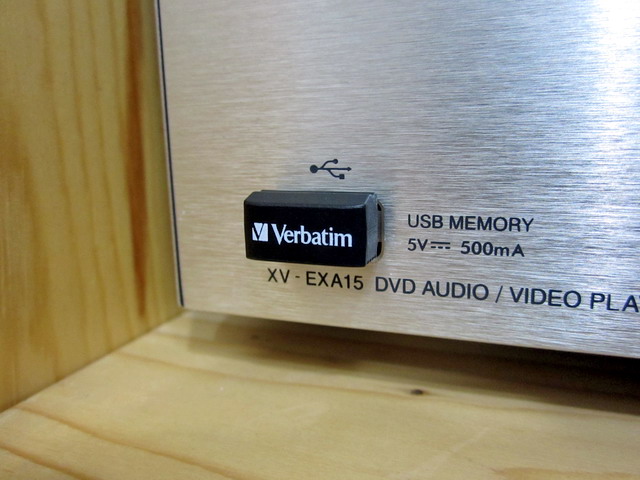
Found this USB flash drive today at a local computer shop. It costs only USD10 for 8GB, branded and it fits neatly to my JVC woodcone Hi-Fi.

Now I can finally put more than 2,500 high quality 320kbps MP3s on to a tiny device, I really like it! :)

IMG_5711

終于升級了Sub-Woofer

By admin, December 2, 2011 2:53 pm

聽了一年多JVC的EX-A15﹐其專利Wood Cone喇叭的聲音很不錯﹐尤其播放人聲和管絃樂的時候﹐但總覺得始終低重音差了些﹐所以聽交響樂的時候就略嫌不足了。

Sub-Woofer這個設備完全是跟金錢成正比的﹐當然想買KEF﹐B&W甚至JBL的產品。但是要麼就是尺寸太大﹐要麼就是價錢太嚇人﹗難道真的要用兩三倍于JVC EX-A15的價錢去買台高端的Sub-Woofer來聽2.1聲道嗎﹖如果真的這麼做﹐那根本就是本末倒置﹐鬧大笑話了﹗

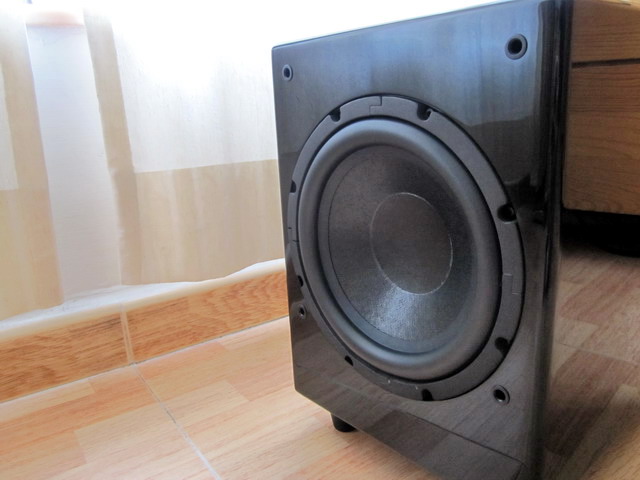
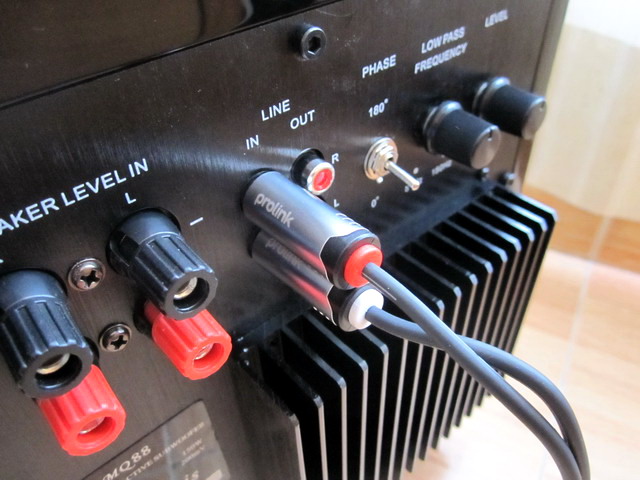
最近幾天出去轉了一圈﹐走遍大小影音舖﹐終于找到了個尺寸大小合適我的客廳﹐性價比又十分之高的8寸小Sub-Woofer﹐而且還有華麗的黑色鋼琴表面Coating。加上商家比較誠實有禮﹐還送了條不太差的Prolink Woofer線給我﹐最主要他分析得有道理﹐尤其是提出了上面的看法。

這是台來自加拿大Marquis MQ88﹐其實懷疑它根本就是本地薑﹐因為Marquis總部就是華人聚集的多倫多Richmond Hill。

最後這次尋找和購買的過程還經歷了各種冷嘲熱諷和受儘白眼﹐開始討厭和鄙視那些自以為是的PRO AV 銷售員了﹐很多都完全不是做生意的材料﹐老以為人家買低端的產品就是沒銀子﹐簡直就是TMD井底之蛙﹗

怎麼最近老花錢升級這樣那樣的﹐難道Xmas is around﹖哈哈。。。

IMG_5691

IMG_5690


Update Dec 3, 2011

無意間在論壇看到一篇很有意思的對答﹕

音樂真的不是單單講解釋力,高低伸延越高,就是越好的…要知道人類聽覺最敏感是中頻,大約從300Hz – 1000Hz…所以當有某牌子/器材在這方面較為出息,會較容易被人所接受…音響世界裏即使用上十萬,幾十萬甚至上百萬元級數器材,其實你一様都需要取捨!

不要過份沉迷於硬件方面,多花些時間去好好享受自己的音樂吧!

如果注意力過份投放於個別硬件上…的而且確會出現你所講的問題,一套較完整音響器材包含多個環節,聆聽環境(當中包含大量聲學…可能同時間既要吸音亦要擴散),其他器材配合,電源,線材調較,防振等等千變萬化…

小弟年少時已熱愛音樂,但由於家庭環境,能夠有錢買一張黑膠碟已非常開心(當時CD尚未普及),到開始踏足社會工作…一度成為一名音響發燒友,,所花金錢不下數十萬,當時互聯網尚未普及,網上評測,用家評語,二手買賣途徑少之又少…只能每月購買音響雜誌,經常到當時位於女人街旺角音響,西洋菜街新時代音響聽下,比較下…

香港人玩音響其實非常狂熱,全世界生產音響公司都非常重視香港巿場,原因真的有人會花上百萬只為玩好一對3/5A,有人於線材方面已花好幾十萬,一旦有新產品可以改善音質亦敢於嘗試,即使低燒,買幾粒RCA頭亦已過千…

從來音響市場都極少出現所謂性價比高產品,因為多數只有不同特性,不同味度(印象中只有多年前一部PS Audio Ultralink技驚四座! 如果有一定音響年資應該都會知道…),有別於電腦領域,因為你不能單純地以速度,價格去評估,你只能不停嘗試,不停組合…有人會覺麻煩,亦有人樂此不疲!

至於內地產品,實在有如天上繁星…自己小心選擇! 我自己未曾用過,未敢武斷…當中可能有不少優秀產品,但相信亦有唔少粗制濫造! 始終一般用家大多會從品牌,軟件支援,信心,甚至二手市場…等等因素去作出選擇…

回想當年, 也曾走過和師兄差不多的心路歷程…花費不少在各個硬件環節上, 為了追求一點點效果, 摩改補品不計其數。一有空就去西洋菜街…經常都聽住嗰幾隻天碟/試音碟…重複比較人聲甜唔甜, 空氣感好唔好, 打爛玻璃聲夠唔夠清脆, 1812嘅炮聲有冇失真…

兜兜轉轉, 而家用返電腦聽歌, 又自得其樂…

其實用什麼器材也好, 最終目的是聽音樂, 而不是聽效果, 所以應該用多啲時間, 聽多啲音樂, 建立自己嘅口味, 品味, 聽力同分析力, 然後跟據自己嘅需要同能力, 去選擇合適嘅器材…

喺追尋嘅過程中, 要客觀冷靜, 小心分析, 不要人云亦云, 胡亂浪費金錢…

當你完全進入發燒階段,莫講話聽到更好既音響器材和音質,就連你腦海閃過一些假設,一些想法…你都會欲罷不能!

玩音響其實大致可分為兩類:

1) 懂得利用適當器材去享受,去欣賞自己喜歡的音樂,適當地花錢,在有限聆聽環境裏利用器材間之匹配,發揮最大潛質,能夠取捨,只求一個平衡點…

2) 經常利用音樂,試音天碟去測試自己器材(情況跟樓上位師兄所講一樣),不計較價錢,會經常換機,換線材,頻頻較音…貪新棄舊,欲罷不能,永無止境!

如果你發覺有第2類徵狀,証明你中毒已深……只能嘗試抽身……

我都係過來人, 又點會唔明白箇中嘅感受呢!!

不過正正因為面對嘅誘惑越大, 就越需要保持冷靜, 越要小心考慮自己嘅真正需要… 因為每個人嘅口味同需要係可以完全唔同嘅 : —-例如有人要買Amp, 你介紹一部出名人聲靚嘅Class A比佢, 點知原來佢係用黎聽Rock嘅

我亦唔係反對摩機改機和使用補品, 但係要適可而止, 同因材施教, 避免浪費金錢, 交左學費而又學唔到野 : —-例如聽到有人話某部機點摩點改, 就會脫胎換骨, 於是就買部新機, 交比人照板煮碗, 結果係有改善, 但係問返機主, 到底邊方面改善左, 佢完全唔識答, 因為部機本身嘅聲底, 每樣補品嘅特性同效果, 佢完全唔知… 呢種食快餐式嘅玩法完全忽略左過程之中嘅領略同趣味, 錢花費了但係又一無所知…可能呢部機嘅聲底跟本就唔啱佢嘅口味, 另外一部可能更加合適…又或者只要摩其中一樣野, 已經可以滿足機主嘅需要…

所以要清楚知道自己嘅真正需要, 然後用最小嘅支出, 得到最大嘅滿足…

要知道”滿足感”係相對而唔係絕對嘅, 例如有人用一千蚊買對電腦喇叭, 小摩後比得上一部六千蚊嘅迷你HiFi, 佢覺得非常滿足, 開開心心去聽音樂…

相反, 有人用兩萬蚊買左套HiFi, 但覺得比部六千蚊嘅迷你HiFi只係好少少, 非常煩惱, 終日攪來攪去, 左試右試, 冇乜時間去聽音樂…

你會係邊一個呢??

事實如此…早年多前有朋友要求我幫忙一同選購一套2聲道音響器材,其中有一部大約10K左右英國制5,60W合拼(原子粒),如果你只以外觀加上內裏平凡用料,非常簡單線路…你難以想像/解釋為何有如此美妙聲音,當時配搭一對ProAc 1SC開聲….

電子零件選配雖然是當中重要環節…但其實更重要是線路設計,生產者/設計人員對音樂認知,理念…如果單純選用高級,名貴零件,就能有好聲音…相信全世界生產音響公司都能夠生產出Hi End級數器材!

Selecting between Intel 320 and Crucial M4 SSD

By admin, December 2, 2011 2:15 pm

I will soon purchase a SSD for testing ESX performance on Poweredge R710 (H700 512MB raid card), After researching a bit on Storage Review and AnandTech, I narrowed down to two most reliable branded SSD.

Crucial M4 128GB 2.5″ SATA 3 6Gb/s SSD (FIRMWARE 009)

Intel 320 Series 120GB (Retail Box w/External Case) G3 Postville SSDSA2CW120G3B5 2.5″ SATA SSD

m4-ssd[1]

1. Intel has two more years of warranty (5 years) vs Crucial has 3 years.

Locally Intel is warranted by聯強 (Synnex), Crucial is warranted by建達 (Xander), I had good experience with both.

2. Intel Retail box comes with USB 3 connector and I really like this! As after the testing, I can still use it with my desktop USB 3.0.

3. Crucial M4 is much faster in terms of sequential read/write, its random IOPS is extremely impressive according various benchmarking and random IOPS is what SSD all about for VM.

http://www.anandtech.com/print/4256
http://www.anandtech.com/print/4421

4. Intel SSD offers a free nice GUI  “Intel SSD Toolbox”, it comes with nicer feature too, like update firmware and erase SSD to have faster speed like new, M4 got nothing to compare in this area.

5. Intel has Power Lost Data Protection, M4 got nothing. However, Intel 320 had a dark period three month ago that losing power of SSD will render the SSD to 8MB bug, may be it’s just a gimmick thing from Intel like always.

6. Intel 320 is still SATA2, 3Gbps, Curcial M4 is SATA3, 6Gbps

7. Both Intel 320 and Crucial M4 uses 25nm NAND.

8. Also found out the latest Crucial M4 is the SAME as Crucial C400 (just a different name) and it’s the newer generation of its famous Crucial C300.

I don’t like OCZ, as I read so many negative reports about their firmware problem previously.

Seemed Crucial M4 120GB SSD is the right one for me, it’s 25nm, SATA3, 6Gbps, 2-3 times faster than Intel 320 120GB SSD in terms of  random 4k IOPS. 

I have decided go for M4 and I can live up by giving up Intel SSD Toolbox feature and USB 3.0 cable, well the compatible SSD USB 3.0 should be very easy to find for M4.

All I want is the huge IOPS, seemed a Single Crucial M4 advertised as 40,000 IOPS for 4k is equivalent to 10 Equallogic PS6000XV boxes with 16 x 15KRPM disks each. That’s 160 15K RPM spindle compares to 1 SSD, absolutely ridiculous! Not to mention the cost is 1,000 times LESS, OMG!!! I CAN’T BELIEVE MY CALCULATION!!!.

That’s in theory, I’ve read the actualy M4 IOPS for 4k reallife 60%random65%read is about 8,000, so equivalent to 2 PS6000XV with 16 x 15KRPM disks each, still that’s amazing! 1 SSD kills 32 enterprise 15K RPM SAS in terms of IOPS.  In additional, the actualy sustained IOPS over a long period still proves 15K RPM SAS is better than SSD, the extremely high number can only sustain for the first few minutes and then it dropped rapidly to 1/10 over a period of serveral hours, so this means if you have a heavy OLTP or transactional based application runs 24/7, 15K RPM SAS is still the only choice.

So who cares about that extra 2 more years of warranties from Intel, if I am looking for reliability later, all I need is to purchase another unit and make it a RAID1.

Dell’s ESX Monitor and Reporting Tool: DPACK

By admin, December 2, 2011 8:57 am

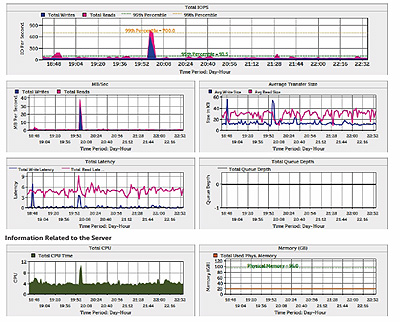
During the Equallogic Seminar yesterday, Dell’s storage consultant introduced DPACK (Dell Performance Analysis Collection Kit) to us.

Basically it’s a Monitoring and Reporting utility that will run over time (4-24 hours) to collect data (such as CPU, Memory, IOPS, network traffic etc) from your physical or virtual servers.

The best thing is the footprint of this program is very small, about 1.5MB, still remember that crappy Dell Management Console 2.0?

The best part is you don’t need to install it at all, simply run it, key in the server or vcenter parameters, select a time range, run it, wait for a few hours, that’s it.

The output is a single file with extension .iokit, then you are supposed to use the online generator to get the DPACK result in PDF. (http://go.us.dell.com/DPACK). However, the site is currently not working as it’s still not ready according to DPACK team.

So what to do? DPACK team is kind enough, I sent the result.iokit to them and Dell helped me to generate the PDF manually.

dpack

The Overview of DPACK and Download DPACK.

Finally, I would say it’s a lite version of Veeam Monitor and Veeam Monitor does a lot more and it’s also free. :)

Veeam Backup & Replication v6 Finally Arrived!

By admin, December 1, 2011 4:04 pm

backup_v6_now_available_3

Despite multiple day, Veeam has finally launched it’s flagship product Veeam Backup & Replication version 6.

One of the most useful features I found is “One Click Restore”, because most of the time we do not have the root password of our client’s servers and often clients ask for mistakenly deleted files, so this enhancement is definitely the key reason for anyone to upgrade to v6.

Besides new improved replication is now 10x faster (see this appreciation post), together with throttling bandwidth capping, finally, we can replicate smoothly over our 100Mbps link between production and DR sites.

Last but not least, the scalability of backup agents (server in Veeam’s term), Veeam B&R 6.0 now utilizes proxy concept, so you have a group of backup agent/proxy or bots that will evenly distribute the loading among them. What’s best, you no longer have to login to each backup server (or agent) and you can manage all of your backup jobs on all proxies from a single panel, isn’t this just beautiful! :)

What about v6 now supports Hyper-V? Dohhhh…Hper-V in my own opinion is still not a mature product and it’s fine for lab use, for enterprise? No Way!

After losing a lot of sleep over the weekend working out the kinks and fixing my mistakes, v6 is running great and I can’t believe the speed increase!

Just a few examples:

  • Replicating a file server with 750GB of data, down to 25 minutes total (replicating the data disk only took 6:30)!
  • Replication job on my Exchange server w/ 400GB of mailbox data… 20 minutes
  • Backup job with 6 VMs ranging from 50-120GB, 35 minutes
  • Replication of a 60GB VM running Accounting software over a 20Mbps WAN… wait for it… 4 1/2 minutes!

The kicker here is I’m running 3-4 jobs in parallel now. My backup window has gone from 6+ hours to around 2 hours for nearly 3TB of VM data and I’m finally saturating my disk writes on the backup target. There are, of course, a few minor bugs, but I’m impressed with the quality for a first release after such major architecture changes.

市場上家用HDD+SSD Caching的解決方案

By admin, November 30, 2011 2:23 pm

After some research, looks like buing a pure SSD like Intel 320 SSD (160GB) is more cost effective. OCZ Synapse SSD is a good choice, but only 1/2 the size can be used, as the other half is used for 2nd level caching.


市場上SSD+HDD的解決方案有不少:

1.最直接的是SSD作OS+Program和HDD作Data
2.HybridDrive
3.Intel Smart Respone Technology (need Z68)
4.Seagate Momentus XT
5.利用軟件把SSD作為HDD的Caching

各方案比較:
利用60GB SSD大約為HK$800和640GB HD為HK$400作計算

  直接SSD HybridDrive Intel SRT Momentus XT 軟件
價格(HKD) 800 1600 1200 900 1600
每GB價格 13.3 2.5 1.9 0.6 2.5

其實HybridDrive能夠適用於非Z68以及不同OS是對比起Intel SRT和軟件作Caching的好處,而且HybridDrive只佔用1個底板的SATA Port,對於一些已經沒有SATA Port又想upgrate的用家是十分適合的。

再者的是,用家可以自由選擇SSD的容量,雖然Momentus XT有每GB價格上的優勢,但是8GB SLC始終太少,還有的是,HybridDrive可以對整個HDD作加速,因為在一般SSD作OS+Program和HDD作Data的解決方案,所加速的Program會受SSD容量限制,因為不能把半個Program放到SSD,另半個放到HDD,而HybridDrive所加速的Program則只受HDD容量限制,所加速的Program可以大過SSD。

唯一不好的是只support SATA II,不能發揮出SSD的極速,當然,要雞蛋裏挑骨頭還是有的,就是不能在Notebook上用的,如果可以有高階Notebook的解決方案是很好的,畢竟相關技術已經開發,雖然要放到Notebook上是極難的,但如果能夠在Notebook上面使用,相信都會有一定市場的。


針對Hybrid Drive而生 OCZ Synapse SSD系列 

ocz

OCZ 針對 SSD Cache 加速應用推出全新 Synapse SSD 系列,能為傳統 HDD 用作讀寫緩衝,支援 SATA III 介面透過自家 Dataplex 智慧型加速軟件,令讀寫性能提升至最高 550MB/s ,達成高性能、高容量與高性價比兼備的 Hybrid Drive 解決方案。

雖然 SSD 在性能上完全壓倒傳統 HDD 產品,但售價高昂加上容量成本難與 HDD 相比較,因此 Intel 於 Z68 晶片組中引入了「 Intel Smart Responed 」技術,能結合 SSD 與 HDD 達成「 Hybrid Drive 」儲存方案,並且得到市場好評,只可惜「 Intel Smart Responed 」技術暫時只能應用於 Z68 平台上。

OCZ 因應市場對 Hybrid Drive 的需求推出全新「 Synapse SSD 」系列,其原理與早前推出的「 OCZ RevoDrive Hybrid 」,但改用 SATA 介面並且不內建 HDD ,而是針對用家正使用的 HDD 進行 SSD Caching 加速,十分適合升級用家。

「Synapse SSD 」採用 2.5 吋 Form Factor ,採用 SandForce SF-2281 控制器並支援 SATA 6Gbps 規格,提供 64GB 與 128GB 容量,採用單顆高容量的 MLC NAND Flash 設計,並且採用了一半的容量用作 Over Provisioning 空間,以提升作 SSD Caching 的性能,達成最高 550MB/s 讀取性能, 64GB 寫入最高達 490MB/s 、 4K Random Write 約 75,000 IOPS , 128GB 入最高達 510MB/s 、 4K Random Write 約 80,000 IOPS 。

「 Synapse SSD 」搭載自家 Dataplex 智慧型快取加速軟體,支援 Windows 7 32Bit 及 64Bit 作業系統,安裝 Synasape SSD 及 Dataplex 智慧型快取加速軟體後,兩個簡單步驟即可組成 Hybrid Drive 配置。

「 Dataplex 」智慧型快取加速軟體能分辨常用的 Hot Data ,將同時寫入至 SSD Cache 及 HDD 中儲存,利用 SSD 改善儲存、讀取速度,非常用的 Cold Data 和大容量檔案會則會直接寫進 HDD 中,能減少寫入次數提升,在性能與 SSD 壽命取得平衡。

據代理商 Microworks 表示, OCZ Synapse SSD 64GB 、 128GB 建議零售價分別為 HK$1,399 、 HK$2,149 ,代理商提供 3 年保固服務。

http://www.hkepc.com/7231
http://www.storagereview.com/ocz_synapse_cache_ssd_review

My Early Xmas Gift: Dell Optiplex 990 SFF Desktop

By admin, November 29, 2011 4:32 pm

Finally, I bought myself an early Xmas gift: Dell Optiplex 990 SFF Desktop!

This is my one and only PC upgrade after almost 13 years. In fact, believe me or not, I am still using the old PIII system (Asus P2B-D, Dual PIII850Mhz, 1GB Ram, 120GB HD, Windows Server 2003 Ent) as I am typing this blog.

There have been probably over 10 PC generations before this upgrade (ie, P4, Core, Core2 now the Sandy Bridge).

The configuration is the latest Intel desktop CPU Core 2, 2nd generation Sandy Bridge i5-2400 with vPro, 3.1Ghz, 4GB (2GB x 2) Ram, 500GB 7200RPM HD, Extra Broadcom NetXtreme gigabit NIC, 8x DVD +/- RW, Windows 7 Professional 64 Bits, MS Office 2010 Home Edition, 5 Years NBD service.

There are several points that I would like to highlight during the selection of this PC: 990ssf

  • Buy Dell, I’ve compared other vendors like IBM/HP/Acer/Asus, nothing even comes close to this 990SFF, similar configuration will cost 20-30% more. Of course, I knew Dell’s inside sales and they have been serving me well over the last 10 years, that’s why I’ve got a good deal.
  • i5-2400 is more than enough, don’t spent money on upgrading to i5-2500 or i7-2600 (4 cores with HT).
  • Sandy Bridge i5-2400 comes with build-in GPU now, it’s 850Mhz HD2000 graphic processor, enough for watching 1080p HD MKV or BD-RMVB. Of course i5-2405S (2.5Ghz) is better as it comes with HD 3000, but Dell does’t sell any 2xx5 or 2xxxS i5 processor, those are for overclock amatures.
  • Ivy Bridge is around the corner, but still have to wait till Mar/Apr 2012 which is too far for me. Besides who knows if there will be any problems in the new chipset (H/P/Q/Z) like before. Remember Sandy Bridge had a serious SATA chipset  problem when they first release in Feb 2011, that most vendors needed to recall defected MBs, so I really don’t want to be that guinea pig.
  • vPro, yes, I definitely want to try this Desktop equivalent of DRAC, saw the demo on Youtube, seems interesting.
  • I want the Energy Efficient Option (90%) version of 990 SSF, but it’s not available locally, neither does Dell offer 16x DVD, also no low-power version of i5. If you are in US, you can order i5-2400S which is only 65W comparing with 95W of i5-2400.
  • Found out the only Intel desktop chipset supports VMware ESX5 VT-D is Q67 and Z68, and there are less than 3 SFF in the market offer Q67 chipset, Optiplex 990 is one of them.
  • People said default installation of ESX5 won’t work due to the on-board Intel 82579LM NIC is too new, probably ESX5 Update 1 will add this driver and solve the problem. For now just use a Boradcom NIC instead, or even a cheap Realtek will do.
  • I compared the cost of DIY PC with Dell Optiplex 990 SSF, almost same price but Dell has 5 years site visit full warranty, I really don’t want to carry each failure piece to it’s corresponding distributor for repair and wait for over 1 week, I really hated that, no more!
  • Dell’s Harddisk and Ram is still way expensive (100% more) than others even after huge discount, so I am going to buy from local computer shops, a 4GB 1333Mhz Ram is only USD20 or less, too cheap to be true! Just be reminded, bring the actual ram over to the computer shop as I heard the Optiplex ram is low profile type.
  • Optiplex 990 SSF includes with many great software such as PowerDVD, Roxio Creator, Dell Backup and Recovery Manger (I will use Acronis still) and best of all Microsoft Office Starter (with Word and Excel only and that’s all I need really). It also includes PowerPoint Viewer 2010, to view and print PowerPoint slides and shows. In case you don’t know, there is also also a version called Office Web Apps which include online versions of Word, Excel, PowerPoint and OneNote.
  • Oh…I just read about the new coming desktop will have 8 ram slots (X79 MB with latest  Sandy Bride E processor, supports  Ivy Bridge and native USB 3.0 of course), so you can have 32GB ram for ESX for less than USD160, (still it’s only half price of a DDR3 1333MHz ECC Server Ram) which is DAMN cheap! With HA and DRS, who really care about the reliability? Well Google is a good example using cheap hardware for building their data center globally.
  • The reason I choose Small Form Factor (SFF) is because it’s size of course and normally SSF has higher PSU 80 Plus efficiency and offers quieter experience.
  • Remember I wrote about my USB 3.0 experience with Poweredge R610 previously? Now I can finally use all those “thought to be wasted “ goodies, such as HighPoint USB 3.0 HBA Dual Ports with 5Gb/s individual port, plus my Hitachi Touro 2.5” 7,200RPM 750GB USB 3.0 external harddisk (somehow it works really fast with USB 2.0 as well), also I will get one more Lacie 2TB Minimus 5,900RPM for backup purpose.
  • I will also purchase a USB 3.0 IDE+SATA docking to transfer all my existing data over to the new PC.
  • Finally I will install VMware workstation 8 and test all the great stuff on it, like nested ESX, MacOS, ESX 5.0 and more.
  • For daily use, I only need Word and Excel, not even Access, so MS Office 2010 Home Edition is the perfect low cost solution for me. Even MS Office Starter should do most of the work, no worried about  opening PowerPoint as Microsft has a free Powerpoint viewer.
  • Same applies to selecting Win7Pro, I don’t need any of those additional features included with Ultimate, I could install Windows 2008 R2 Standard on this PC, but since the core is the same for Windows 7 and W2K8 now and Windows 7 supports more multimedia  devices, so why bother.

Update Dec 13, 2011

Btw, I’ve got my Optiplex 990 for almost a week now, I love the compactness and it’s really quiet even I placed it near my bed. Somehow, the internal 7200RPM 500GB boots up Windows 7 Pro in less than 15 seconds, this really makes me wonder if I still need to add the SSD caching (e.g., OCZ Synapse SSD). Anyway, I still ordered the special 2.5″ hard disk bracket for future upgrade which can fit 2 x 2.5″ SSD or  HD+SSD.

The other things is the default 4GB is enough for now, may add more later when I run VMWare Workstation 8 on top. Don’t have time to play this especially Xmas coming. :)

My 2.5″ USB 3.0 external 7200RPM Hitachi Touro is lightning fast around 116MB/s when testing with HDTune, even faster than the internal 3.5″ Western Digital Blue 500GB (about 105MB/s), comparing to my existing PIII 33MB/s ATA  (actually 12MB/s tested), this is almost 10 times more). Again the nice thing is I choosed that cheap Syba USB 3.0 card instead of Highpoint again because it doesn’t require external power, and 990SSF only has two SATA power cables which I will use for the above two 2.5″  disks later. Of course there is SATA split cables, as I don’t want to complicate the cables and reliability is another reason.

IMG_5706

Last but not least, the integrated Intel HD 2000 Display Port to DVI works perfectly with my old Dell Ultrasharp 2007FP (somehow Dell still sells it even now), it can output 1600×1200dpi sharper than ever, I can finally enjoy 1080p HD MKV movie and I noticed the CPU usage is only 2%, crazy low!

Update Dec 28, 2011

Finally received my 2.5″ HD Kit from Dell after the holiday. I have to say it’s a very hard to find item, took me a few days to google and talked to my sales in order to locate this Kit set. My advice is to order the complete Kit Set, not invididual parts, as it includes many extra items such as SATA split cable, SATA  cable, 4 screws (why 4 instead of 8? well, Dell expects you to use the 4 screws from original HD, that’s why this kit is called Extra Parts not Replacement Parts) and one more blue plastic HD holder, so R494D alone is not enough.

IMG_6326

Update Jan 19, 2012

There has been a very strange problem with my Optiplex 990 SSF recently, it will simply power on itself automatically. I’ve searched around and found nothing, not even local Dell support was able to solve this myth.

Finally, I was able to locate the root of the problem, it’s related to Intel vPro or AMT (Active Management Technology) and the auto power on problem has nothing to do with BIOS setting or particular the WOL  setting.

By default Intel vPro has it’s own WOL and my PC is connected to an always-on fiber modem, so probably it received a WOL packet from the Internet. You can refer to AMT mannual for more information.

The solution is simply disable AMT for the time being (btw, the default password is “admin”) and I shall study more regarding vPro and how to use it and how to avoid such thing happen later.

Update Jan 30, 2012

The PC turns itself on problem continues and I tried one more thing to disable NIC with PXE and hope this will solve the problem completely.

Update Mar 14, 2012

The previous mysterious PC automatically turn on issue has been solved for sure, now it’s time to due with overall noise reduction.

After some research, I’ve figured out the most possible noise emission is from the main system fan (8cm fan), although the 1500RPM fan itself is already a better than normal quality, it still produces a noticeable amount of noise pollution.

So what you may have already guessed, yeah! Pull it OFF! Dangerous to do? Not really! It’s because the CPU has it’s own passive heat sink with fan, power supply never really pushing to 100% as my PC is mainly used for browsing the net, daily word processing as well as watching some HD movies.  The part needs the most cooling is RAM, after running for 1 hour with all sorts of activities, HWiNFO shows RAM merely went over 30C and hard disk also stays below 35C, that’s why I conclude and convinced it’s safe to do so.

If I want to reduce the noise further, the default 3.5″ 7200RPM hard disk will be my next target, simply by replacing it with a 2.5″ 5400RPM or SSD will make my Optiplex 990 SSF almost completely silent, but since my Dell carries 5 years warranty, I will probably let go on that option.

Finally, another big advantage by disconnecting the main 8cm system fan is reduction in dust pollution,  my 990 SSF was like a dust sucking machine before, and it’s no longer the case, um…I wonder how come main stream Optiplex 390/990 doesn’t come with a dust filter like Optiplex XE?

Update Mar 20, 2012

I’ve decided to put back the fan as it’s not a good idea after all, as the hard disk went over 40+ degrees after running for a few hours.

Update Jun 10, 2015

The biggest problem with Optiplex SFF is dust! Searching for that official dust filter for Optiplex for years in vain, ending up doing my own, simply cut a piece of water filter material for fish tank (9.5cm x 7.5cm) and put in front of SFF’s main fan. That’s it, it does the job beautifully as I’ve been running this configuration for the past 2 months, bulletproof, it works!

ASP Upload Hacking and PHP Spam Mailer

By admin, November 27, 2011 1:47 pm

I noticed the outgoing traffic of my email gateway has almost doubled over the past two days. There were thousands of spam mails using the default PHP email account (s285@domain.com was the default email account configured in PHP.ini, this helps a lot in tracking back which server is sending the spam) connecting from the Relayed dedicated server.

s285 is the relay dedicated server that’s been sending spam though our gateway and there are more than 50 sub sites on it, so to find out which sub site got infected spam mailer seemed impossible at first.

By searching thought which php file was modified in the past week, I was lucky to locate only a few, and by examining the file name (normally those hacking robot or mailer has blizzard names), I found one strange php script named 9024.php, tried to run it from the web page shows nothing, opened it with notepad, found it’s a PHPMailer using URL string as the parameter.

Then I simply removed it, but wait, how did it get uploaded in the first place? Well, client is running ASP and I asked if they have any upload function, but it turns out they have no idea at all  and I have no time to search through 200+ ASP scripts.

So the quick solution is to disable PHP function for this site.

Case closed. MAMAMIA!

p.s., Btw, I have a feeling that PHP hacking scripts are gaining a lot of ground in the past 2-3 years. One of the most interesting case I’ve came across that I’ve seen DDOS PHP script utilizing UDP and use URL string as the attacking parameter, I must admit this is simply genius indeed!

可能是史上最貴的一次杭州菜

By admin, November 22, 2011 11:44 pm

今天是個特別的日子﹐去了本地杭州菜老字號“天香樓”慶祝﹐地方不難找因為之前經常經過。

前晚還特別做了事前研究﹐所以心裡大概有了個菜單。

80幾年的老鋪果然很有味道﹐我特別喜歡這裡六七年代的感覺。小店只有7張台﹐大概20來個客人加上幾個員工和老闆娘。

天香樓的陳年花雕酒果然香氣撲鼻﹐新來的店員還很有心地問我們要不要先暖酒才上。這次服務態度很好﹐很友善﹐跟幾年前第一次5分鐘不到就離座的不愉快經歷截然不同﹐那次可能是個持老賣老的開國員工吧。

我小時候最喜歡吃東坡肉﹐曾經試過找遍西湖邊的各大名菜館子﹐為的就是吃到最好的東坡肉﹐當年第一的居然也是天香樓﹐當然香港的這間才是老祖宗字號。

天香樓最出名的蟹粉雖然好吃﹐但沒傳說中那麼“犀利”。

天香樓的價錢也和其食物質量之高完全成正比﹐一年才一次﹐沒問題啦。

倒是今晚的膽固醇完全超標了﹐達到爆燈指數。

最後還巧遇蘇民峰師傅和女友在鄰桌用膳﹐真人跟電視上差不多。

3

4

Pages: Prev 1 2 3 4 5 6 7 ...70 71 72 ...102 103 104 Next