
Federer is Back!
 Comments (0)
 Suddenly, Federer is playing like champion again in his early 20s, beating the hell out of his opponent with bashing shots. Just look at his rhythm and footwork, something definitely has changed to him recently.
Comments (0) Suddenly, Federer is playing like champion again in his early 20s, beating the hell out of his opponent with bashing shots. Just look at his rhythm and footwork, something definitely has changed to him recently.
VMWare has just released VMware vCenter Converter Standalone 5.0 this week. Among the all the new features, ”Optimized disk and partition alignment and cluster size change” is the one I considered the most important! This means V2V your existing unaligned Windows Server 2003 is no longer mission impossible and no need to pay those alternative ones who charge a premium for this simple task.
Also, the new version supports more 3rd parties vendors:
Convert third-party image or virtual machine formats such as Parallels Desktop, Symantec Backup Exec System Recovery, Norton Ghost, Acronis, StorageCraft, Microsoft Virtual Server or Virtual PC, and Microsoft Hyper-V Server virtual machines to VMware virtual machines.
Enable centralized management of remote conversions of multiple physical servers or virtual machines simultaneously.
Ensure conversion reliability through quiesced snapshots of the guest operating system on the source machine before data migration.
Enable non-disruptive conversions through hot cloning, with no source server downtime or reboot.
Third-party backup images and virtual machines:Microsoft Virtual PC 2004 and Microsoft Virtual PC 2007
Microsoft Virtual Server 2005 and Microsoft Virtual Server 2005 R2
Hyper-V Server virtual machines that run Windows guest operating systems
Hyper-V Server virtual machines that run Linux guest operating systems
Acronis True Image Echo 9.1, 9.5, and Acronis True Image 10.0, 11.0 (Home product)
Symantec Backup Exec System Recovery (formerly LiveState Recovery) 6.5, 7.0, 8.0 and 8.5, LiveState Recovery 3.0 and 6.0 (only .sv2i files)
Norton Ghost version 10.0, 11.0, 12.0, 13.0, and 14.0 (only .sv2i files)
Parallels Desktop 2.5, 3.0, and 4.0
StorageCraft ShadowProtect 2.0, 2.5, 3.0, 3.1, and 3.2
I came across an interesting thread about 3PAR’s unique SAN capability especially about its Chunklets, again it’s in Chinese. Those who participated in that thread seemed to be the SAN elite in their fields.
To my surprise, I’ve learnt that 3PAR is still using the old PCI-X, NO SAS drives. Well heard they are going to release the SAS version shortly in Q4 2011 and there is a new series V after T & F.
Interesting enough another SMB SAN/NAS product named Drobo somehow can achieve the same unique feature as 3PAR as Drobo’s Beyond RAID technology can also form a RAID using different size, different RPM drives (ie, mix SSD/FC/SATA), What’s more Drobo doesn’t use any hot-spare for redundancy as all the drives can devote part of the capacity for the hot-spare purpose, this is another similarity to 3PAR. Well, the price difference between the two is of course beyond numbers.
1,中端存储高端化:3PAR定为于高端存储,但是它的架构有点类似中端存储的架构,有控制器的概念,最多可以有8个控制器(S400最多有4个控制器,S800可以有8个),控制器之间由一个网状背板连接起来,每个控制器有两个INTEL的CPU负责控制指令,还有一个3PAR自己控制器的ASIC完成数据移动。普通的中端存储,一个LUN只能属于一个控制器,用户必须将LUN人工分布到两个控制器上,而3PAR每个LUN实际上是由多个控制器并行处理的。
这个怎么说那?
个人感觉本身可能打算用来代替EVA的,但是目前在hp的产品线看来他是介于xp和eva之间,当然他的满配跟hp的xp也差不多少了,更何况他更适合于云,另外当年oracle又说他跟asm结合能够如何如何的提高性能。毕竟他是hp自己的东东,相对于可能更愿意推3par,其实3par2个系列,F和T,而跟在后面的数字就是支持的控制器的最大数,F200最大支持2个,F400最大支持4个,T400最大支持4个,当然T800最大支持8个,
至于他的控制器的芯片感觉有点类似于LSI,intel的cpu只是负责控制信息,真正做raid计算的是ASIC,所以如果和其他厂家的控制器全intel inside来pk说3par的cpu不行,可就有点外行了
当然Q4听说要出新3par就将采用双ASIC控制器,并支持SAS硬盘,将pci-x改为pci-e
另外说双A(不是ALUA哦),这点不能说其他厂家的终端存储都最多做到ALUA,其实hds的AMS也是真正的双A,至于eva和cx都是ALUA,ds5000就只能是A/P了2,非常有特点的盘盒: 3PRA插盘的方式非常独特,和其他存储都完全不同,在4U高度的盘盒中,有10个盘包,每个盘包可以纵向插入4块盘,相当于其他存储一块盘的位置插入了四块,所以3PAR的盘的密度非常高。当然这也有问题,比如在换盘时,每次需要将整个盘包拔出,或者盘包自身的背板损坏,可能造成数据丢失等等。不过3PAR已经考虑了这些情况,并有解决方案。
其实3par有3种盘笼,DC2, DC4(T-Class ) and DC3(F-Class)DC2, DC4累就是上面写的,但是dc3是16个个drive bay,0-15就不是4个硬盘装在一起了。
3,虚拟卷管理:第一层:每个盘都被划分为256M的小块(chunklet),由于每个盘盒都和两个控制器相连,所以这些存储块都有两个访问通道。第二层:将这些存储块,基于RAID类型和存储块的位置组成逻辑盘(LD)。第三层:将一个或多个LD映射成为了一个虚拟卷(VV),并最终以LUN的形式输出给主机(VLUN)。这样可以将IO分散到系统所有的磁盘,光纤连接和控制器上,而不象某些存储,必须要借助主机的LVM才能实现。如果我们使用文件系统或者ASM的话,将会很方便。另外一个特点就是管理非常方便,只需要告诉系统我要多大的LUN,其他系统会自动完成
这点感觉有点类似于eva(其实eva)或者v7000,xiv,当然他们又不完全相同,XIV的Pool是个逻辑的,他并没有将disk物理隔离(譬如EVA中的Disk Group,eva有rss的概念),对于外部的IO quest由所有的Disk提供,只是在空间,也就是Size方面逻辑的划分pool
对于国内存储市场来说,3PAR 是不折不扣的后来者。也是个相对陌生的存储产品,以至于其竞争对手的人员甚至都不知道这家公司已经杀入中国市场。
3PAR 在 1999 年成立,几个创始人主要出自 Sun ,前身叫作 3PARdata , 2008 年上市。要知道在存储技术领域竞争还是比较激烈的,EMC / HDS 等控制着高端存储的主要市场,3PAR 能突破技术壁垒并最后成功上市,没两把刷子那是绝对做不到的。
InSpire 硬件结构
3PAR 背板采用全网状的连接结构,每个控制器节点之间高速直连。因为是全网状的,所以基本上一个链路坏掉只影响直连的两个节点的通信,对其它节点无影响。每个控制器节点内置一块硬盘,用于操作系统安装。控制器节点最多可以扩展到 8 个,是 3PAR 存储最核心的组件。
相比之下,HDS 架构采用全光线交换方式(Universal Star Network),而 EMC 是采用直连矩阵方式(新一代产品采用虚拟矩阵架构–Virtual Matrix ,其实已经放弃了直连矩阵架构了)。这些连接方式的孰优孰劣历来是厂商攻击竞争对手的着眼点,能否最大限度发挥性能是用户最需要关心的。
3PAR 针对 I/O 指令和数据移动使用不同的计算芯片。I/O 指令(元数据/控制Cache)用 Intel 的芯片,而 数据移动/Cache 则使用专门设计的 ASIC 芯片来完成。
因为有专门的硬件 ASIC 芯片用于 RAID 5 XOR 校验,3PAR 号称有了其第三代 ASIC 芯片,实现的 RAID 5 是业界最快的,甚至 SATA 盘也能有不错的性能表现。(从 Oracle 公司测试的数据来看,和 RAID 10 速度的确相差无几。)
InForm 操作系统软件与虚拟化
3PAR 的操作系统叫 InForm,最初就是面向层次化的设计。与其他存储不同的是,3PAR 所有磁盘被分成 256MB 统一大小的小盘(Chunklet),可以根据需要用多个 Chunklet 组成 RAIDlet(逻辑磁盘)。因为这个独特的设计方式,3PAR 是可以很容易做到不同容量的磁盘混用,同一个 RAID 组里都可以有不同大小、不同转速的磁盘混用,这是其他存储做不到的。而且,所有的磁盘都可以利用,因为Hotspare Chunklet 以更小的单位分散在不同的磁盘上,也不再需要单独留热备盘。空间利用率可以更充分一些。
多说一句,有这个冗余机制,3PAR 更换磁盘也是与众不同:直接抽磁盘盒子(一个盒子可是四块磁盘啊),我当初看到 3PAR 技术人员这么操作真是着实吓了一跳。
因为固定大小的 Chunklet 的存在,可以将 I/O 更为均匀的分散到多个磁盘上。
对于熟悉Oracle 的朋友来说,会发现这和 ASM 的思想非常接近。因而也可以和 Oracle 数据库进行无缝集成:
因为软件做得非常具有易用性,日常管理与维护远远没有其他高端存储那么复杂,新增磁盘这种事情,都是一行命令之后底层自动处理。其实在 Thin Provisioning 方面 3PAR 也是很值得一说的,比一些厂商的伪 Thin Provisioning 具体多了。限于篇幅,不赘述。
3PAR 在美国有很多金融证券行业的客户,也有 Web 2.0 行业的客户–MySpace 。在保证 I/O 响应在 10ms 以内的前提下,3PAR 的 IOPS 能力非常优异(这才是卖点,不难理解其客户多集中在证券、金融领域)。虽然有些厂商号称能得到更高的 IOPS ,但那是在 I/O 响应时间很差的情况下的数据。要说明的是,现在随着一些存储厂商在高端服务器上也支持 SSD ,未来几年如何还要再看。
前两年 3PAR 推行所谓 Utility Storage(功用存储) 理念,现在貌似改成敏捷存储了。说实话,我觉得敏捷存储真的挺适合的,3PAR 命令行批量创建 LUN 真的很让人感觉舒服。当然,也在宣传云存储和绿色存储的理念,那是题外话了。
3PAR 原来只做中高端市场,只有 T 这一个系列,现在也开始关注中低端市场了,推出了 F 系列的产品。软硬件体系基本没变,倒是没仔细看过。
当然3PAR也有几个不怎么样的地方:
1.不支持sas盘,大家都用sas,你不用,是不是有点另类?
2.换盘麻烦,不像xp,eva那样直接就拔盘(当然只是T系列),虽然这点对于用户和销售来说不是问题,但是对于工程师来说还是费劲。估计要多干10分钟的活
3.pcx-133的总线
4.虽然说背板不是个什么问题,但不管怎么说还是个单点
5.后端依然是JBOD
5.硬件感觉不如软件那么NB
6.lun的大小调整需要额外的license,不像eva,这都是基本的免费功能
7.3PAR 的技术优势在机械硬盘时期,但未来将是SSD 的时代,追求高 IOPS ,更小 I/O 响应时间,如果全用ssd即可
8.不支持raid3
1.3par相比其高端存储配置时间和复杂度大大降低,抛开xp配置的复杂度不说,只谈时间,每次做dci,格式化后,我们就可以去睡觉了。
2.相比其他中端双控存储,
他们很难做性能方面的扩展,也难以提高的更安全的保障,某些硬件故障的时候,它这个性能可能会大幅的下降,即使是某些高端的存储,如果某一个cache 板挂掉,性能可不是降低一点点哦?将近达到90%以上了。3.自动分层
他把不同类型的硬盘,如SSD、FC或者SATA,划分为256MB Chunklets,这些Chunklets被自动的分组,构成vv,以前是针对整个卷进行RAID划分,而现在,对子卷进行RAID划分。实现了分层的存储,从而让一个卷可以跨SSD、FC和STAT等不同的类型的硬盘。通过对vv中不同类型硬盘IOPS的监控,就可以实现基于策略的数据自动迁移,自动在不同硬盘底层平衡工作负载,如用SSD来满足应用对IOPS要求。系统帮他决定哪个应用需要IOPS比较高,自动把这部分数据迁到SSD的硬盘上,
不像其他存储,redolog你要不放在SSD上,要不放在FC盘或者SATA上,如果我很多的文件都要求性能很高就费劲了,都要放在ssd上,但是3par就不用了,你可以把他们都放在池子里面,性能不够加ssd,容量不够加sata,其他的,管他那,唉,做3par的cpu挺累的,真不容易,我感觉未来应该就是这样,对用户越来越透明,不过以后如果全部ssd,这个功能就可以88啦,关于自动分层吹牛的东西咱不聊,网上讲的很多,也很细,不过我看很多其他厂家也有这技术了
Today is another one of my lucky day for vSphere treasure hunt. I was able to locate three really useful ones again.
VMWare Compliance Checker for vSphere
Not much to say here, simply get it and run through your infrastructure, the assessment report is mainly related to the default settings causing security holes on ESX hosts and recommendation how to fix them.
VMTurbo
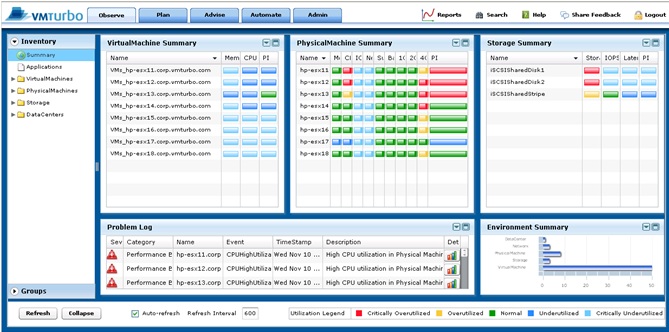 If you have already got Veeam’s Monitor (Free Version), then this is the one that you shouldn’t omit. It’s a compliment to Veeam monitoring tool where you can use VMTurbo Community Version (Monitor+Reporter) to see those details are only available for the Veeam paid version. Furthermore, it clearly displays a lot of very useful information such as IOPS breakdown of individual VMs.
Except the recommendation part is a bit too aggressive. For example, if a VM has been idled for 1 day, then VMTurbo would recommend to reduce the Ram size, but in reality the size is required during the user session. Another example is VMTurbo always suggest to reduce the size of those already Thin-Provisioned disk as it think they are taking too much wasted storage space.
The Report Feature is probably the Best I’ve ever seen and the most easiest one to setup, there is no more complicated steps like in Veeam Reporter (setup MSSQL Reporting Service along is a pain) as VMTurbo itself is a virtual appliance. 
Overall speaking, it’s a very good product, way better than Xangati IMOP and has a great potential to match Veeam’s product. I still haven’t got time to play the Capacity Planning feature, last time I ran VMKernal’s Capacity View (Free Version), the recommendation was simply a joke as it said there are only 2 VM we can add while in reality there is a couple of hundreds of Ram that’s free to use, hopefully VMTurbo can give me some insight for real capacity growth prediction.
AVG Anti-Virus ISO
Simply use it to boot the VM, scan and clean the whole volume or designated directories. It also allows you to update the virus definition file in real-time. Just to make sure the disk type is not paravirtual as it won’t recognize this new disk type.
Update Aug-31
Well, after extensively testing VMTurbo for 3 days, I must admit it’s probably the most comprehensive monitoring and reporting product I’ve ever seen. I love the features that I couldn’t find in Veeam’s free edition and VMTurbo probably got every scenario combination you can think of, like those vCPU/MEM/IOPS/Network, etc.
Of course there is some drawback, one of the biggest drawback is to manage the product itself is too complicated, somehow, I don’t get the same easy to use feeling as Veeam. I understand both have tree on left pane and details on the right, but somehow it just takes me a few more clicks to find out what I need on VMTurbo, it would be perfect if they can improve this aspect. It actually did happen to me that I got lost after 10 clicks for in-depth information of what I was looking for.
Another thing is I still haven’t got the Planning working out correctly, I tested on a 2 hosts cluster with even load (probably 53%:47%), the result strongly recommend to shift all the load from host 1 to host 2, so I got a 2%:98%, isn’t this suppose to be evenly balanced? (ie, close to 50%:50%)
Finally, I understood the concept and calculation how to derive the available HA Slot today. ESX 4.1 did a great job in simplifying the whole calculating thing and present the available slot number automatically. This HA Slot Availability number is crucial in estimating the future capacity growth. The other thing is I’ve learnt instead using Reservation, Use Limit instead for your SLA as this will not change your default HA Slot. So simply create a Resource (ie, Jail) Pool and assign CPU & MEM Limit (for Network, use VLAN with capped speed, for IOPS use SIOC) to it and place those abusive VMs into the “Jail”, Btw…there is no chance they can ever “Jail Break” under vSphere.
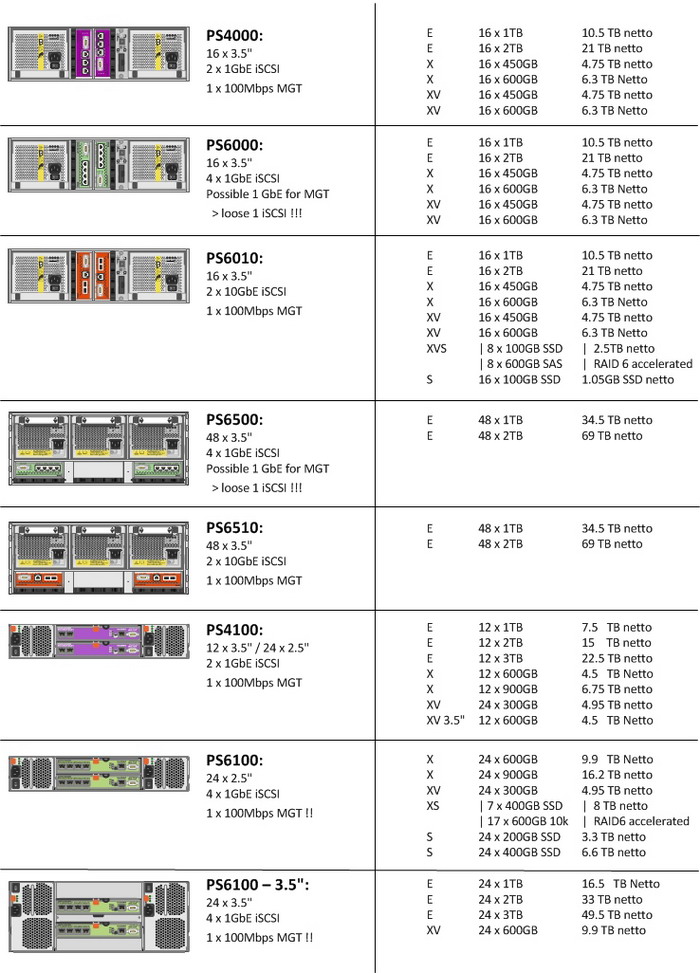
Dell has released the updated version of its iSCSI flagship Equallogic PS6100/PS4100 series today. Why do I say it’s an updated version instead of a complete new generation? It’s because how Equallogic naming convention after their products, previously there are PS50, PS100, PS3500, PS5000, PS6000, if it’s a new generation, then it would be PS7000 series. After going through different documents, release notes, blog articles, I confirmed my guess is right. Best of all, you can mix and match any generation of Equallogic box in your SAN, I simple love this!
![dellstorage082211[1]](http://www.modelcar.hk/wp-content/uploads/2011/08/dellstorage0822111.png "dellstorage082211[1]")
The followings are some of the major changes:
1. 4GB Cache vs 2GB Cache, probably won’t do much in terms of IOPS performance gain, I knew there are other vendors like EMC/Hitachi products using hugh cache up to 32GB/64GB, but real data shows the amount of cache isn’t the decision factor for IOPS.
2. The look of the new PS6100/PS4100: front and back looks almost identical to Dell’s SMB storage Powervault series, especially the back. It seemed to me that Dell has finally decided to use the same OEM hardware to save cost since the acquisition of Equallogic back in 2007. Especially, I don’t like the cheap look of the controller module on the back, it’s too Powervault MD1200/MD1220/MD3200 alike and the design of the new PS6100/PS4100 drive tray looks really ugly to me. Well, I am a person with design background, so I have a particular requirement for the Look! “Look is Everything!” once said by Agassi!
3. Dell claimed there is 60% more IOPS with PS6100, well, it’s kind of misleading as there are 24 drives in PS6100 vs 16 drives in PS6000. Simple math shows the extra 8 drives is only 50% more spindle if not counting the spare drivers. Also it’s interesting that if you use 24 x 2.5″ 10K drives on PS6100X, the IOPS performance is probably going to be similar to 16 x 3.5″ 15K drives PS6000XV. Of course if there is major upgrade in PS6100 controller hardware, then the story is different, just like PS5000XV and PS6000XV, controller module hardware is vastly different, the performance is also different even with the same number of spindles and disk RPM.
4. All PS6100 models has reduced its size from 3U to 2U with 24 x 2.5″ 15K/10K drives, it does save some rack space and power (probably not as there are more drives per 2U). Except for PS6100XV 3.5″ model which has been increased from 3U in PS6000XV to 4U, that extra 1U is for the additional 8 drives.
5. IMOP, the best products is PS6100XS which really combines the Tier 0 (7 400GB SSD) with Tier 1 (17 x 15K drives), this is the one I will purchase in our next upgrade cycle.
6. There is a Dedicated Management port on all PS6100XV, it’s a plus for some deployment scenarios.
7. On the VMware side, Dell said EqualLogic’s firmware 5.1 has “thin provisioning awareness” for VMware vSphere. As a result, the integration can save on recovery time and manage data loss risks. Dell has focused on VMware first given that 90 percent of its storage customers use virtualization and 80 percent of those customers are on VMware.
Over the third and fourth quarters, Dell and VMware will launch:
• EqualLogic Host Integration Tools for VMware 3.1. (Great!)
• Compellent storage replication adapters for VMware’s vCenter Site Recovery Manager 5.
• And Dell PowerVault integration with vSphere 5. (Huh? PV is becoming the low cost solution VMware SAN for 2-4 hosts deployment)
Finally, I wonder what does “Vertical port failover” mean in the PS6100 product PDF?
In fact, as usual I am more interested to know the hardware architecture of the new PS6100 series. One thing for sure PS6100 storage processor is 4-cores vs 2-cores in PS4100.
Can someone post a photo of the controller module please? What chipset does it use now?
Luckily, Jonathan of virtualizationbuster solved part of the mystery, thank you very much!
-SAS 6GB Backplane – Finally. That’s all I can say. Will we see a big difference? With 24 drives SAS 6GB + SSD’s SAS 6GB is definitely needed. There have been independent review sites of other storage hardware showing that we are getting pretty close to maxing SAS 6GB out, especially with 24 SSD’s….I will be talking to the engineering team at EQL about the numbers on this in the future, I am curious.
-Cache to Flash Controllers – Bye-Bye battery backed cache, hello Flash Memory Based controllers. All I have to say is it’s about time! (this goes for ALL storage vendors- -hello? Its 2011!). Note*- In my review of the Dell R510, the PERC H700 was refreshed in the beginning of the year to support 1GB NV Cache, which is similar to what EQL using, and it rocks!
-2U Form Factor – Well, you can’t beat consolidation right? The more space we save in a rack the better + more drives in each array = more performance per U, per rack, per aisle. I have been a HUGE proponent of the 2.5in drive form factor for many reasons outside the room for this post. I have been running 2.5in server drives from Dell for about 4 years now and they have been rock solid.
-24 Drives vs 16 Drives- Well, you can’t beat more spindles, not much to say here but if you are a shop that thinks they NEED 15k drives you really need to take a look at the 2.5in 10k drives, their performance is steller, yes its slightly slower than its 15 3.5in counterpart, but performance is pretty close, especially with 24 of these.
A Good Example About Veeam’s Retention
Re: Job Set for 14 Mount Points – 46 exist
Posted: Thu Jan 20, 2011 4:57 amby tsightlerLogically your requirement to keep 14 restore points can’t be met until there are at least 14 more restore points from the last VBK.
In other words, you have a full backup, then 46 incrementals, then a full backup. If Veeam deletes the first full backup, and 33 incrementals, you’ll be left with 13 incrementals and a full backup, except those 13 incrementals will be worthless since the full backup on which they were based would be deleted. Setting the number of retention points for incremental backups sets the minimum number that will be retained. The maximum number might vary based on the interval that you run full backups (either active or synthetic).
This has been explained in another thread, but here it is again for simplicity. Let’s say you run backups every day, and you want to keep 14 restore points, and you run a full every week. After one week you get this:
Week 1: F…I…I…I…I…I…I
So that’s one full, and 6 incrementals, for a total of 7 restore points, now the second week:
Week 1: F…I…I…I…I…I…I
Week 2: F…I…I…I…I…I…ISo that’s two fulls and 12 incrementals for a total of 14 restore points, now it’s day 15, and you run another full and end up with this:
Week 1: F…I…I…I…I…I…I
Week 2: F…I…I…I…I…I…I
Week 3: FYou’ve told veeam to keep 14 restore points, but it can’t delete the full backup from week one, because that would invalidate all of the incremental backups from week 1 and leave you with the following:
Week 2: F…I…I…I…I…I…I
Week 3: FThat’s only 8 restore points, and you’ve told Veeam to keep 14. Veeam will not delete the first weeks backups until the last backup of Week 3 because at that point you’d have 21 backups:
Week 1: F…I…I…I…I…I…I
Week 2: F…I…I…I…I…I…I
Week 3: F…I…I…I…I…I…IThus if Veeam deletes Week 1 I get:
Week 2: F…I…I…I…I…I…I
Week 3: F…I…I…I…I…I…I14 backups, which meets the requirement.
If you want Veeam to keep the exact number of restore points you can use reverse incrementals since in that case the oldest backup can always be deleted, otherwise, it’s no different than tape backup retention has been forever, the ratio of full to incremental backups will determine the number of backups that have to be kept to meet a minimum retention period.
I came across an interesting article today that a new storage startup Nutanix can do what Google does for a living, using cheap hardware to simulate a big pool of distributed storage, of course it’s software based raid, something like the hardware based (actually it’s still software based + vendor specific designed array box) NetApps Network Raid, 3PAR and Compellent’s Cluster File System or even the newly launched vSphere Storage Appliance (purely software based). The concept is very nice, but at the end IOPS is still linked to how many spindles you have.
![nutanix_appliannce_architecture[1]](http://www.modelcar.hk/wp-content/uploads/2011/08/nutanix_appliannce_architecture1.jpg "nutanix_appliannce_architecture[1]")
Yes it may be true that Nutanix’s storage has no boundary, but in my own opinion, only the next Google or Amazon alike company may need this kind of technology to drive down its operational cost, for most SMB (which Nutanix is aiming for), a low end SAN/NAS or even a free iSCSI target like MS iSCSI Target/Windstar shall do the job beautifully for their vSphere hosts. If Nutanix really targets for SMB, then they will definitely need to reduce the price and start to use really cost effective DIY servers as the selling point.
Finally, it’s interesting to know Nutanix is in fact founded by ex-employee of Google who probably the brain behind GFS, no wonder!
2013-05-05
Nutanix新款伺服器,可讓多臺伺服器肚內的儲存硬碟,共組成統一的叢集儲存槽,企業不用額外建置SAN儲存架構
伺服器新創廠商Nutanix在今年初由逸盈科技代理來臺,推出新款伺服器,可透過Nutanix Distributed File System(NDFS)技術,讓多臺伺服器肚內的儲存硬碟,共組成統一的叢集儲存槽,企業不用額外建置SAN儲存架構,伺服器節點也能共享儲存空間。
Nutanix區域銷售經理PK Lim表示,Nutanix產品設計源自於Google、Facebook、Amazon、Twitter等大型資料中心設計概念。
過去,企業資料中心架構,伺服器運算與儲存裝置都需要單獨採購,在伺服器運算設備以外,需要再額外架設SAN儲存環境來共享大量磁碟儲存空間。
但大型的資料中心,例如Google、Facebook、Amazon等,為了加快資料存取的I/O速度,讓伺服器運算的資料不需再儲存至外部硬碟,因此就設計了Google File System技術,讓伺服器肚內的SSD或儲存硬碟可以讓多臺伺服器共享,就可以取代企業傳統的SAN架構。
Nutanix產品取經Google等大型資料中心的儲存架構概念,設計出Nutanix系列伺服器,單臺機器採2U高度,機架式設計,每臺伺服器內含4個運算節點,多臺伺服器可透過網路埠串接,並共用每臺伺服器內的儲存空間。
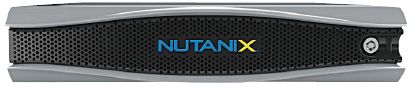
Nutanix新型態伺服器採2U機架高度,內含4個運算節點,由逸盈科技代理來臺。
目前Nutanix產品依照系統規格可區分為NX-2000、NX-3000等系列,高階XN-3050最高可內裝3.2TB SATA介面的SSD,每個節點採2路設計,配置Intel Xeon E5-2670系列處理器。因此,一臺2U高度的XN-3050系列裝滿4節點後最高可達8顆處理器、64核心。每個節點提供2個10GbE和2個1GbE網路埠。企業可以依照建置規模,來選擇伺服器內裝的運算節點數量和儲存大小等。
Nutanix也和VMware合作,推出在Nutanix伺服器內預載vSphere 5.1虛擬化平臺的版本,目前已在臺上市。
世界上有多家攝影雜志擁有完整科學的鏡頭測試設備,一直堅持刊登各自的鏡頭測試報告,形成各自的風格和系列,其中公認為最權威的有德國的<攝影雜志>和<彩色攝影>,美國的<大眾攝影>,法國的<攝影師>和瑞典的<攝影>(即哈蘇實驗室測試報告).
對于同一款鏡頭的測試結果,它們有時趨于一致,有時卻出現偏差,以致引起不少爭議.引起這些偏差的原因主要有鏡頭的個體差异(特別是業余鏡頭存在質量不穩定現象),測試內容的不同(有的將机械質量和光學質量綜合評判,有的僅測試光學質量;有的僅判斷分辨率和MTF值,有的則綜合考慮色彩傳遞,畸變等) 和判斷標准不同(再客觀的測試,也是由許多個枯燥的數值組成的,要轉化為大家能夠理解的測試報告,最后必須用主觀的方式來表達,如分值,星號等).
這些測試應該相信哪一家好呢?于是有人想出將這些測試結果綜合起來判斷,最大程度地消除偶然性.德國攝影器材評論家克勞斯席洛夫1998年時將上述五家測試報告按一定的標准轉化為統一的5分制分值,并加權平均,用這种方法評測了當時市場上流行的205款135單反相机鏡頭,其中變焦鏡頭98款,定焦鏡頭107款,其中獲得了滿分5分的鏡頭有7款,它們是:
Leica Vario-Elmarit R 70-180mm f/2.8(3)
Leica Elmarit R 100mm f/2.8 APO macro(3)
Leica R 180mm f/2 APO(2)
Leica R 180mm f/3.4 APO(3)
Leica R 280mm f/4 APO-IF(3)
Leica R 400mm f/2.8(2)
Canon EF 400mm f/2.8 USM L ?(3)用這种方法來評价鏡頭光學質量不失為一种有趣的方法,但也存在缺陷.后面括號內的數值表示測試的雜志數,并非上述五家雜志都做了測試,如果同為三家雜志所測試,但雜志卻有所不同,其可比性相對就差了,如果后來又加入新的測試,分值會有變化,變化有可能還不小,因此對于分值接近的兩款鏡頭,光學素質孰高孰低很難說,但如果兩款鏡頭分值相差較遠,它們的光學素質的差距是不可動搖的事實.
徠卡鏡頭名不虛傳,7個滿分鏡頭中占了6個,另一款為佳能的超級400mm大炮.徠卡果然沒有讓人們失望,各款鏡頭均表現出超俗的水平,不過話說回來,它的价格也是鶴立雞群,讓我們多數人不抱擁有的希望.
在4.5-4.99分之間的鏡頭也有7款,它們是:
Leica R 280mm f/2.8 APO-IF = 4.96(4)
Carl-Zeiss Sonnar T* 135mm f/2.8 = 4.87(2)
Canon TS-E 45mm f/2.8 = 4.61(2)
Canon EF 300mm f/2.8 USM L = 4.6(4)
Leica Vario-Elmarit R 80-200mm f/4 = 4.6(3)
Canon EF 135mm f/2 USM L = 4.54(4)
Minolta AF 200mm f/2.8 APO G = 4.52(3)由上可以看出,變焦鏡頭与專業的定焦鏡頭相比,在光學質量還是有所遜色.除上述兩款徠卡變焦鏡頭外,超過4分的變焦鏡頭只剩下3款:
Carl-Zeiss Vario-Sonnar T* 28-85mm f/3.3-4 = 4.17(4)
Canon EF 70-200mm f/2.8 USM L = 4.07(4)
Nikkor AF 35-70mm f/2.8 D = 4.01(5)而超過4分的定焦鏡頭數量可觀,包括上述定焦鏡頭總共達到45款. 相對与長焦鏡頭來說,廣角鏡頭(無論是定焦還是變焦)由于涵蓋率和构造的關系,更難達到高分.超過4分的定焦廣角鏡頭(焦長28mm以下)有5款:
Leica R 19mm f/2.8 = 4.28 (3)
Carl-Zeiss Distagon T* 21mm f/2.8 = 4.17 (2)
Leica R 28mm f/2.8 = 4.16 (3)
Pentax SMC-F 28mm f/2.8 = 4.13 (3)
Leica R 28 f/2.8mm = 4.12 (2)分數最高的超廣角變焦鏡頭是:
Nikkor AF 2.8 20-35mm D = 3.46 (4)
近兩年中又有許多新鏡頭面世,最近克勞斯席洛夫對上述評价做了調整,去掉了徠卡鏡頭和康太時單反相机鏡頭,加入了康太時G系列鏡頭(旁軸平視取景相机),即所列鏡頭全部為自動對焦鏡頭,共計變焦鏡頭115款,定焦鏡頭103款.對評分標准也做了一些修改,去掉了爭議較大的德國<攝影雜志>測試,換之以英國的<業余愛好 者>雜志測試.綜合評分達到4. 5分以上的鏡頭被定為”杰出鏡頭”,目前共有18款,它們是:Pentax SMC-FA 85mm f/1.4 = 4.85 (3)
Carl-Zeiss Planar T* 45mm f/2 G = 4.77 (3)
Sigma AF 50mm f/2.8 Macro EX = 4.77 (3)
Canon EF 135mm f/2 USM L = 4.72 (4)
Canon TS-E 90mm f/2.8 = 4.72 (2)
Nikkor AF 60mm f/2.8 Micro = 4.63 (4)
Carl-Zeiss Sonnar T* 90mm f/2.8 G = 4.62 (3)
Canon EF 400mm f/2.8 USM L = 4.60(3)
Minolta AF 100mm f/2 = 4.60(3)
Canon EF 100mm f/2.8 Macro = 4.57(5)
Carl-Zeiss Biogon T* 28mm f/2.8 G = 4.57 (3)
Nikkor AF 105mm f/2.8 Micro = 4.54(5)
Nikkor AF 85mm f/1.8 D = 4.53(3)
Canon EF 85mm f/1.8 USM = 4.52(4)
Minolta AF 200mm f/2.8 APO G = 4.50(4)
Canon EF 300mm f/2.8 USM L = 4.50(3)
Nikkor AF-S 300mm f/2.8 ED D = 4.50(2)
Pentax SMC-FA* 200mm f/2.8 ED IF = 4.50(2)超過4分的變焦鏡頭有9款:
Nikkor AF-S 28-70mm f/2.8 ED D = 4.24 (3)
Minolta AF 80-200mm f/2.8 APO G = 4.18 (3)
Canon EF 70-200mm f/4 USM L = 4.16 (2)
Nikkor AF 35-70mm f/2.8 D = 4.11 (5)
Nikkor AF-S 80-200mm f/2.8 ED D = 4.11 (3)
Canon EF 80-200mm f/2.8 L = 4.07 (5)
Canon EF 70-200mm f/2.8 USM L = 4.06 (3)
Sigma AF 70-200mm f/2.8 EX (HSM) = 4.05 (5)
Canon EF 28-70mm f/2.8 USM L = 4.01 (5)超過3.75分的28mm以下廣角鏡頭有9款:
Carl-Zeiss Biogon T* 28mm f/2.8 G = 4.57 (3)
Carl-Zeiss Biogon T* 21mm f/2.8 G = 4.28 (2)
Nikkor AF 28mm f/1.4 D = 4.00 (3)
Pentax SMC-FA 28mm f/2.8 = 3.89 (4)
Canon EF 28mm f/2.8 = 3.82 (4)
Canon EF 24mm f/1.4 USM L = 3.82 (3)
Nikkor AF 24mm f/2.8 = 3.77 (3)
Canon EF 20mm f/2.8 = 3.75 (4)
Canon EF 24mm f/2.8 = 3.75 (3)
I have been planning to move my desktop on to the cloud for years, now it’s the right time as cloud technology has finally matured.
There has always been a need for me to print documents via Remote Desktop on my locally attached laser printer. Today, I finally got time to try this out, I thought it was as simple as enabling the Printer in Local Resources under Remote Desktop options, but it turns out no printer was found in the RDP session PC. In additional, Windows 7 or W2K8 doesn’t have this problem as printer drivers were loaded by default, only Windows XP or W2K3 needs to install printer drivers.
After Google a bit, I was able to locate the answer that all you need is to install the printer driver on the remote PC as well. Soon after I’ve done that, the remote printer showed up magically. Besides, I was also able to tested out the local drive letters and USB disks on demand, they all worked flawlessly, so no need to use VPN and Shared Folder function any more. Worried about RDP’s security? It’s encrypted, if you need much higher level, then use Windows 7 or Windows Server 2008 R2 will do the trick.

Now it’s time for me to Acronis my 13 years old desktop (Dual PIII 850Mhz,1GB Ram and 120GB IDE, amazingly it’s still running and can play HD MKV!) and send it to the cloud by using vCenter Converter, then I can connect with any thin client (e.g., iPhone) as long as it has Remote Desktop, I can finally open my huge Excel way faster now! Yeah!
It shouldn’t be classified as hack-in incidence at all, as the hacker didn’t break into their system but rather jammed HKSE’s pipe. Btw, no body dares to say the truth that there is no way to prevent bandwidth type of DDOS attack, as bandwidth is limited, but DDOS bot is unlimited, so even the biggest gun will be brought down to its knee including FBI site last year. That’s why HKSE senior is so afraid to disclosure the bandwidth they had.
and Guess Who’s that security expert in DDOS from Iseral? Well, there is only one, my guess is Radware!
【明報專訊】本報獲悉,前日令港交所「披露易」網站癱瘓導致7隻股票停牌、連累股民帳面損失逾2000萬元的海外黑客攻擊,相信源自中國大陸、韓國、印度及俄羅斯等多國數以百計的「傀儡電腦」,但警方仍未確認誰是幕後主腦。而黑客昨日再度攻擊披露易網站,但因港交所按警方建議及時加裝「過濾裝置」,成功阻截攻擊。為防再遭黑客癱瘓網站引發停牌,港交所引入5項新措施。
分散披露通告 業績名單登報
港交所行政總裁李小加指出,今日起會引入的5項新措施,包括把上市公司通告由過往的中央(披露易)發放,改為分散披露,增加黑客攻擊的困難。港交所亦會每日以報刊廣告及電郵等形式,把公布板的上市公司消息告知小投資者及證券商(詳見圖)。
李小加昨日又證實,黑客是以「分散式阻截服務攻擊(DDoS)」癱瘓披露易,電腦專家指這種襲擊很難追查出誰是幕後黑客(見另稿),但建議港交所日後多做「滲透式」測試,即以黑客角色嘗試攻擊自己網站,以找出保安漏洞。
警或聯同國際刑警緝兇
警方商業罪案調查科科技罪案組則指出,前日接獲港交所舉報指披露易網站被干擾,以及介入調查後,已把案件列作「有犯罪或不誠實意圖而取用電腦(此罪最多可判監5年)」處理,暫時未有人被捕;據悉,警方不排除會聯絡國際刑警追查幕後黑客主腦。
李小加則再以為免影響警方調查為由,未肯披露黑客來自哪些海外國家,並強調事前未接過恐嚇。但本報獲悉,前日一浪接一浪的黑客攻擊,是來自中國大陸、韓國、俄羅斯、印度等多國至少數以百計的傀儡電腦,由於攻擊頻率高兼技巧多變,料是高級黑客所為,警方前晚遂已即時建議港交所加裝過濾裝置,阻截攻擊,結果獲接納,並由港交所聘用的供應商,包括以色列專家在內人員,成功於前晚裝好過濾裝置,故黑客昨日再襲擊披露易網站時,網站未有癱瘓,只是一度反應遲鈍。
股民促賠償 李小加稱停牌正確
披露易癱瘓,令7公司股票(港交所、匯控、國泰、中國電力、華潤微電子、大新銀行及大新金融)及419隻衍生工具前日停牌半天,料令大批原看好的投資者昨蒙受損失,不少人怒吼指港交所應賠償。李小加昨就會否賠償一事未有正面回應,只是強調對部分投資者因不能買賣股票而損失感到遺憾,又形容要7隻股票停牌是「痛苦決定」,但兩害取其輕下,堅持停牌是正確決定,因為不能讓小投資者在得不到公平資訊情下買賣股票。
對於有激動股民認為他應該辭職,李小加不以為然,他表示,「若做錯了當然要負責……(但停牌)已是最好的選擇」,他強調決定是具有良好目的(in good faith),並強調港交所關鍵的清算及交易系統,採高保安封閉式運作,未有受黑客攻擊。
海外黑客前日癱瘓了港交所「披露易」網站,所發動的「分散式阻截服務攻擊(DDoS, distributed denial of service attack)」攻擊法,即是在背後發出遙控指令,令全球數以百計已中電腦病毒的傀儡電腦,同時向目標網站發出大量攻擊信息,耗盡其頻寬及伺服器能力使之癱瘓,事件揭出披露易網站事發前欠缺強力保安設施,無法抵擋黑客攻擊。
昨設過濾裝置 成功擋襲擊
港交所指出,前晚被黑客攻擊後,專家引入新的過濾裝置,成功擋住黑客另一輪攻擊,即過濾掉攻擊信息。
港交所首席科技總監周騰彪昨解釋事故時,否認披露易網站不設防,因為該網站以往曾成功擋住一些簡單的黑客攻擊。但他承認,前日海外黑客發動的DDoS攻擊,技巧遠較以往成熟兼變化多,並透過百計電腦,以極高頻率發出大量攻擊信息,終癱瘓網站。對於事發後要大半天才能令披露易恢復正常,他解釋是因專家也需時分析大量攻擊信息,才能引入適用的過濾機制抵擋襲擊。
周騰彪以為免被黑客掌握虛實為由,拒透露披露易網站頻寬有多少,但港交所會檢討是否需增加頻寬,加強抵擋DDoS攻擊,為工程人員爭取時間作防禦。
電腦保安事故協調中心古煒德稱,DDoS特色是執法者極難追查背後發動攻擊者,以往黑客曾用此法攻擊微軟、阿馬遜等國際網站以示不滿,故古氏不排除今次黑客施襲,亦可能是為宣泄對港交所或一些上市公司的不滿。
